Introduction
Experian’s Digital Graph connects digital identifiers across devices, enabling a variety of use cases, including targeting and measurement. The Digital Graph supports connectivity across a wide variety of devices and identifiers, including computer, mobile, and connected television (CTV). Where applicable, digital identifiers can be tied to the offline world via Experian’s Living Unit ID (LUID) and Person ID (PID).
Within the Digital Graph solution, Experian supports two primary workflows:
- Experian sends you a Digital Graph install file on a weekly cadence that includes digital IDs that have been linked and resolved to household and individual profiles. You specify the digital IDs you would like to receive.
- You send Experian your digital identifiers and Experian resolves your IDs to household and individual profiles. As part of this process, Experian appends related digital IDs to your digital IDs.
This document will take you through details on how to get set up to receive the Experian Digital Graph.
Experian Points of Contact
- Main project point of contact: Your Experian Solutions Engineer (SE) will be your main point of contact throughout your time using the Experian Digital Graph. Your SE will help to facilitate data transfers and answer any questions you have regarding the Digital Graph.
- Interest in other Experian products or services: Your Experian Account Executive or Customer Success Manager will be your primary point of contact for contracting or if you are interested in using more Experian products or service.
Building the Digital Graph
Experian’s Digital Graph is re-constructed every week from both deterministic data and unauthenticated device sightings collected over a 60-day lookback window. We stream, resolve, and link all these digital signals back to pseudonymous household and individual profiles to build the Digital Graph on a weekly basis. IDs are refreshed as part of the weekly graph build, which may include the addition of new digital IDs, households, individuals, and/or the removal of digital IDs, households, and/or individuals where applicable.
The Digital Graph is built on top of a curated network of data providers, combined with the power of utilizing sophisticated machine learning models with authenticated and real-time signals, to provide the most comprehensive and differentiated digital identity graph in market. The Digital Graph averages 1.1 million QPS and 5.7 trillion sightings per weekly build. Thanks to advanced filtering algorithms, the output contains an exceptionally low signal to noise ratio.
This is how we build our Digital Graph:
Ingest Data
The Digital Graph ingests trillions of data points every week from our pixels across partner properties, data we own and operate, and data we license from 3P data aggregators.
Train Model
The Digital Graph analyzes a vast set of data points ingested from our partners, including timestamps, IP addresses, location, Wi-Fi networks and a variety of device identifiers. We leverage these data points and train our machine learning algorithm on a deterministic data set (sourced from our enterprise partners, publishers and Experian).
Evaluate Precision
Once we have ingested data and trained the matching algorithm, we test precision by running the algorithm and validating against a subset of deterministic data that has been set aside for this purpose. This quantifies the performance of our algorithm and ensures a high degree of precision over each successive graph build.
Build Graph
After testing against deterministic data, we then apply the proprietary model to the raw data ingested from our partners to map digital IDs (cookies and MAIDs). We first produce a probabilistic map of device IDs at the household level and then subcluster them to individual consumers.
Digital Graph Onboarding Process
Kick-off & Planning
Experian will schedule a solution design call, with your Experian Solutions Engineer (SE), to confirm your objectives and key use cases and to determine the best account setup to meet your needs. We will align on the delivery timeline and key action items.
Prior to configuring your Digital Graph delivery, your SE will collect your selections regarding the following account setup options.
Required Account Setup Options
Delivery location: Select the delivery location option that you prefer to receive the Digital Graph and/or to share your data as an input for filtering (see Delivery Locations for Digital Graph).
Digital Identifiers: Select the specific digital identifiers to include in your Digital Graph output, along with any additional data output options (see Digital Identifiers included in the Digital Graph).
File format: Confirm you can receive the Digital Graph as a split file delivery (default), along with any additional file format and resolution level options (see Split File Options for Digital Graph).
Providing data: Select if you will receive a Digital Graph install or if you will provide ID data as an input to filter the Digital Graph output to your unique universe (see Data Inputs for Digital Graph).
Countries: Select if you want to receive the Digital Graph for any regions or countries outside of the United States.
Note: We offer our Digital Graph in Canada, Mexico, LATAM, APAC, and MENA
Account Setup
Your Solutions Engineer will build out a dedicated Digital Graph configuration, delivery location, and work with your team to ingest your input data and/or to implement a cookie ID sync, if necessary.
Graph Delivery
You will receive a new Digital Graph in your delivery location. Your Solutions Engineer will provide key metrics related to the scale and connectivity of your Digital Graph output. (see Delivery Cadence for Digital Graph)
Performance Optimization
Your Solutions Engineer will monitor the key metrics and work with your team to identify and resolve any issues that are negatively impacting your Digital Graph performance.
Data Inputs for Digital Graph
Sending data to Experian enables customization of the Digital Graph output that you receive to your ID universe. You can choose to send us digital IDs that we match and enrich with related IDs that are connected to your IDs in the Digital Graph.
While sending your digital IDs to Experian is an option, it is not required to receive the Digital Graph. You can receive a full Digital Graph install with all the digital IDs of interest without sending Experian any of your digital IDs.
If you choose to send Experian digital IDs as an input to customize your Digital Graph output, we support several ways for you to send your IDs, including real-time, batch, and list-based formats, each of which is described in more detail below.
Quickly jump to a section using these links:
Sending Digital Identifiers in Real-time
You can send data to Experian in real-time through our Pixel API, which allows you to send digital IDs through client-side or server-side requests.
The following high-level workflow describes how real-time data ingestion is set up and processed by Experian:
Request a real-time pixel from your Experian Solutions Engineer. Please specify the ID types that you want to send to Experian.
Your Solutions Engineer creates your pixel endpoint. This pixel endpoint will include a unique ID for segmenting the digital IDs that you send to Experian.
Your Solutions Engineer configures the pixel parameters based on the types of IDs you will send to Experian.
When you call the pixel endpoint via client-side or server-side, your data is captured by Experian’s server in real-time.
Note: When you send cookie IDs to Experian via real-time or batch, there is usually an additional step of syncing cookie IDs that is done on the client-side (see Cookie Syncing section below).
Real-Time Pixel Endpoint
The following is an example of a pixel endpoint that represents what your Solutions Engineer would provide upon request:
During the Account Setup phase of the onboarding process (see Digital Graph Onboarding Process), your Solutions Engineer will configure the relevant pixel parameters and ID placeholders based on the ID types that you will send to Experian.
[PARTNER_ID] is replaced with your unique ID
The pixel endpoint is populated with {“DEVICE_TYPE”:”ID_VALUE”} parameters corresponding to the ID types that you will send to Experian
Note: Please reference the Supported ID Types table below for a list of supported ID types that are accepted by Experian via real-time input.
After your real-time pixel endpoint has been created and configured by your Solutions Engineer, you can continuously send your data to Experian in real-time by making calls to the pixel endpoint URL.
Sample Server-Side Pixel Request
https://pixel.tapad.com/idsync/ex/receive?partner_id=[PARTNER_ID]&partner_typed_did={"HARDWARE_IDFA":"idfa-id-value"}&ip=108.240.253.70&user_agent=Mozilla/5/0 (iPhone; CPU iPhone OS9_3_2 like Mac OS X) AppleWebKit/601.1.46 (KHTML, like Gecko)Mobile/13F69×tamp=1464493375000&s2s
Sample Client-Side Pixel Request
Response
EMS receives the request and draws a pixel.
During the pixel implementation process, EMS populates the device type and device IDs based on the parameters in your request. The PARTNER_ID is replaced prior to being sent from EMS. The pixel is defined with {“DEVICE_TYPE”:”ID_VALUE”}.
Note: Reference the Device Types table for a list of supported IDs that are accepted by EMS.
Result: Real-time Ad IDs are sent to the server.
Supported ID types
Experian accepts the following ID types for real-time data input. Please reach out to your Experian Solutions Engineer if you want to send hashed IDs, or other types of IDs via real-time pixel.
| ID | ID Type | Device_Type Value | Description |
| 23 | Raw IDFA | HARDWARE_IDFA | An iOS IDFA ID. This is an identifier that is consistent/persistent across all apps. If your engineering team needs a way to identify, parse, or validate these types of IDs, apply this regular expression to the data file: "[0-9a-f]{8}-[0-9a-f]{4}-[0-9a-f]{4}[0-9a-f]{4}[0-9a-f]{12}" |
| 29 | Google Ad ID | HARDWARE_ANDROID_AD_ID | A Google-specific ID used instead of a cookie ID. If your engineering team needs a way to identify, parse, or validate these types of IDs, apply this regular expression to the data file: "[0-9a-f]{8}-[0-9a-f]{4}-[0-9a-f]{4}[0-9a-f]{4}[0-9a-f]{12}" |
| 30 / 14 | CTV IDs | HARDWARE_TV / HARDWARE_MD5UDID | Contact your Solutions Engineer if you are not sure which CTV ID to use. |
Cookie Syncing
Why do cookie syncing?
Cookie syncing is important for two reasons:
It is a way to identify which IDs in the Digital Graph are relevant to your cookie ID universe
It provides Experian a mapping between your cookie IDs and Experian cookie IDs
Note: Cookie syncs need to be initiated by you. Additionally, you may choose to store a copy of the mapping of your cookie ID to the Experian cookie ID on your end. Since client storing of Experian cookie mapping is a less common practice, please contact your Solutions Engineer to request details about this workflow if it is desired.
Cookie Sync Workflow
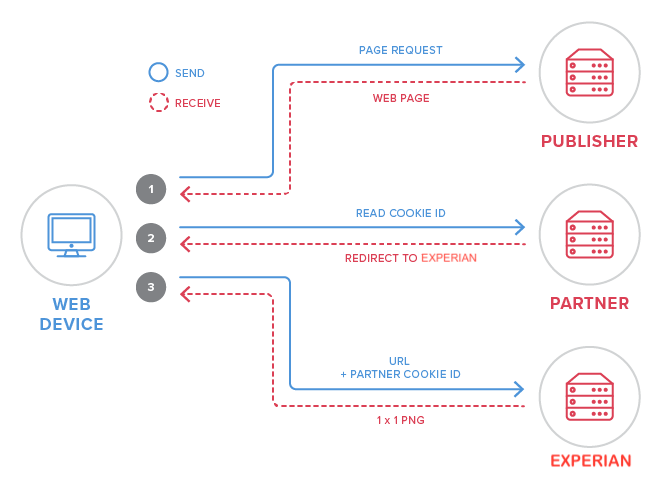
Each step consists of sending and receiving data, as follows:
A web device loads a site where you can place a pixel.
The pixel directs the browser to your endpoint, so that you can read (or set) your cookie on the browser. Your endpoint returns a redirect to Experian’s endpoint.
The browser follows the redirect to Experian’s endpoint with your cookie ID in the URL. Experian stores the mapping (between your cookie ID and the Experian cookie ID) and returns a 1x1 PNG to the browser.
(Optional step) If you also want to store the ID mapping, Experian redirects the device back to your endpoint with the Experian cookie ID in the URL.
Note: Experian supplies the following endpoint URL parameters to the partner (you):
| EMS ENDPOINT PARAMETERS | DESCRIPTION |
| your-partner-ID | your unique Experian partner ID |
| ${your-cookie-ID} | a placeholder macro for you to insert your cookie |
Sample Cookie Sync Endpoints
The following endpoints are secure using https.
When only Experian stores ID mapping (the following example applies when only Experian stores the ID mapping):
Experian Endpoint:
- https://pixel.tapad.com/idsync/ex/receive?partner_id=<PARTNER_ID_GOES_HERE>&partner_device_id=<COOKIE_ID_GOES_HERE>
Where:
- <PARTNER_ID_GOES_HERE> will be replaced by us with your unique Experian Partner ID
- <COOKIE_ID_GOES_HERE> will be replaced by you with your cookie ID when the pixel is called
When both you and Experian store ID mapping (the following example applies when both you and Experian store the ID mapping):
Experian Endpoint:
- https://pixel.tapad.com/idsync/ex/receive?partner_id=<PARTNER_ID_GOES_HERE>&partner_device_id=<COOKIE_ID_GOES_HERE>&parner_url=<ENCODED_PARTNER_REDIRECT_URL>
Where:
- <PARTNER_ID_GOES_HERE> will be replaced by us with your unique Experian Partner ID
- <COOKIE_ID_GOES_HERE> will be replaced by you with your cookie ID when the pixel is called
- <ENCODED_PARTNER_REDIRECT_URL> will be replaced by you with the encoded URL to your endpoint that will capture the Experian cookie ID
- The Experian pixel will redirect back to your endpoint with an Experian cookie ID after recording the corresponding client cookie ID
- Include the following macro where you want the Experian cookie ID to be included on your endpoint. Please ensure that the macro is not encoded: ${TA_DEVICE_ID}
Example:
Your cookie sync endpoint:
- https://client.com/cookie-sync?experian_cookie=
Your cookie ID when the Experian pixel is called:
- client-cookie-12345
The Experian pixel should be called in the following format:
- https://pixel.tapad.com/idsync/ex/receive?partner_id=12345&partner_device_id=client-cookie-12345&parner_url=https%3A%2F%2Fclient.com%2Fcookie-sync%3Fexperian_cookie%3D${TA_DEVICE_ID}
Cookie Sync Frequency
It's important to sync cookie IDs at the appropriate frequency. This prevents IDs from expiring in the Digital Graph. It also helps Experian connect your IDs to other IDs in the Digital Graph.
Note: We recommend sending Experian your unique IDs at least once per hour. Do not limit the cookie syncing to a lower cadence. The following table displays an example of when you should and shouldn’t sync with us.
Reach out to your Solutions Engineer with any questions about cookie syncing. They can also help you determine the next steps of your workflow.
| TIMESTAMP | COOKIE ID | SYNC? |
| 2016-01-01 1:00 | ABC | Yes |
| 2016-01-01 1:30 | ABC | No |
| 2016-01-01 1:30 | 123 | Yes |
| 2016-01-01 2:05 | ABC | Yes |
Sending Digital Identifiers in Batch Signals
The batch file method of sending digital identifiers to Experian allows you to deliver high volumes of device signals (also known as "device sightings") in a single batch file. The batch file is received by Experian, at scheduled times, enabling us to ingest your signals as part of the Digital Graph workflow.
Note: Your batch files need to be uploaded to your selected Delivery Location sub-folder by 12:00pm EST each Wednesday for the corresponding device signals to be included in the next weekly Digital Graph delivery.
Device Signals
Digital Graph prefers unfiltered device sightings (such as impression logs or page/app visitation logs), with precise timestamps. There should be no aggregated or duplicate data.
A device sighting includes the following columns:
- Timestamp
- Device ID
- IP address
- ID Type
- Platform
- Context
- User agent
- Consent string
Batch File Schema
The following schema is required for batch files. All columns are required unless otherwise indicated.
| Column Number | Column Name | Description | Example |
| 1 | timestamp | Required. Expected format in UNIX, to the second, in UTC. | 1456869714 |
| 2 | device_id | Required. The device ID value. For in-app mobile/tablet device sightings, EMS accepts raw IDFAs (iOS) and raw Android Ad IDs (Android). If your integration requires sending other ID types, contact your Solutions Engineer. | 47e5b7d0-49d1-4c74-b360-17f08d162e50 |
| 3 | ip_address | Required. Unhashed IP address for this specific sighting of the device ID. | 189.38.69.26 |
| 4 | id_type | Required. For in-app mobile/tablet device sightings, this column’s value can be either HARDWARE_IDFA for raw IDFA (iOS) or HARDWARE_ANDROID_AD_ID for raw Android Ad ID (Android). If your integration requires sending other ID types, contact your Solutions Engineer. | HARDWARE_IDFA |
| 5 | platform | Required (unless column 7 user_agent is defined). You must specify one of the Platform Type "Formatted as" values in this column. If no value is specified, the platform value defaults to COMPUTER. Exception : Alternatively, you can define the platform type in column 7 user_agent. Only in this scenario can this column (column 5 platform ) be empty. | IPHONE |
| 6 | context | Optional . The full URL of the sighting or the app name (which can be URL-encoded but is not required). While this column is optional, is it preferred by EMS. | Clash%20of%20Clans%20iOS |
| 7 | user_agent | Required. (Unless column 5 platform is defined). Specify the user_agent string (which can be URL-encoded, but is not required). Exception: If column 5 platform is defined, this column can be empty. If both column 5 platform and column 7 user_agent are left empty, the platform defaults to COMPUTER. | Mozilla%2F5.0%20 (iPhone%3B%20CPU%20iPh... |
| 8 | consent_string | Optional. The data containing specific and detailed GDPR (or other regulatory) consent information for this request. This is usually the "DaisyBit" from the IAB Consent Framework, the technical details of which are best described here. Currently, EMS Graph supports IAB TCF versions 1 and 2. | COzqLtEOzqLtEO3AAAENAiCMAP_AAH_AAAAAF5EX2S5OI2tho2YdF7BEYYwfJxyigMgShgQIsS8NwIeFbBoGPmAAHBG4JAQAGBAkkACBAQIsHGBcCQABgIgRiRCMQEGMjzNKBJBAggkbI0FACCVmnkHS3ZCY70-6ubAvIi-yXJxG1sNGzDovYIjDGD5OOUUBkCUMCBFiXhuBDwrYNAx8wAA4I3BICAAwIEkgAQICBFg4wLgSAAMBECMSIRiAgxkeZpQJIIEEEjZGgoAQSs08g6W7ITHen3V3_7YAA.IF5EX2S5OI2tho2YdF7BEYYwfJxyigMgShgQIsS8NwIeFbBoGPmAAHBG4JAQAGBAkkACBAQIsHGBcCQABgIgRiRCMQEGMjzNKBJBAggkbI0FACCVmnkHS3ZCY70-6ubA |
| 9 | cookieless_id_value | Optional. The cookie-less ID Value. If your integration requires sending other ID types, contact your Solutions Engineer | d118094c-1da5-4ef1-a996-9f4d43276ac6 |
| 10 | cookieless_id_type | Optional. The cookie-less ID Type. If your integration requires sending other ID types, contact your Solutions Engineer. | UID2, ID5_UID |
Batch File Sample
1456869714 12a3b 10.0.0.1 HARDWARE_IDFA IPHONE https://example.com Mozilla COzqLtEOzqLtEO3 abc ID5_UID deterministic merge
Processing Empty Values
If you have empty values in any of the required columns, include the appropriate number of tabs so that the column order is preserved in the batch file.
For example, the following row displays the ideal scenario (when each column has a value):
{timestamp}<tab>{device_id}<tab>{ip_address}<tab>{id_type}<tab>{platform}<tab>{context}<tab>{user_agent}<tab>{consent_string}<tab>{cookieless_id_value}<tab>{cookieless_id_type}
Suppose you have empty values for platform (column 5) and context (column 6). Include an extra <tab> as a placeholder for each empty value:
{timestamp}<tab>{device_id}<tab>{ip_address}<tab>{id_type}<tab><tab><tab>{user_agent}<tab>{consent_string}
Tip: Notice the extra <tab> that appears between {id_type) and {user_agent}. Since platform values (column 5) are required, this extra <tab> serves as a placeholder for the empty value.
ID Types
Experian accepts the following ID types for batch ingestion:
| Device Type | Symbol | Description |
| Google Ad ID | HARDWARE_ANDROID_AD_ID | A Google-specific ID used instead of a cookie ID. If your engineering team needs a way to identify, parse, or validate these types of IDs, apply this regular expression to the data file: "[0-9a-f]{8}-[0-9a-f]{4}-[0-9a-f]{4}[0-9a-f]{4}[0-9a-f]{12}" |
| Raw IDFA | HARDWARE_IDFA | An iOS IDFA ID. This is an identifier that is consistent/persistent across all apps. If your engineering team needs a way to identify, parse, or validate these types of IDs, apply this regular expression to the data file: "[0-9af]{8}-[0-9a-f]{4}-[0-9a-f]{4}[0-9a-f]{4}[0-9af]{12}' |
| Non-EMS Cookies | THIRDPARTY | This is an identifier that refers to either a first-party or a third-party cookie. |
| CTV IDs | HARDWARE_TV or HARDWARE_MD5UDID |
Contact your Solutions Engineer if you are not sure which CTV ID to use. |
| Cookieless ID Type | UID2, ID5_UID | This is an identifier of the cookieless ID type. |
Platforms
Platforms are the commercial, or commonly used, names for various device types (Android tablet, iPhone, Kindle, and so on). The enumerated platform types are different from "formatted" ID types, which are Experian-specific descriptors for cookies and other device identifiers.
Tip: When defining parameters as part of the batch schema requirements, you must specify one of the "formatted as" values from this table for the platform type device signal.
| PLATFORM TYPE | FORMATTED AS |
| Android | ANDROID |
| Android Tablet | ANDROID_TABLET |
| Blackberry | BLACKBERRY |
| Computer | COMPUTER |
| Feature Phone | FEATURE_PHONE |
| iPad | IPAD |
| iPhone | IPHONE |
| iPod | IPOD |
| Kindle | KINDLE |
| Kindle Fire | KINDLE_FIRE |
| Palm | PALM |
| Playstation | PLAYSTATION |
| Television | SYMBIAN |
| Wii | WII |
| Windows phone | WINDOWS_PHONE |
| Windows tablet | WINDOWS_TABLET |
| Xbox | XBOX |
Format and Delivery
Enforce the following format and delivery specifications when sending batch files to the Digital Graph:
Header row: Do NOT include a header row.
File format: tab-separated values (.tsv).
Compression:
If the file is uncompressed, it must be a .txt tab-delimited file.
If the file is compressed, any file extension followed by .gz or .bz2 is accepted (for example, tsv.bz2, tsv.gz, .txt.bz2, .txt.gz).
Filename (with timestamp in UTC):
If sending a single file: {partner}\_signals\_{yyyyMMdd}\_{HHmmSS}.tsv.bz2
If sending multiple parts of a file: {partner}\_signals\_{yyyyMMdd}\_{HHmmSS}\_(partnumber}.tsv.bz2
Delivery method: SFTP or S3.
Delivery frequency: At least daily.
Tip: If you are sending files for multiple regions (NA/EMEA/APAC), the files should be uploaded to separate sub-folders. For example, my-bucket/NA/, my-bucket/EMEA/ and my-bucket/APAC/.
Sending Digital Identifiers in Lists
ID List onboarding enables you to send Experian a list of digital IDs to use as your primary ID universe for your Digital Graph output. Using your ID List, Experian can deliver a Digital Graph output that exposes the provided IDs whenever there is a match with a Digital Graph Household cluster, along with any related digital IDs within the same Household cluster.
IPO Onboarding (IPO)
IP Onboarding enables you to provide a list of IP addresses. Experian will deliver a Digital Graph exposing the provided IP addresses whenever there is a match with a Digital Graph Household.
Notes:
IP Onboarding is available for Household, Individual, and Combined Graph Resolution Level files (see Resolution Level Options).
Your IP lists need to be uploaded to your selected Delivery Location sub-folder by 12:00pm EST Thursday to see the corresponding IPs included in the next weekly Digital Graph delivery.
IP Onboarding is currently available in North America, Australia, and Japan.
IP List Formatting
Please adhere to the following formatting guidelines when sending IP addresses in batch:
No header
One IP address per row
CSV or TSV extensions only
Do not use formatting such as 1.1.1.1/5
Normalize the IP address, by removing leading zeroes and keeping a single .0, using the format below:
- Original IP: 172.0.072.010
- Normalized IP: 172.0.72.10
File can be uncompressed, .gz compressed or .bz2 compressed
Example IP Whitelist File
173.245.48.0
103.21.244.0
103.22.200.0
103.31.4.0
141.101.64.0
108.162.192.0
190.93.240.0
188.114.96.0
Note: Digital Graphs with IPO can be provided in flat-file format, even if quality scores are included. However, if any additional attributes are purchased, it needs to be transitioned to the JSON, Avro, or Parquet file format (see File Format Options).
Hashed Email (HEM) Onboarding
Experian can onboard hashed e-mails (HEMs) that you provide in a list and return related digital IDs, such as cookies and MAIDs, tied to Individual or Household clusters. HEMs are appended to your Digital Graph output as an additional ID type.
Notes:
Your HEM list needs to be uploaded to your selected delivery location sub-folder by 12:00pm EST Thursday to see the corresponding HEMs included in the next weekly Digital Graph delivery.
Experian will only store HEMs for 30 days and will be dropped from the Digital Graph output after 30 days. If you wish to maintain connections to your HEMs in the Digital Graph, you must re-upload the HEMs at a minimum cadence of every 30 days.
HEM List Formatting
Experian accepts HEMs hashed with MD5, SHA256, and SHA1 hashing methods.
The hashed emails that you provide must meet the following formatting requirements:
Each row must contain a valid, non-empty email address.
Each email address must be formatted in lowercase only.
There must be no whitespace at the beginning or end of any email addresses.
The file that you provide must meet the following requirements:
A single column .csv (Comma Separated Value) file, with one record per row
Header Row: hashing algorithm name (i.e MD5 or SHA1 or SHA256)
Columns must not be surrounded by single quotes (‘ ’) or double quotes (“ ”)
File size limit: 5TB
The file can be .gz or .bz2 compressed or uncompressed
Can be single file or multiple files with partitions
Recommended File Name Format: YYYYMMDD_audiencename_OptionalFileNumber.csv.gz
- YYYYMMDD: Date the file is sent to Experian
- Audience Name: Any name that you would like to associate with your file/audience
- OptionalFileNumber: Possible file number. This would be necessary if the file needs to be split into multiple files.
Data Outputs
Quickly jump to a section using these links:
Digital Identifiers
Within Experian’s Digital Graph, digital identifiers are connected and linked at the Household and Individual levels. Experian includes pseudonymous IDs in the Digital Graph output that represent unique Household and Individual clusters. These Household and Individual IDs are specific to clusters in the Digital Graph.
Digital identifiers that are available in Digital Graph include:
Household IDs and Individual IDs
IP Addresses: IPv4, IPv6
Mobile Ad IDs (MAIDs): Android Ad ID (AAID), Apple IDFA
Connected TV (CTV) IDs
Hashed emails (HEMs): SHA256, MD5, SHA1
Cookies: Third-Party, First-Party
Cookieless Universal IDs: The Trade Desk UID2, ID5 Universal ID
IP as an Attributes (IPA)
The IPA feature enables you to receive both Experian-sourced and client-matched IP addresses as IDs in your Digital Graph. The IP addresses are associated to a Household cluster in the Digital Graph output file. IPA is available for Household, Individual, and Combined Graph Resolution Level files (see Resolution Level Options).
Note: Digital Graphs with IPA can be provided in the flat-file format, even if quality scores are included. However, if any additional attributes are purchased, it needs to be transitioned to the JSON, Avro, or Parquet file format (see File Format Options).
IPv6 formatting: When formatting IPv6 addresses, we focus on the first 64 bits (the network portion) and apply industry-standard compression to remove redundant information. This compression follows RFC 5952, ensuring consistency with existing systems that handle IPv6. Our normalization process can be simplified into four key rules:
- Preserve only the first 64 bits (first four hextets), removing the last 64 bits entirely
- Remove leading zeros from each hextet
- Replace the longest consecutive sequence of 0000 hextets with :: (only once per address)
- Append :: to indicate the missing last 64 bits
| Step | Rule | Example of Transformation |
| 1 | Keep only the first 64 bits (first 4 hextets) | 2603:8001:00f0:0da0:7cd1:6410:25fa:7bf8 → 2603:8001:00f0:0da0 |
| 2 | Remove leading zeros in each hextet | 2603:8001:00f0:0da0 → 2603:8001:f0:da0 |
| 3* | Replace the longest consecutive sequence of 0000 hextets with :: | 2603:8001:f0:da0 → 2603:8001:f0:da0 |
| 4 | Append :: to indicate the removed last 64 bits | 2603:8001:f0:da0 → 2603:8001:f0:da0:: |
*Note: Consecutive sequences of 0000 hextets rarely appear in the first 64 bits of an IPv6 address, which is why step 3 does not change the example. While a 0000 group can exist in this portion, these typically refer to reserved or unspecified addresses rather than network or device identifiers.
Hashed Email (HEM)
Hashed Email is a privacy-safe identifier that can further enrich and expand the functionality and utility of the Digital Graph. Access to Experian's universe of email data can provide maximum coverage for targeting and measurement when combined with other digital IDs such as Cookies, MAIDs, CTV IDs and IP Addresses. The Digital Graph offers Hashed Emails as an additional ID for output in the Graph, as well as an ID that customers can onboard and extend with.
The Digital Graph’s Hashed Email feature returns direct linkages between Hashed Emails (HEMs) and additional IDs at the Individual cluster level, setting it apart from audience-based solutions in market.
The Digital Graph supports three hashing methods: MD5, SHA256, and SHA1. SHA256 and MD5 will be the default provided to support modern use cases. SHA1 can be delivered at your request. Hashed Emails can naturally be tied back to offline and online data through other available Digital Graph identifiers and identifiers that you provide to be connected to your Digital Graph output.
Note: Experian does not use or receive PII in association with this Digital Graph feature. No raw data is processed by Experian for the Digital Graph; all emails are required to be hashed. As NIA and DAA members, we do not allow for re-identification; and we prohibit the merging of PII with de-identified data.
Universal IDs
Universal IDs have been created by multiple ad tech companies to support continued marketing use cases in environments where 3rd party cookies are not supported. Experian does not create a Universal ID. Rather, we support interoperability by integrating several market leading Universal IDs into the Digital Graph.
By including Universal IDs in the Digital Graph, Experian can leverage our core capabilities across machine learning and digital identity management to provide a connection between traditional digital identifiers and this new wave of universal IDs that will be increasingly utilized in the future. Through Experian’s Digital Graph, you can take advantage of the broad ecosystem of identifiers to drive targeting and frequency capping strategies and enable detailed measurement and attribution in environments that do not support the third-party cookie.
The following Universal IDs are available in the Experian Digital Graph:
| ID Type | ID Name | ID Description |
| UID2 | TradeDesk Unified ID 2.0 | The TradeDesk UID2 is created deterministically by authenticated traffic. |
| ID5_UID | ID5 Universal ID | ID5 ID is created with a hybrid method in browser by identifying users cross domain. |
A Digital Graph containing one or many Universal IDs can be delivered in flat-file, JSON, Avro, or Parquet format (see File Format Options).
Quality Scores
Experian can provide Quality Scores for digital IDs included in the Digital Graph output (excluding HEMs and Universal IDs), which represent the likelihood of an ID belonging to a given cluster. Quality Scores are generated for ID mappings at the Household and Individual levels.
Using a combination of proprietary signals along with device ID to device ID propensity scores, we normalize a 1-10 score per ID for both the Individual and Household cluster it is part of.
Note: The base confidence level of the Digital Graph is 80%. After an ID is connected into the Digital Graph, it is given a score from 1-10 (1 lowest, 10 highest). Even ID connections assigned a score of 1 achieved the baseline level of precision required in our Digital Graph.
Quality scores will be added as a field within your current file type:
{"ip":"1.1.1.1","household_id":"HH_ID","individuals":[{"individual_id":"IND_ID","ids":[{"type":"ID_TYPE",
"value":"ID_VALUE","household_quality_score":HH_SCORE,"individual_quality_score":IND_SCORE}]}]}
Quality scores enable connections within the Digital Graph to be optimized based on the type of use case.
Device & Location Attributes
Experian can provide additional information about the devices, geographic locations, and internet connections associated with digital IDs included in the Digital Graph (excluding HEMs and Universal IDs). This includes attributes like the associated device manufacturer, model, marketing name, as well as geo country code, geo postal code, and internet service carrier name.
Formatting and Definition Guide
Below is a guide on file formatting and definitions for each available device and location attribute within the Digital Graph.
Note: Device & Location attributes are available in JSON, Parquet, and Avro file formats (see File Format Options).
| Attribute | Description | Data Type | Combined Graph | Individual Graph | Household Graph |
| manufacturer | device manufacturer (e.g Samsung) | STRING/ NULLABLE |
X | X | X |
| model | Model of the device (e.g. SM-N9005) | STRING/ NULLABLE |
X | X | X |
| vendor | Vendor of the device (e.g. Verizon) | STRING/ NULLABLE |
X | X | X |
| marketing_name | Marketing name of the device (e.g. Galaxy Note 3 4G LTE) | STRING/ NULLABLE |
X | X | X |
| year_released | Year the device was released to market | INTEGER/NULLABLE | X | X | X |
| primary_hardware_type | type of hardware (e.g. desktop) | STRING / NULLABLE | X | X | X |
| camera_pixels | mobile device camera pixels, represented in megapixels (e.g. 13) | FLOAT / NULLABLE | X | X | X |
| diagonal_screen_size | diagonal screen size of the device | FLOAT / NULLABLE | X | X | X |
| display_height | display height pixel value (e.g. 720) | FLOAT / NULLABLE | X | X | X |
| display_width | display width pixel value (480) | FLOAT / NULLABLE | X | X | X |
| browser_name | name or type of the browser on the device | STRING / NULLABLE | X | X | X |
| browser_version | version of the browser on the device | STRING / NULLABLE | X | X | X |
| id_last_seen | The alias last seen | STRING / REQUIRED | X | X | X |
| country_code | country code in ISO 3166-1 alpha-3 format, if available | STRING / NULLABLE | X | X | X |
| region_code | a given region in the country, if available | STRING / NULLABLE | X | X | X |
| postal_code | a given postal code in the country, if available | STRING / NULLABLE | X | X | X |
| metro_code, | the designated Market Area code, if available | STRING / NULLABLE | X | X | X |
| domain_name | Internet service provider (can be either WiFi domain or carrier domain) | STRING / NULLABLE | X | X | X |
| connection_speed | tells if the domain is mobile or WiFi | STRING / NULLABLE | X | X | X |
| carrier_name | the name of the carrier (e.g. Verizon) | STRING / NULLABLE | X | X | X |
Offline Identifiers
Experian enables a bundling of the Digital Graph with Experian’s Marketing Attributes and Audiences, which enables a deeper understanding of digital consumers’ demographics and behavioral characteristics.
The ability to append thousands of offline consumer marketing attributes to linked digital identifiers in a privacy compliant manner is a unique capability that enables interoperability between consumer data that originates in the online and offline environments.
Profile associations between the Digital Graph and Offline Graph occur at the Household and Person level.
Note: Experian does not allow the connections built between the digital and offline worlds to be used to reidentify the consumer at any point in time and it is also prohibited for all clients using our data.
Experian Living Unit ID (LUID)
For Households in the Digital Graph that have been linked to offline households, Experian includes the Experian Living Unit ID (LUID) as an attribute of the digital Household ID in the Digital Graph output.
Experian’s LUID is a household-level ID that’s used to identify households in our Offline Graph, along with associated household-level attributes. The LUID acts as a join key between the Digital Graph output and Experian’s offline products, like Marketing Attributes and Audiences products.
Experian supports the following configuration options for connecting digital households to offline households connections in the Digital Graph.
One to Many
Digital Graph Households can have one mapped LUID. LUIDs can be linked to multiple Digital Graph Households. This allows for you to activate a variety of use cases, by using this balanced approach that offers both scale and precision.
The Digital Graph build process resolves conflicts in mappings between Graph Households and LUIDs to ensure Graph Households have only a singular mapped LUID value.
Singular LUIDs can belong to multiple Graph Households
One to One
Digital Graph Households can have one mapped LUID. LUIDs can only be linked to one Digital Graph Household. This is beneficial for when you need to prioritize accuracy, for initiatives, like Measurement, Predictive Analytics, and Precision Targeting.
Experian Person ID (PID)
For Individuals in the Digital Graph that have been linked to offline persons, Experian includes the Experian Person ID or PID as an attribute of the digital Individual ID in the Digital Graph output. Digital Graph Individuals can have one mapped PID. PIDs can only be linked to one Digital Graph Individual.
Digital Graph Delivery
Quickly jump to a section using these links:
Delivery Cadence
Experian will deliver a full refresh of the Digital Graph to the established delivery location on a weekly basis. Each weekly Digital Graph will be re-constructed from device signals received over a 60-day lookback window.
Service Level Agreement (SLA)
Experian’s SLA for Digital Graph delivery is by 11:59pm ET on Thursday, although the Digital Graph is typically delivered by Monday or Tuesday of each week.
Delivery Location Options
Experian supports the following options for you to send and receive data inputs and data outputs for Digital Graph.
Amazon (AWS) S3
Experian or client hosted
If you want Experian to host, please share your role or user ARN and Experian will provision access and share bucket details
If you want to client host, please provide bucket details and provision access to an Experian role ARN that will be provided during the Account Setup phase of the onboarding process (see Digital Graph Onboarding Process)
Google Cloud Storage (GCS)
Experian or client hosted
If you want Experian to host, please share your Google service account and Experian will provision access and share bucket details
If you want to client host, please provide bucket details and provision access to an Experian service account that will be provided during the Account Setup phase of onboarding process (see Digital Graph Onboarding Process)
Secure File Transport Protocol (SFTP)
Experian or client hosted
If you want Experian to host, Experian will provide Username/Password and location details
If you want to client host, please share Username/Password and location details
Snowflake Share
Client hosted
If you want to access the Digital Graph within your Snowflake environment, please share the following Snowflake information:
- Organization, Account, Edition, Cloud, Region, Locator
- You can send the text from the “Copy account identifier” button within the Snowflake account details section
Currently, your file will be delivered in the Avro format.
Experian will publish shared tables that enable you to retrieve and update the Digital Graph and Opt-Outs
Note: Client will use compute resources and incur associated costs when querying the shared tables
Delivery Files
Each week you will receive a new Graph file for the last 60 days with the most up to date and accurate connections. You will see 3 different file types in your selected delivery location:
- Graph File
- Example: [client]_ids_full_YYYYMMDD_000000.gz
- This is the Experian Digital Graph file
- Trigger File
- Example: [client]_ids_full_YYYYMMDD_000000.gz.trigger
- This file indicates that the graph file has been delivered successfully
- Opt-Out Files
- Example: [client]_optout_tapad_YYYYMMDD_000000.gz
- These are daily files containing opted out IDs
- For more information on Opt-Out files see Processing Opt-Outs
Split File Options
Experian supports the delivery of the Digital Graph as a split file in several parts. We support part sizes of your selection with a minimum part size of 1GB.
Note: Due to the potential size of the Digital Graph, by default we deliver the Digital Graph in 1GB file parts for easier data transfer and ingestion.
When split file delivery is configured, the Trigger file is delivered in the following format:
Master Trigger File
- Example: [client]_v2_ids_full_YYYYMMDD_000000.gz.master.trigger
- This file indicates that all graph part files were delivered successfully
Part Trigger Files
- Example: [client]_v2_ids_full_YYYYMMDD_000000_part-000.gz.trigger
- This file indicates that the corresponding graph part file was delivered successfully
Resolution Level Options
In the Digital Graph file, each record or line represents digital IDs within a Household or Individual cluster. The cluster represents all the IDs that are connected to each other.
You may choose to receive a Household file, an Individual file, or a Combined file.
If you choose a Household file, each record or line represents a Household cluster.
- Records begin with a Household ID followed by all the IDs that belong to that household.
If you choose an Individual file, each record or line represents an Individual cluster.
- Records begin with an Individual ID followed by all the IDs that belong to that individual.
If you choose a Combined file, each record or line represents an Individual within a Household.
- Records begin with a Household ID, followed by an Individual ID, and then followed by all the digital IDs that belong to that Individual.
The Household and Individual identifiers remain consistent week to week to help you track a cluster over time, even if some of its digital IDs change. Note that these cluster identifiers are privacy safe and differ for each client.
File Format Options
The Digital Graph File can be delivered in several formats, based on your selection, JSON, Flat File, or Avro & Parquet. Please note the following details about each format.
JSON File Format
JSON format organizes Household and Individual clusters in a standardized and hierarchical convention that can be parsed by many widely used programming languages.
In JSON Graph file format:
Each top-level object represents a Household.
IP address is an attribute of the Household and it has a 1:1 relationship with the corresponding Household.
Individuals are nested as an object array under the Household object.
Multiple Individuals can be associated with a single Household.
Digital IDs are nested as an object array under the Individual object.
Multiple IDs can be associated with a single Individual.
Here is a sample of the Combined Household JSON file:
{
"ip": "100.100.100.0",
"household_id":"E4deAHeff3bIp4OPkMdRIOjnPsoZkUQLCx%2FcoJ%2BZUSo%3D"
"individuals":[
{
"individual_id":"e83FH9X9s%2FUd%2BaaMT%2BvA%2BOfGf62RbaSNnXdlQUTtfdE%3D",
"ids":[
{
"type":"TTD",
"value":"123456789"
},
{
"type":"HARDWARE_ANDROID_AD_ID",
"value":"dc5ef572-7c78-465a-9e08-6c0db00abae9"
},
{
"type":"HARDWARE_IDFA",
"value":"46db75ea-1397-4558-a88c-5d537b2de57d"
},
{
"type":"HARDWARE_TV",
"value":"e6a77cc4-3552-a145-71fd-5d5120faffb7"
},
{
"type":"HEM_MD5",
"value":"faed0ff40230c13a4943211fff9f2b082"
},
{
"type":"HEM_SHA256",
"value":"bc23bd0a248cfc0be9cb5e9421874ec9404cfa136de04dbc747bd913eab245da3"
}
]
}
]
}
Flat File Format
In the Flat File Digital Graph format:
- Files are tab-delimited flat files containing ID data.
- Columns are semicolon delimited.
- The following syntax is applied, depending on the resolution level of Digital Graph file you are receiving:
- Household File Syntax: HOUSEHOLD_CLUSTER_ID;ID_TYPE=ID_VALUE \t ID_TYPE=ID_VALUE
- Individual File Syntax: INDIVIDUAL_CLUSTER_ID;ID_TYPE=ID_VALUE \t ID_TYPE=ID_VALUE
- Combined File Syntax: HOUSEHOLD_CLUSTER_ID;INDIVIDUAL_CLUSTER_ID;ID_TYPE=ID_VALUE \t ID_TYPE=ID_VALUE
Where each of the parameters is defined as:
| PARAMETER | DESCRIPTION |
| HOUSEHOLD_CLUSTER_ID | An identifier that represents a household in the Digital Graph, delimited by a semi-colon. The Household cluster ID does not change week to week, but Device IDs may be added and removed from the cluster. |
| INDIVIDUAL_CLUSTER_ID | An identifier that represents a digital individual in the Digital Graph, delimited by a semi-colon. The Individual cluster ID does not change week to week, but Device IDs may be added and removed from the cluster. |
| ID_TYPE=ID_VALUE | The Device Type and Device ID are defined in a tab delimited list /t: ID_TYPE is the value that signifies the ID type (such as cookie, IDFA, Android Ad ID). Note: Reference the ID Types that are available. ID_VALUE is a cookie or Ad ID (URL encoded) that belongs in the cluster. |
Flat File Format Examples
ABC123;12345;BDC=123 BDC=234 HARDWARE_IDFA=345
ABC123;67890;BDC=456 BDC=789 HARDWARE_IDFA=012
DEF456;23456;HARDWARE_IDFA=456 HARDWARE_IDFA=567 HARDWARE_ANDROID_AD_ID=678
DEF456;34567;BDC=890 HARDWARE_ANDROID_AD_ID=789
Avro & Parquet File Format
We support Digital Graph delivery in Avro and Parquet formats, which helps streamline file transfer and data ingestion into data warehouse systems.
Note: If Avro or Parquet file format is selected, Digital Graph will be delivered as a compressed split file by default. Additionally, by default, Avro files are delivered in Deflate compression format and Parquet files are delivered in Snappy compression format.
Processing Opt Outs
In accordance with Experian’s Privacy Policy, our clients and partners are required to process opt-out data provided in a daily batch file. This ensures that consumer opt-out requests are respected and addressed in a timely manner.
To do so, you need to synchronize with the Graph data at least once every twenty-four (24) hours to ingest daily opt-out and deletion information. In the event it is not feasible for you to synchronize at least once every twenty-four (24) hours, you shall either (i) only use the latest version of the Graph received by Client in the prior seven (7) days or (ii) apply opt-outs and deletion information no less frequently than every seven (7) days to all Graph data you retain. Such use shall be only in accordance with the license granted in the Agreement.
Before receiving Experian’s Digital Graph, ensure that you are prepared to:
Receive opt-out data in batch files.
Process this opt-out information in your downstream applications.
Note: Since the Digital Graph is updated and delivered on a weekly basis, ensure that you are working with the latest Digital Graph files.
Quickly jump to a section using these links:
Opting Out of Browsers
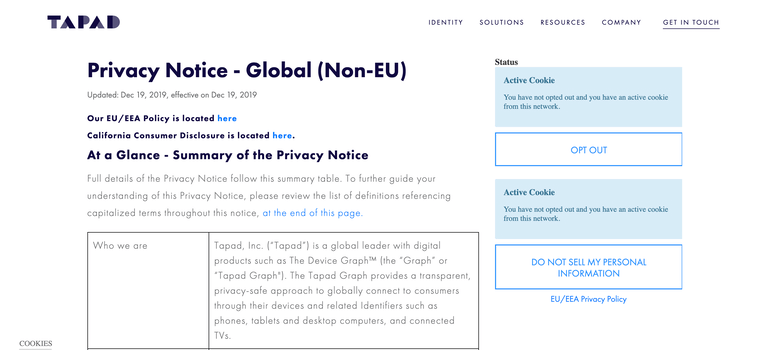
The following procedure describes how consumers can opt out of Experian's browser data collection.
From the right-hand side of Experian’s Tapad Privacy Policy page, click OPT OUT.
Upon receiving your opt-out status, Experian:
Sends the opted out ID to our partners via FTP data transfer.
Opting Out of Mobile Apps
Consumers who want to opt out of data collection for mobile applications can visit the Mobile Application Opt-out section of our Privacy Policy page and download the opt-out apps for Android or iOS systems.
Upon receiving the opt-out status, Experian applies the following workflow to share mobile opt-out data:
- Adds an opt-out flag for all device IDs belonging to that device.
- Writes opted-out device IDs to a database, for archival and backup.
- Runs a nightly batch job on the opt-out file to consolidate and verify data.
- Sends the opted-out IDs to all partners that we share data with.
Receiving Opt-Out Data from Experian
Experian delivers opt-out data to your selected Delivery Location (see Delivery Locations) on a daily basis. The format is a tab-separated flat file that contains the timestamp and user device IDs.
Note: The requirement for receiving opt-out data in batch mode is that you must ingest this file daily
Opt-Out File Format
An opt-out batch file contains the following columns:
Timestamp: a GMT timestamp in yyyy-mm-dd hh:mm:ss format that records when the consumer opted-out of data collection.
Device_ID: the consumer’s device ID. IDs can include hardware IDs like MAIDs and CTV IDs, Experian cookie IDs, or partner IDs.
Device_ID_Type: an ID that identifies the device type (see Opt-Out ID Types below for more details)
Opt-Out File Naming Convention
The following syntax displays the opt-out batch file naming convention: {partner}_optout_tapad_{yyyymmdd}_{HHmmSS} · {extension}
| FILE NAME SECTION | DESCRIPTION | EXAMPLE |
| partner | Your company name. | BigDataCompany |
| yyyymmdd | Date opt-out file was created. | 20160415 |
| hhmmss | Time (UTC) opt-out file was created. | 010444 |
| extension | Extension of file based on compression type (same as the one used for DGA files). | gz |
Opt-Out ID Types
The following ID Types are included in the opt-out file:
| DEVICE_ID_TYPE | GRAPH ID TYPE | DESCRIPTION |
| 1 | [ID label configured in Graph] | Tapad cookie ID |
| 3 | [ID label configured in Graph] | Your cookie ID or Partner ID |
| 14 | HARDWARE_MD5UDID | Hardware MD5UDID |
| 23 | HARDWARE_IDFA | Raw IDFA |
| 24 | HARDWARE_SHA1IDFA | SHA1 IDFA |
| 25 | HARDWARE_MD5IDFA | MD5 IDFA |
| 29 | HARDWARE_ANDROID_AD_ID | Android ID |
| 30 | HARDWARE_TV | Connected TV ID |
| 103 | UID2 | UID 2.0 |
| 105 | ID5_UID | ID5 Universal ID |
| 107 | HEM_SHA256 | SHA256 Hashed Email |
| 108 | HEM_SHA1 | SHA1 Hashed Email |
| 109 | HEM_MD5 | MD5 Hashed Email |
| 2001 | [IP address included in Graph] | IP address |