Introduction
Experian’s Activity Feed product ingests granular event-level digital activity, like website visitations or digital media exposures, resolves it back to Experian households, individuals, and/or the related addressable IDs within the household or individual, and delivers the log-level output back to you, the client.
Through unification to a single household or individual, you better understand all the digital activity from a single consumer, which you can use to derive richer audience insights, produce unique behavior-based audience segments, and to run more comprehensive measurement and attribution.
Activity Feed ingests granular event-level user data across digital media channels, like CTV, mobile applications, and web. Then, it resolves the digital activity data, using the available identifiers, to known households, individuals, additional digital identifiers, and Experian IDs. Lastly, Activity Feed delivers a log-level output for its clients (brands, platforms, publishers, and measurement providers) to use for more accurate cross-channel measurement and attribution and more complete audience insights.
This document will take you through details on how to get set up to get the most from Activity Feed.
Experian Points of Contact
- Main project point of contact: Your Experian Solutions Engineer (SE) will be your main point of contact throughout your time using Activity Feed. Your SE will help to facilitate your set up, tag implementation, batch file uploads, and any other questions you have regarding Activity Feed.
- Interest in other Experian products or services: Your Experian Account Executive or Customer Success Manager will be your primary point of contact for contracting or if you are interested in using more Experian products or service.
Activity Feed Overview
Activity Feed is a future-proof identity resolution solution that facilitates brands, agencies, publishers, and platforms to capture granular event-level user data and resolve that data to anonymous individuals or households as well as provide access to alternative addressable IDs and Experian IDs, such as the Living Unit ID (LUID) and Person ID (PID).
Activity Feed’s identity resolution capabilities are powered by Experian’s Digital Graph.
How is the data collected?
Data can be shared to Activity Feed via:
Real-Time:
- Tags: Img Pixel, Java Script, iFrame
- Server-to-server
Batch
What data can Activity Feed ingest?
Activity Feed ingests event-level and arbitrary user data. You can customize the arbitrary data passed to Activity Feed based on your marketing needs. Here is a list of inputs Activity Feed can ingest:
Digital IDs: Mobile Ad IDs (MAIDs - Hashed and Raw), IP addresses (IPv4 and IPv6; Hashed and Raw), Hashed Emails (HEMs), 3P partner cookies, Tapad cookies, ID5 IDs, UID2.0s (raw and authenticated), and CTV IDs
Event sightings: User agent, timestamp, referrer URL, etc.
Metadata: Campaign ID, creative ID, products viewed, etc.
What data points can Activity Feed output?
Activity Feed can resolve your data and return the following data points back to you:
Digital IDs: MAIDs, HEMs, 3P partner cookies, UID2.0s, ID5 IDs, and CTV IDs
Event sightings: User agent, timestamp, referrer URL, etc.
Metadata: Campaign ID, creative ID, products viewed, etc.
Experian IDs: Living Unit IDs (LUIDs) and Person IDs (PIDs)
Digital Graph Household and/or Individual ID
What environments can Activity Feed collect data from?
Activity Feed can collect data from online environments such as web, mobile, mobile web, and CTV. The events captured can be generated from online user activity, web/ mobile properties, or from digital campaign exposures.
Activity Feed is even capable of capturing digital event data from cookieless environments, like Safari and Firefox.
What regions is Activity Feed available in?
Activity Feed is available in North America, LATAM, MENA, and APAC. It is not available in the EU.
Data Ingestion
Sending Data in Real-Time
You can send real-time data to Experian through our Tag API or via Server-to-Server.
Tag API Workflow
The following is a high-level workflow that describes how you can send data in real-time to Activity Feed.
- Generate a tag via the Activity Feed UI or request one from your Experian Solutions Engineer.
- Deploy the tag to your property (site) or within digital ad campaigns.
- Devices loading the site with the Activity Feed tag direct requests to the Activity Feed endpoint so that we can read (or set) our cookie on the browser
- (Optional) If you want to store ID mapping, Activity Feed redirects the device back to your endpoint (or ID mapping partner) with the Experian Digital Graph cookie ID in the URL.
Server-to-Server (S2S) Workflow
The following is a high-level workflow that describes how you can send data to Activity Feed servers via post-back URLs.
- Generate a post-back URL via the Activity Feed UI or request one from your Solutions Engineer.
- Deploy the post-back URL in your server, ensuring all required query parameters are sent.
- Your server sends Activity Feed the required event-level information via query string parameters
Note: When sending IP addresses via S2S, please ensure this is the event IP Address and not the Server IP Address.
Sending Data in Batch
The batch file method of sending event, log-level data to Activity Feed allows you to deliver high volumes of device signals (also known as “device sightings”), in a single batch file.
Activity Feed prefers receiving unfiltered device sightings, such as impression logs or page/app visitation logs with precise timestamps. There should be no aggregated or duplicate data.
It is recommended to supply both digital IDs and IP addresses to maximize your resolution rate. The exclusion of digital IDs or IP addresses may impact your resolution rate.
Device Sightings
- Timestamp (optional) - Expected format in UNIX, to the second, in UTC
- Digital ID – required if IP address is not present – need at least one of the following for resolution:
- 1st or 3rd party cookie – cookie ID value
- Mobile Ad ID (MAID) - Mobile Ad ID value
- EMS accepts raw and hashed MAIDs.
- For in-app mobile/tablet device sightings, EMS accepts raw IDFAs (iOS) and raw Android Ad IDs (Android)
- For hashed MAIDs, Activity Feed supports ingestion of the following hashing formats, SHA256, SHA1, and MD5
- Before hashing your MAIDs, the MAIDs need to be lowercased and follow the UUID format (e.g. 123e4567-e89b-12d3-a456-426614174000)
- Hashed Emails
- Connected TV – CTV ID value
- Universal IDs – Universal ID value
- ID5 IDs
- UID2.0s
- ID type (optional) - ID type for each digital ID
- IP address – required if no digital ID is present – support batch ingestion of both Hashed and Raw IPv4s and IPv6s
- User agent (optional) - specify the user_agent string
- Data (optional) - client specific metadata related to digital events (e.g. Campaign ID, Creative ID, etc.)
File Formats
| File Format | Supported Compression Type |
| CSV | GZIP |
| JSON | GZIP |
| Avro | SNAPPY |
| Parquet | SNAPPY |
Note: Activity Feed supports automatic decompression based on file extensions supported by Apache Beam. File type and compression may only be used with some file formats – contact your Solutions Engineer to define compression specifications.
Setup Using the Activity Feed User Interface
Use the User Interface (UI) to create and manage users within the platform, where users can configure and produce tags.
Quickly jump to the following sections:
Account Setup
Platform Hierarchy
Your Activity Feed UI instance is referred to as an account. Within an account, you will have advertisers and tags. Tags belong to advertisers and advertisers fall under the account. You can think about the platform hierarchy in this way:
Accounts
Advertisers
Tags
Note: If you are an advertiser, your Advertiser and Account may be one in the same.
Initial User Setup
Here is the process:
- Your Experian Solutions Engineer creates the first new user on your behalf
- The new user receives an email, containing a link to the Activity Feed UI where they can create their password
- This user will be an account-level user, meaning they can create new users as needed
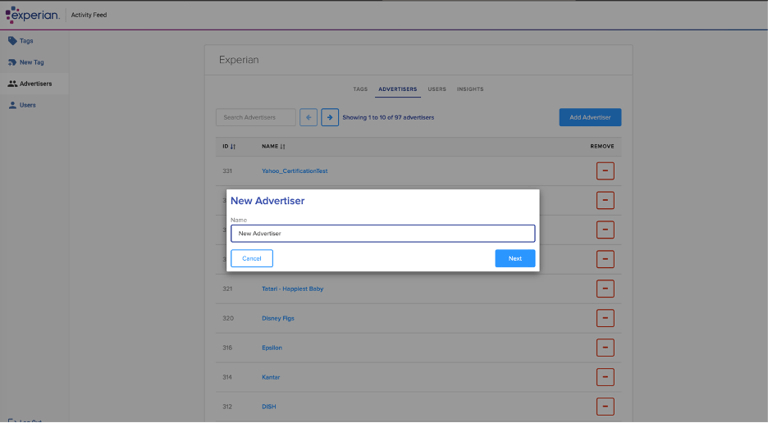
Creating an Advertiser
You can create a new advertiser by:
- Navigating to the “Advertisers” tab and selecting “Add Advertiser”
- Enter the advertiser's name and region
- Then, select “Create” and you will see the new advertiser created under your account.
Creating Account-level Users
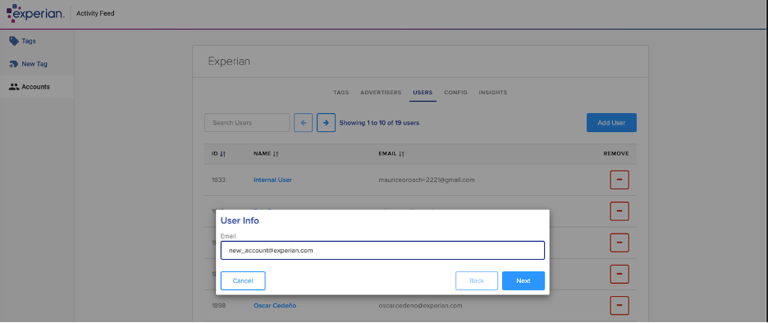
You can create additional account-level users by:
- Navigating to the “Users” tab in the Activity Feed UI and selecting “Add Users”
- Enter the user’s email address and click “Next”
- The new user will receive an email with a link to the Activity Feed UI and can set their password.
Creating Advertiser-level Users
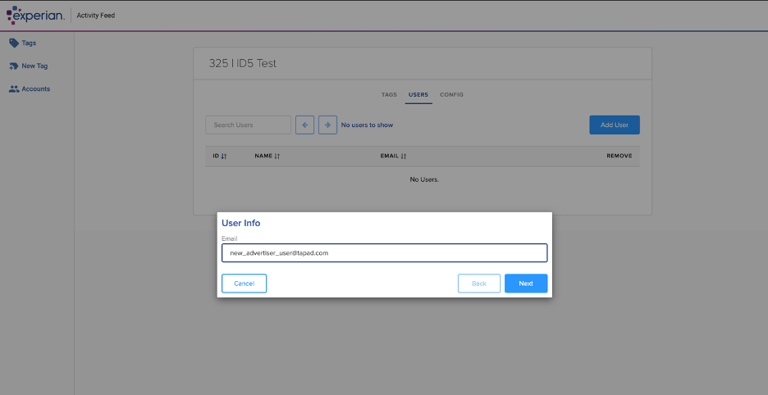
You can create advertiser-level users by:
- Navigating to the “Advertisers” tab in the Activity Feed UI and selecting the relevant advertiser
- Then, click the “Users” tab and “Add Users,” entering the new user’s email address and clicking “Next”
- The new user will receive an email with a link to the Activity Feed UI and can set their password
Event Tracking Setup
Creating Tags
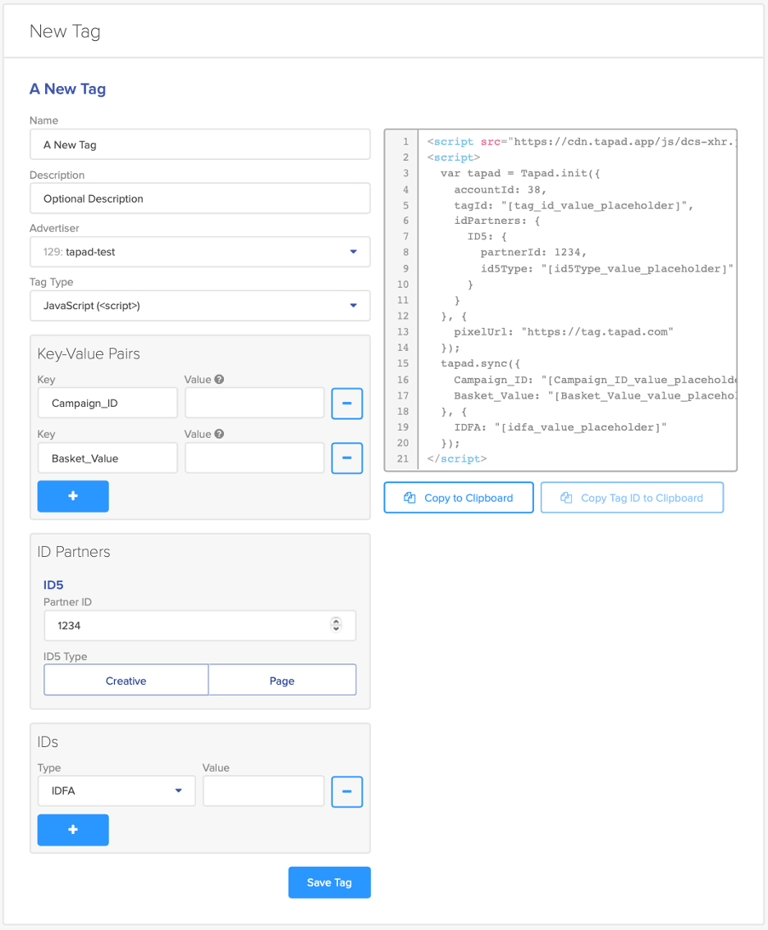
Here is the process to generate a new tag:
- Navigate to the “Tags” tab and select “+New Tag”
- Enter the required fields and select “Save Tag”
- The new tag will be added to the advertiser you created the tag within
- You can find the tag code on the screen, which you can copy and use as needed
Tag Required Fields
- Name: A short name for the tag (e.g. homepage tag)
- Description: A brief description of what the tag will be used for
- Advertiser: The associated advertiser for the tag. For a new advertiser, you need to create the advertiser first
- Tag Type: The Activity Feed UI supports three type:
- JavaScript
- Image Pixel
- IFrame
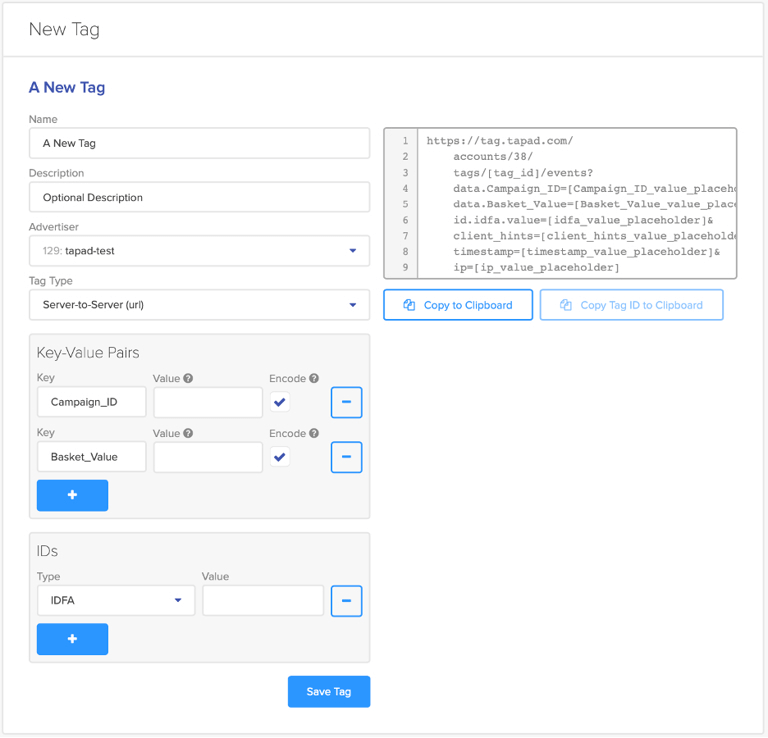
- Or, Server-to-server URL
- Key-Value Pairs: The data you wish to pass through with the tag, some examples are Creative ID, Page Name, etc.
- IDs: The additional IDs associate with the event that you would like to use for resolution
Note: To stop collecting data for a specific tag, please ensure it is removed from the web properties or digital campaigns where it has been deployed.
Tag Type
We support Javascript tags, Image pixel, and IFrame.
Javascript
iFrame
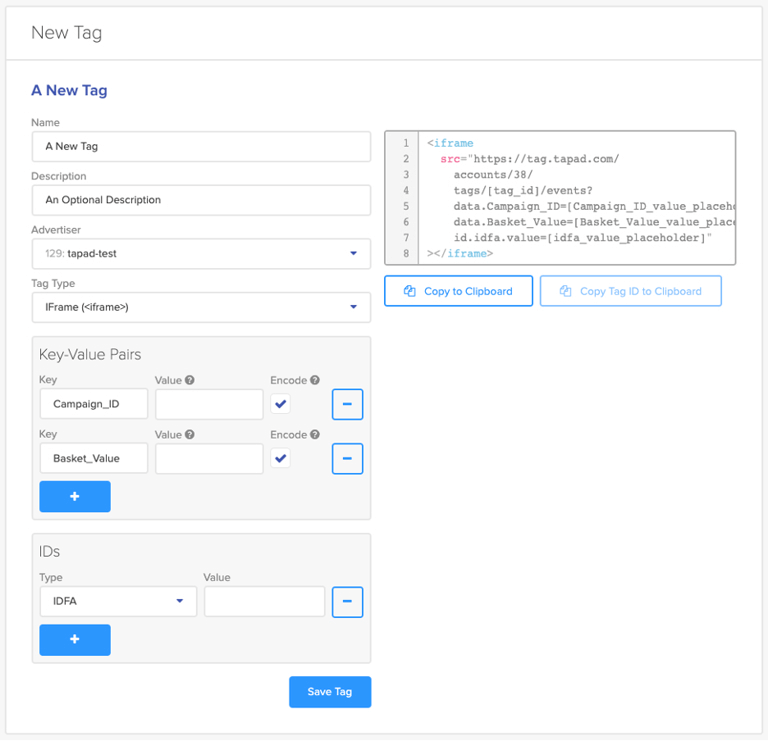
Image Pixel
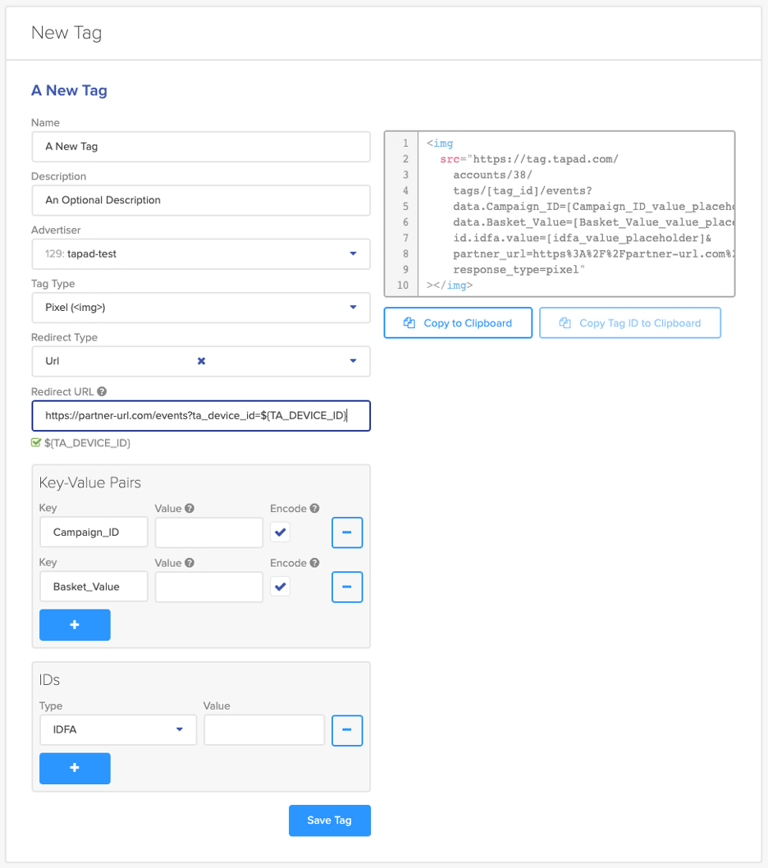
- When choosing the Image Pixel, you can opt to redirect the Experian Marketing Services Cookie to a specific endpoint (advertiser endpoint)
- The following macro can be used to determine what information to push. A checkbox will appear below the URL to confirm that the macro (if used) is valid: ${TA_DEVICE_ID}
- URL redirects are currently available only for the Image Pixel
Server-to-Server URL
Key-value Paris
Standard key-values are supported for all tag types and can be configured in the UI. Each key is stated explicitly, even when used again to define a different value. The arbitrary pairs of key/values will be added to the data array in the files.
For k/v pairs the allowed characters are a-z A-Z 0-9 as well as _ (underscore) and - (dash).
The use of special characters within the naming of the “Key” is not supported and will result in an error message being displayed when the tag is saved.
- The Encode feature will URI-encode values that contain special characters. This can be unselected if the values contain special characters needed for macros. When the “Value” of the key is added in the UI placeholder:
- Special characters are supported when the value is encoded.
- The value will be percent-encoded by default.
- The user can select not to percent-encode the value (i.e. if the value is a DSP macro).
- If the value is inserted into the tag by some manual or automatic process outside of the UI, it is important that the process percent-encodes the final value inserted into the tag URL.
- For more information on percent-encoding please see https://en.wikipedia.org/wiki/Percent-encoding.
Note: Removal of any k/v pairs after the tag has been generated won’t break the tag. However, we strongly advise against manual editing of the tags.
Length restrictions
Both the keys and the values should be a maximum of 100 characters long each. The total length of the URL should not exceed 6000 characters.
There will be a warning in the UI when the sync URL is >2000 characters which indicate that the pixel may break in older browsers due to the URL length.
IDs
You can select the ID type that will be passed to Experian Marketing Services (EMS). These IDs will be used by EMS as additional data points to resolve the event:
- Mobile Advertising ID: “DEVICE_ID” “HARDWARE_ANDROID_AD_ID “, “HARDWARE_IDFA”
- Connected TVs: “HARDWARE_TV”
- Hashed Emails: “HEM_MD5”, “HEM_SHA256”, “HEM_SHA1”
- Partner Cookie IDs: “THIRDPARTY”
- Cookieless Identifiers: “ID5_UID”, “UID2_UID”
- Experian ID: “LUID”, “PID”
The pairs of IDs/values will be added to the Event_IDs array in the files.
ID Partners
ID partners are utilized to capture IDs your business may be in partnership with. For example, if you have a partnership with ID5 as a universal identifier partner, you can use this feature to capture IDs from the ID5 API without placing an ID5 tag in addition to the Activity Feed tag.
Note: ID Partners functionality is only available with the JavaScript Tag.
ID5
To use the ID Partner ID5, you must have an existing business relationship with ID5. ID5 will supply you with a Partner ID, which is used by Activity Feed to retrieve an ID5 ID on your behalf from the ID5 API. The Partner ID is required for JS tag creation when using this feature
ID5 provides two options to retrieve an ID.
Page: to retrieve an ID5 ID when the event was generated from a page view.
Creative: to retrieve an ID5 ID when the event was generated from a digital campaign creative.
UID2.0
To use UID2.0s, you must have an existing business relationship with TTD (UID2.0). You can choose whether to receive raw or encrypted UID2.0s.
If a client opts to receive Encrypted UID2.0s from Experian, the client will need to establish a seat in the UID2.0 portal so that they can obtain decryption keys (Note: This is completed between the client and TTD. Your SE will confirm that the client has completed this step).
Data Outputs
Data Parameters
These are the parameters that Activity Feed can return to you. You can configure the log file to include any selection of the below data parameters:
| Parameter | Type | Optionality | Description |
| ip_address | String | Nullable | IP address of the Activity Feed event |
| tag_id | String | Required | Activity Feed unique tag ID |
| referrer_url | String | Nullable | A full or partial web address making the request to Activity Feed |
| data | Array | Nullable | The arbitrary client data. Each item in the array contains an object/struct with fields:
|
| timestamp | Integer | Required | The timestamp that the event was received by EMS systems, in milliseconds since the Unix epoch |
| event_ids | Array | Required | The IDs associated with an Activity Feed event. Each item in the array contains an object/struct with the following fields:
|
Identity Resolution
Identity resolution is configurable. Activity Feed can enrich an event with the following types of ID and data:
- Tapad Household ID - Experian Digital Graph household ID
- Tapad Individual ID – Experian Digital Graph individual ID
- Mobile Advertising ID (MAID) - EMS utilizes IDFAs (iOS) and raw Android Ad IDs (Android)
- Connected TV ID (CTV ID)
- Partner Cookie IDs - Cookie IDs from select partners (e.g. The Trade Desk IDs) that are connected at the HH or IND level to the Activity Feed event.
- Universal Identifiers - Additional universal identifiers (e.g. ID5, UID2.0, etc.) that are connected at the HH or IND level to the Activity Feed event.
- Hashed email (HEM)
- Experian ID (e.g. LUID, PID)
JSON Sample File
{
"ip_address": "4.14.240.170",
"tag_id": "2175gj",
"data": [
{
"name": "clientGreeting",
"value": "HelloFromClient"
}
],
"timestamp": "1625193095030",
"event_ids": [
{
"type": "TAPAD_COOKIE",
"value": "53db1d4c-6f76-4237-b9e2-21d07a578123",
"metadata": []
},
{
"value": "a4caf1d2-1384-436b-81a2-113c471d89a1",
"type": "TAPAD_HOUSEHOLD_ID",
"metadata": []
}
]
}
File Format and Delivery Location
You will finalize the details of your file configuration with your Experian Solutions Engineer, in accordance with the options detailed here.
File Format and Compression for hourly/daily files
| File format | Supported compression types |
| JSON | GZIP |
| Avro | SNAPPY |
| Parquet | GZIP, SNAPPY |
Delivery Filepath
File names include the time partition the data is from
- {FILE_PREFIX}/{YEAR}/{MONTH}/{DAY}/{HOUR}/*.FILE_EXTENSION
- {FILE_PREFIX}:
- Prefix refers to the file path (not including the scheme or bucket)
- Configurable. Example value: “exported”
- {YEAR}/{MONTH}/{DAY}/{HOUR}
- The year, month, day and hour of the data. For daily shipping cadence, there are no hourly partitions and the hour will therefore not be in the file name.
- *.FILE_EXTENSION
- Wildcard pattern for zero or more files. The FILE_EXTENSION depends on the data format and compression type.
- JSON with GZIP: “json.gz”
- Avro: “avro"
- Parquet: “parquet”
Success File
When a partition is complete, Activity Feed will drop a success file. The path of the success file is:
{FILE_PREFIX}/{YEAR}/{MONTH}/{DAY}/{HOUR}/_SUCCESS
The semantics of the file parameters are the same as the data files.
Ingestion for a partition should not start until the success file has been uploaded. The ingestion should assume that there are zero or more files with file names specified in this section containing the actual data.
Delivery Method
Activity Feed supports the following delivery methods: SFTP, Amazon S3, GCS.
You can define who can host the SFTP server or S3 bucket. For EMS hosted locations, please coordinate with your EMS representative to confirm the hosting credentials.
Delivery Cadence
Activity Feed supports the following file delivery cadences: Hourly, Daily.
Opt-Outs
In accordance with Experian's privacy policy, our partners are required to process opt-out data in a daily batch file. This ensures that opt-out requests are respected and addressed in a timely manner.
Experian delivers opt-out data to your S3 or SFTP location. The format is a tab-separated flat file that contains the timestamp and user device IDs. The requirements for receiving opt-out data in batch mode are:
You must ingest this file daily
You must delete any historical event log-level data, received via Activity Feed, related to the opted-out user device IDs
Opt-Out File Content
An opt-out batch file contains the following parameters:
Timestamp: a GMT timestamp that records when the user opted-out of data collection; using the yyyy-mm-dd hh:mm:ss format.
Device_id: the user’s device ID. IDs can include hardware ID, Tapad ID, or partner device ID.
Device_id_type: an ID that identifies the device type. (See Opted-out ID Types for more details.)
Batch File Naming Conventions
The following syntax displays the opt-out batch file naming convention:
{partner}_optout_tapad_{yyyymmdd}_{HHmmSS} · {extension}
| Macro | Description | Example |
| Partner | Date opt-out file was created | 20220907 |
| yymmdd | Time (UTC) opt-out file was created | 01044 |
| extension | Extension of file based on compression type (same as the one used for batch files) | gz |
Appendix
Insights Dashboard in Activity Feed UI
Activity Feed Insights is a reporting interface in the Activity Feed UI, where you can monitor the performance metrics across your digital events and activities.
Each chart’s timeframe can be defined in the drop downs, and the data can be filtered by Market and Tag ID.
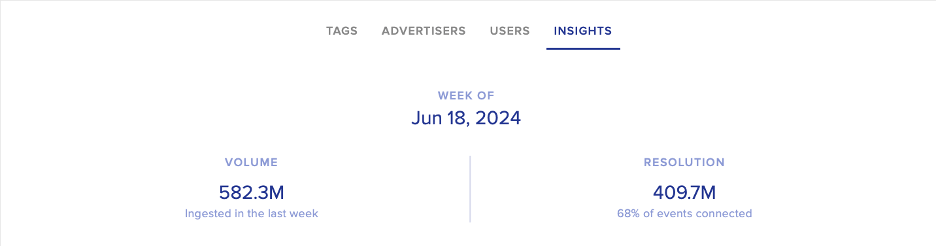
Weekly Insights
Keep an eye on key metrics to understand how Activity Feed is resolving your events to the desired output.
Explanation of metrics:
Volume: Number of events ingested by Activity Feed
Resolution: Number of events (and percentage of events) resolved to your configured output
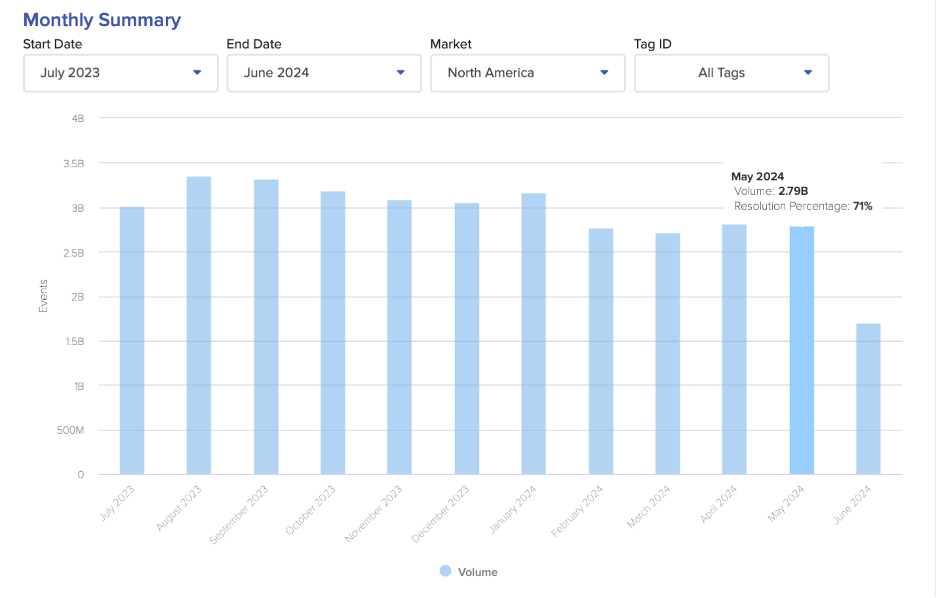
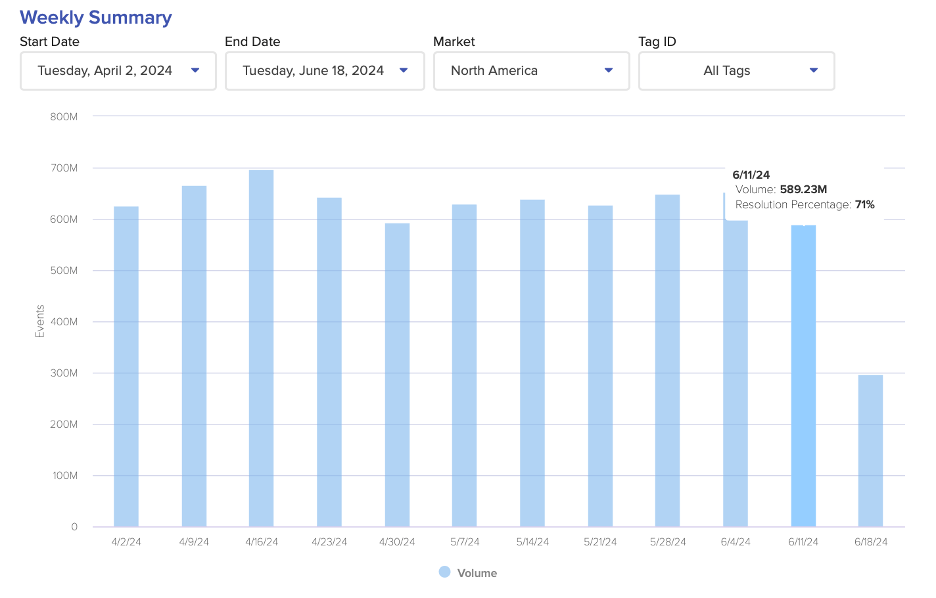
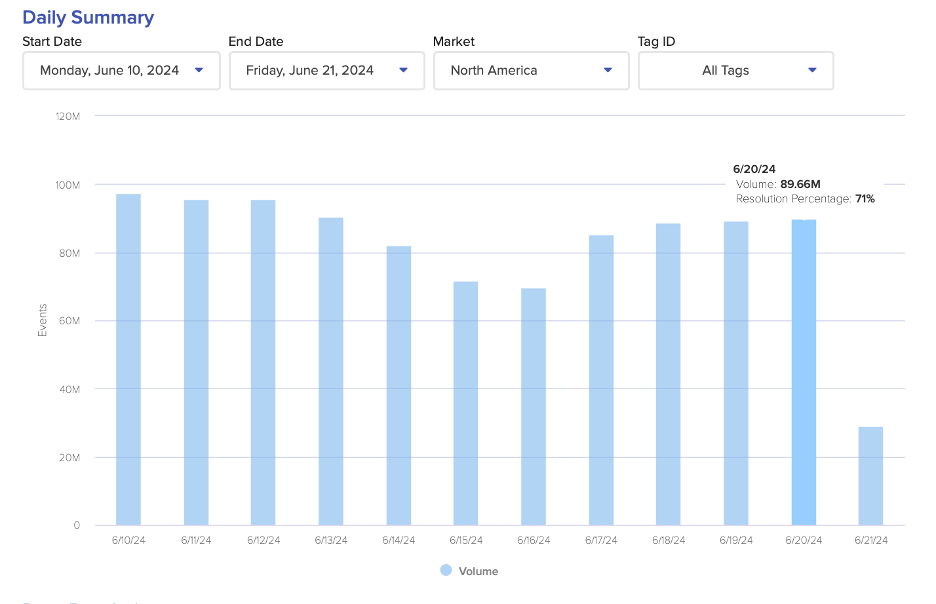
Monthly, Weekly, and Daily Summary
Displays the events that Activity Feed ingests and resolves, by Month, Week, and Day.
By hovering over the bars, you can see the volume of events ingested and the resolution rate.
Explanation of metrics:
Events: Total number of events ingested by Activity Feed
Resolution Rate: Percentage of events resolved to your configured output
Data Resolution
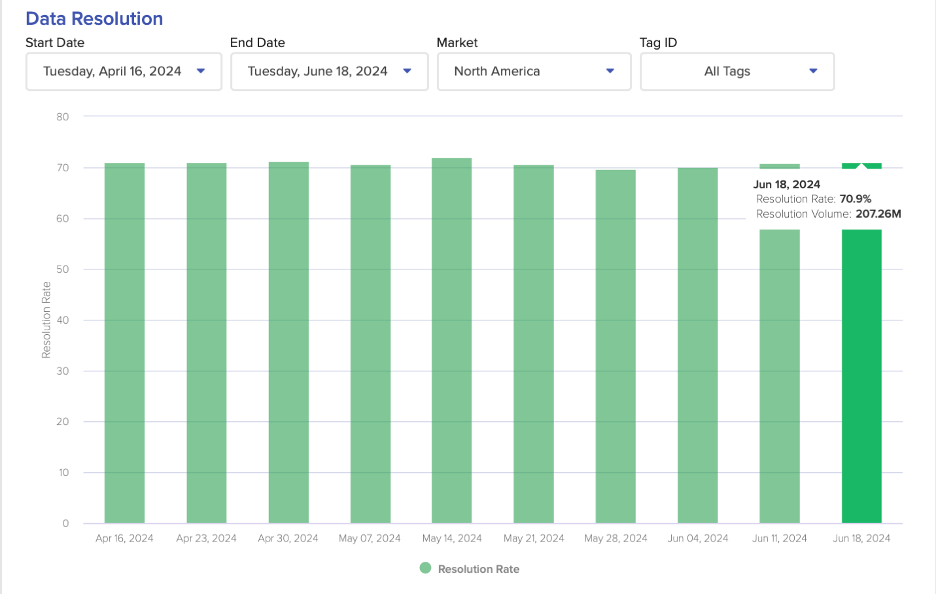
This displays the resolution insights of your events, week-over-week. By hovering over the bars, you can see the resolution rate and the volume of resolved activity.
Explanation of metrics:
Resolution Rate: Percentage of events resolved to your configured output
Resolution Volume: Number of events resolved to your configured output
Browser Resolution Breakdown
Displays the distribution of browser types in your data. By hovering over the bars, you can see the volume of events ingested, and the volume of events resolved to your output configuration, by Edge, Safari, Chrome, and other browsers.
Explanation of Metrics:
Events: Number of events ingested by Activity Feed by a specific browser
Resolution: Number of events resolved to your configured output
Pixel FAQs
How long does a pixel remain active?
Pixels will remain active until they are removed from your environment.
Where should a pixel be placed?
The website(s) or system(s) that will initiate the pixel request to Experian Marketing Services. This can be a website, mobile website/app, CTV property or a 3rd party media platform serving ad impressions.
Due to their data privacy policies, some media platforms may not allow the pixel or may request Experian to complete a certification form.
Why am I seeing a different volume of pixel fires compared to Experian?
There may be multiple reasons for the discrepancy in pixel fires. One common issue may be because a cachebuster was not implemented. In this case, a user’s browser may cache our tag, preventing it from firing and sending information to our servers.
There are various ways to implement a cache buster using our tag.
If you are using Google Tag Manager, please make sure to disable the Cache Busting option in the tag configuration screen. This option should not be enabled to allow the tag to properly function.
Another way is to use key value pairs and passing us a value that will be different with each tag fire (e.g. timestamp)
If you have any questions regarding pixel discrepancies, reach out to your Experian Solutions Engineer representative for further troubleshooting tips.
IP Address
IP Address Formatting
Activity Feed can ingest raw and hashed IPv4 and IPv6. Raw IPv4 and IPv6 can be ingested in real-time; hashed IPv4 and hashed IPv6 must be sent via batch.
Raw IP Address Formatting
IPv4 – Standard “dotted quad” notation.
- Example: 127.0.0.1
IPv6 – For unhashed values, raw truncated or untruncated are accepted.
- Example truncated: 2603:8001:f0:da0::
- Example untruncated: 2603:8001:00f0:0da0:7cd1:6410:25fa:7bf8
Hashed IP Address Formatting
IPv4 – Use standard “dotted quad” notation prior to hashing
IPv6 – For hashed values:
- When formatting IPv6 addresses, we focus on the first 64 bits (the network portion) and apply industry-standard compression to remove redundant information. This compression follows RFC 5952, ensuring consistency with existing systems that handle IPv6.
- Our normalization process can be simplified into four key rules:
| Step | Rule | Example of Transformation |
| 1 | Keep only the first 64 bits (first 4 hextets), removing the last 64 bits entirely. | 2603:8001:00f0:0da0:7cd1:6410:25fa:7bf8 → 2603:8001:00f0:0da0 |
| 2 | Remove leading zeros in each hextet | 2603:8001:00f0:0da0 → 2603:8001:f0:da0 |
| 3* | Replace the longest consecutive sequence of 0000 hextets with :: (only once per address) | 2603:8001:f0:da0 → 2603:8001:f0:da0 |
| 4 | Append :: to indicate the removed last 64 bits | 2603:8001:f0:da0 → 2603:8001:f0:da0:: |
*Note: Consecutive sequences of 0000 hextets rarely appear in the first 64 bits of an IPv6 address, which is why step 3 does not change the example. While a 0000 group can exist in this portion, these typically refer to reserved or unspecified addresses rather than network or device identifiers.