Summary of Changes
| Version | Change | Date |
| V2026-7.9 | Added additional API parameters to Apendix A | 7/09/2026 |
| V2025-3.25 | Added Combined API information | 3/25/25 |
| V2025-3.11 | Updated Error Messages | 3/11/25 |
| V2025-2.11 | Updated General Service and Performance | 2/11/25 |
| V2024-3.6 | Updated Onboarding Process; Updated Return Codes; Added Multichannel Request information | 3/6/24 |
| V2023-12.19 | Major rewrite; New and Updated Code Samples; Updated Reference Materials; Updated Return Codes | 12/19/23 |
| V2023-9.14 | Added section for “Restricting Returned Data by State.” | 9/14/23 |
| v2022-10.1 | Added long table name and new data table options for Universal Enrichment | 10/1/22 |
| v2022-07.1 | Removed the field limit from Data Append (Universal Enrichment) Appendix | 7/28/22 |
| v2022-04.1 | Updated API Maintenance Window | 4/11/22 |
| v2021-12.1 | Corrected the word perofrmance to performance | 12/20/21 |
| v2021-11.2 | Added service and performance | 11/6/21 |
| v2021-11 | Updated UE return message | 11/5/21 |
| v2021-06 | Revised Automated Password Reset Section | 6/23/21 |
| v2021-05 | Added support for IP Address | 5/30/21 |
| v2021-01.1 | Revision to data dictionary for alias fields | 1/27/21 |
| v2021-01 | Added Support for MAID to Data Append | 1/14/21 |
| v2020-07.1 | Added Process Model Validation API | 7/14/20 |
| v2020-07 | Added new APIs; OmniView Opt-out, OmniView Micro-batch, Universal Enrichment Data Dictionary, Address Cleansing | 7/10/20 |
Introduction
The Experian Services API allows you to access Experian consumer data in real-time to enable well-timed decision-making and to optimize your marketing and customer data management efforts.
The Experian Services API provides real-time (transaction and micro-batch) access to Experian Marketing Services’ solutions to power your marketing engagements.
The Experian Services API is a backend solution. The user is responsible for creating any front-end interfaces and code development to call the real-time API in the transactional or micro-batch method.
We have two distinct offerings that help you either maintain a view of your customers, OmniView, or build out your view of your customers with Universal Enrichment:
- OmniView, the system that powers Offline Identity Resolution, enables you to link your customers across channels with our persistent consumer-level linkage solution. Another aspect is Address Cleansing, powered by Experian’s CorrectAddress software, cleans up your postal address so that you receive back a cleansed postal address along with OmniView IDs.
- Universal Enrichment appends best-in-class Consumer View demographic, geographic, behavior, automotive, segmentation, and other consumer data from personal or near-personal information. It can also fill in missing identity. The Universal Enrichment system supports two downstream products, Enrichment and Offline Identity Append.
This document is intended for use by developers and other technical resources. It will help you set up the necessary infrastructure to communicate with Experian through the Experian Services API.
Purpose of this Document
Getting Setup on the Experian Services Portal
There are several steps to getting authority to use the Experian Services Portal. These can be coordinated with an Experian representative. A username and password are issued within 3-5 business days. This does not include the contracting process.
Client credentials are as follows: A client set-up within our system, user(s), name, company address, phone, and e-mail. If the client is a broker, we require that each end-user must have their own credentials for system access.
Requirements
To use the Experian Services API, you must have:
- The URL of the API: https://us-api.experian.com/marketing-services/targeting/v1/<ProductName>
- Note: The <ProductName> depends on what product (or products) you have purchased from Experian.
- Log-in credentials (username, password, client_id, and client_secret) provided by Experian.
- An Experian ID (a four to five-digit number uniquely identifying your company).
- A URL for getting OAuth2 Bearer Token with your API Log-in credentials.
- A tool for sending requests over HTTPS to the API. This request must:
- Include your OAuth2 Bearer Token in the request header as an Authorization header.
- Include the consumer’s name / addressable information in the HTTP request body.
- Transmit using the POST method.
- A tool for receiving and interpreting the HTTPS response contains the processing results in a JSON message.
- The API framework restricts calls per party ID to 30 TPS (Transactions Per Second). With the overhead of backend services and additional security instituted on our platform, you need to limit your transactions to 5-10 TPS.
The API supports Secure Communications (TLS (Transport Layer Security) v1.2); however, the service does NOT support two-way, mutual authentication using certificates. We have taken this position due to service interruptions regularly incurred by expired certifications, permission changes, missing root chains, etc.
General Service and Performance
The details regarding services and performance are not legally binding. They serve as general information and guidelines about the practices Experian uses to manage our API solutions.
Definition of terms:
Availability: The total hours the system is operational during the coverage period.
Availability Percentage: The ratio of the total hours the system is operational to the total hours it is scheduled to be operational.
Downtime: The period when the system is not operational. This can be scheduled or unscheduled, but only unscheduled downtime is used to calculate the availability percentage.
Outage: Any unscheduled downtime, typically caused by errors in application software, systems software, systems hardware, or telecommunications lines.
Response Time: The time, measured in seconds and tenths of seconds, that the online system takes to interpret an inquiry, retrieve the necessary data, and prepare the response. This does not include communication time between the Client and Experian or time to/from external data sources.
Single-record Transactions: API requests consisting of a single record sent in the request and the same single record returned with the service output.
Micro-batch Transactions: API requests consisting of two or more records sent in a single request, with the same records returned with the service output.
Service Standards
The goals listed below are measured from January 1 through December 31 each year and are reported monthly (both as a monthly and year-to-date annual percentage).
- Availability/Uptime
- Goal: 99.5% annual availability for Experian Marketing Services.
- Note: This measurement excludes the scheduled monthly maintenance window.
- Maintenance Window
- A monthly maintenance window of 5 hours is reserved for patching and system updates, as per the annual schedule.
- Occasionally, additional maintenance windows may be introduced during server optimization or upgrades. In such cases, clients will be notified at least 7 days in advance.
- API Performance
- OmniView Single Record:
- SLA: Daily average response time of 4.0 seconds or less for all inquiries.
- Recommendation: Do not exceed 10 transactions per second (TPS).
- Universal Enrichment Single Record:
- SLA: Daily average response time of 4.0 seconds or less for single record transactions involving no more than 1,000 fields (attributes). Actual times may vary based on data requirements.
- Recommendation: Do not exceed 10 TPS.
- Combined API Services / Single Record:
- SLA: Daily average response time of 5.0 seconds or less for single record transactions involving no more than 1,000 fields (attributes). Actual times may vary based on data requirements.
- Recommendation: Do not exceed 10 TPS.
- Micro-batch Transactions
- Micro-batch response times will vary based on the number of batch records, fields requested, and micro-batch records requested per second.
- Maximum 300 records per batch and no more than 1000 fields (attributes)
- Recommendation: Do not exceed 10 TPS.
Cache and reuse. Experian requires clients to cache and reuse OAuth tokens to achieve stated API response times.
API Process description and diagram
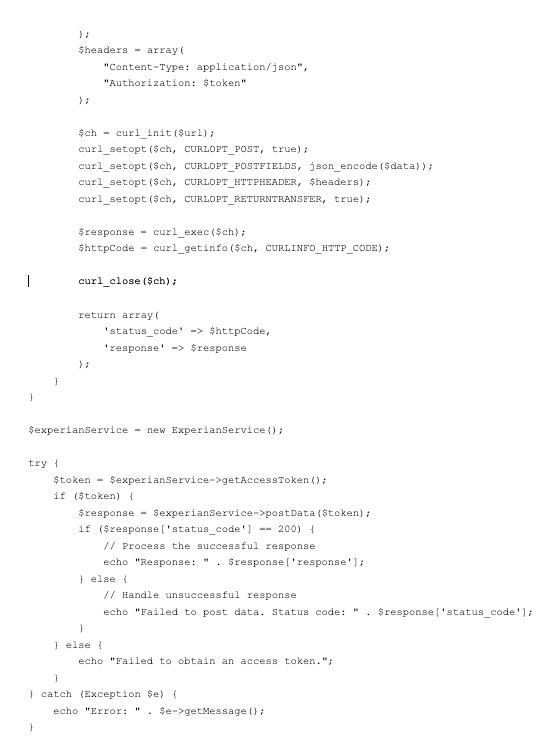
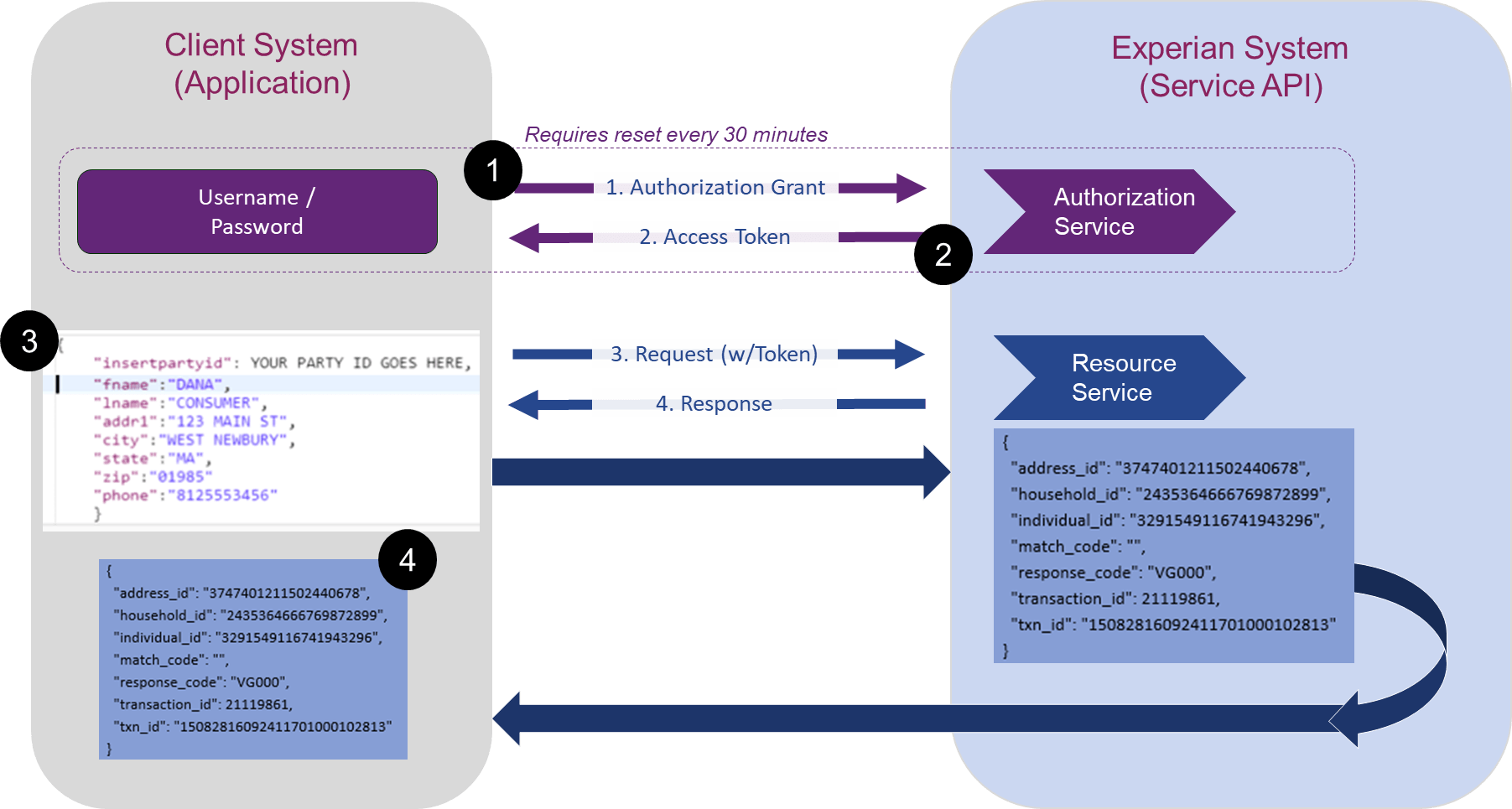
- The user calls API for the OAuth token.
- The user receives the token.
- The user uses the token to call the API for the contracted service.
- The system checks the token every 30 minutes to ensure it has not expired.
- If the token is active, the system processes the request, returns the service results, and can continue sending requests (back to step 3).
- If the token has expired, the user is notified with an invalid token error (back to step 1)
Account Management
Initial Log-In
Your Experian representative will set up your client credentials and initial login. This takes five to eight business days, depending on the type of account and number of users. Set up information required includes:
- User(s),
- Company name,
- Company address,
- Phone,
Note for brokers: The information provided must be the end user’s credentials.
This information is used to set up your Experian Party ID, username, and initial one-time password. Once these credentials have been defined, you will receive three automated email messages.
- The first email message will inform you of your new username.
- The second email message will contain a link to Origin. Origin is an identity management application that creates and administers clients, groups, and individual users, all of which are protected by Single Sign-on (SSO) authentication. Please note that the link within this second email message will expire within a week, so be sure to click the link within this timeframe. If the link expires when you click it, the system will prompt you to enter your username and email address. You will then be sent a new email message with a new link.
- The third message is informational and will inform you that your user account has been associated with the Experian Services API product.
To complete the initial registration process:
- Click the link within the automated email message. This link directs you to the Origin Account Information screen, where you will complete the initial registration process.
- Enter a new password. Your Experian Services API password must conform to the following requirements: At least eight characters, contains a lowercase letter, contains an uppercase letter, and the password can't be the same as your last 13 passwords
- Confirm your new password.
- Read and accept the terms and conditions.
- Click "Complete Registration." A screen is displayed indicating that you have successfully completed your registration.
Getting your OAuth2 Bearer Token
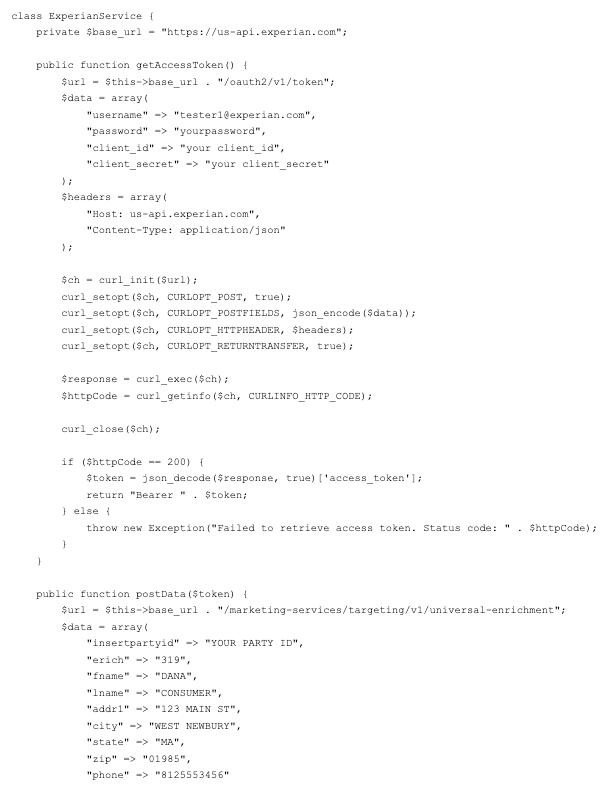
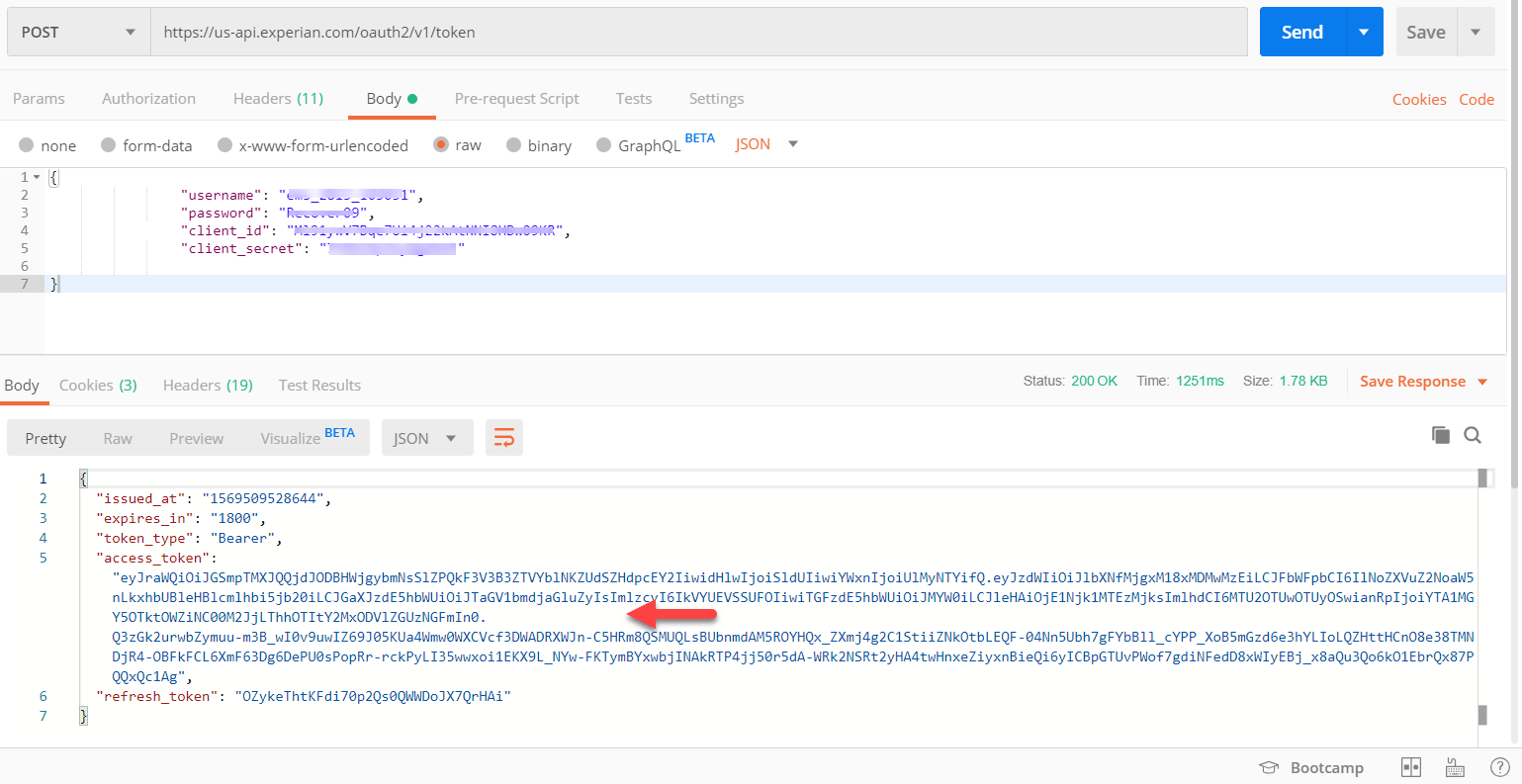
The URL of the Experian OAuth2 Bearer Token: https://us-api.experian.com/oauth2/v1/token
Experian requires an OAuth2 Bearer Token in the message header. To request one, the user must post a request with the Experian-provided “username,” “password,” ”client_id,” and “client_secret” in JSON format. The User will receive the “access token” for Experian Marketing Services APIs. Tokens are valid for 30 minutes.
You will receive an email from Experian with a PDF document with your production credentials and the information noted above. We do not provide UAT credentials. If you received an API credentials PDF document with a UAT URL, please ignore it. If you only received the UAT credentials, please contact us so we can issue you the proper credentials.
All token requests must be made from the known list of static IPs.
Setup Requirement - Token Caching
Please set up Token Caching to make full use of the access token's lifetime and avoid unnecessary call overhead.
Token Caching facilitates quicker processing of individual API requests by storing the authorization token. Failing to implement token caching slows down every API request.
Token Caching is a process in which your system generates a token and securely caches it. The token is used for all your service API calls until it expires. When it does, a new token is requested to replace the expiring one in the cache. This cycle is repeated to ensure that your system always uses the latest active token.
All users of the Experian APIs shall implement a timer (<30min).
If the timer is < 30 minutes, use the existing token. Otherwise, get a new token.
Sample curl command:
curl --location --request POST 'https://us-api.experian.com/oauth2/v1/token' \
--header 'Accept: application/json' \
--header 'Content-Type: application/json' \
--data-raw "{
\"username\": \"$USERNAME\",
\"password\": \"$PASSWORD\",
\"client_id\": \"$CLIENT_ID\",
\"client_secret\": \"$CLIENT_SECRET\"
}"
Password Management
It is essential to change your password at least every 90 days. You can do it manually or through the automated password reset process. You can contact your Client Service Representative to configure your account and follow the instructions for password resets every 90 days or less. Please note that Experian does not provide non-expiring or persistent passwords. To ensure two-factor authentication, Experian requires all calling solutions to list IP Addresses for whitelisting.
Manual Password Reset
To change your password manually, you can log into the Origin system and change it at any point within the 90-day window. It is essential that you coordinate this with your system by following the directions below.
You will also receive an automated email message before the 90-day limit, informing you that you must change your password.
To manually reset your password:
- Shut down your system application interface to the API
- Access the Origin login screen in your Internet browser. The URL for the Origin login screen is https://origin-na.experian.com/login
- Click on the Forgot Password link
- Enter your username
- You will receive an email with instructions
- Your Experian Services API password must conform to the following requirements: At least 8 characters, a lowercase letter, an uppercase letter, and password that can't be the same as your last 13 passwords
- Confirm your new password.
- Click "Reset Password"
- Change the password on your API interface to your new password within the request message header.
- Confirm password change by running a manual test.
- Once the password change is confirmed, restart your application API interface.
Automated Password Reset
Password Guidelines
The password automatically expires ninety days after its creation, after which access will be denied. Therefore, users must regularly change their passwords to maintain continuous service.
Production users will receive a password email reminder ten days before its expiration. The email will be sent to the email address associated with the User ID, so the email address must be kept up to date in our Access Control System.
Since the development and testing of an application usually takes less than 90 days, Demo (test) users will not receive an email reminder. It is up to them to remember to maintain their testing password.
Passwords can be changed manually using the appropriate Experian website or automatically using the Automated Password Reset Function (see the “Automated Password Reset Function” section below for details).
If the Automated password reset function is not used, the user’s application should remind users to change their password regularly before its expiration. This is a requirement for third-party software applications.
To manually change the password, use the following Browser URLs:
https://origin-na.experian.com/login
If the software normally changes passwords programmatically and a manual password change is made, it is recommended that the software automatically change the password again to avoid any mismatching and to ensure that the automation process is working properly.
Automated Password Reset Function
An Automated Password Reset Function is available for those who want to change the password programmatically. It uses an HTTPS POST to the following URLs.
Automated Password Reset URLs
Internet Access:
- Production and Demo: https://ss3.experian.com/securecontrol/reset/passwordreset
Extranet Access: (VPN / leased line)
- Production and Demo: https://www.experiannet.com/securecontrol/reset/passwordreset
Automated Password Reset Pre-Conditions
The following conditions must be met before the automated password reset process can be used:
- The current user ID and password must be active. If no user ID exists, one must be manually created.
- The client must use an HTTPS (SSL 3.0 or later) connection.
- The client must connect to the Automated password reset function using a fully qualified static IP address. If not, the user will receive an HTTP status code of “302 Unable to authenticate response.”
- Demo and Test: Contact your TSSR (Technical Support Specialist Rep) to have your IP address(es) added to your User ID. A maximum of 20 IP addresses may be added. Address ranges may also be used. Production: The client’s Head Designate must contact Experian Client Support (800.831.5614) to have the IP address(es) added to your User ID. Up to 20 IP addresses or address ranges can be added.
- Note: Adding IP addresses to the User ID restricts usage to only those IP addresses for all transactions, so make sure that you also add the ones for your standard transaction processing if they differ.
- The client should have a property stating the frequency at which it wants to reset passwords. The recommended frequency is 30 to 45 days. Every time the client runs, it should check the date it last did a password reset. The system must trigger an automated password reset if the password has not been changed in the specified number of days.
Automated Password Reset Process Flow
1. Request a new password: The client connects to Experian using an HTTPS POST and Basic authentication to indicate a new password request. The client passes the user ID and current password in the same manner as in a standard transaction. It also passes the following key-value pairs:
“command=requestnewpassword” “application=netconnect.”
A dump of the HTTPS POST would look like this:
POST /securecontrol/reset/passwordreset HTTP/1.1
Authorization: Basic dGVzdGlkOnBhc3N3b3Jk ß original user ID and password
Content-Type: application/x-www-form-urlencoded
Cache-Control: no-cache
Host: ss3.experian.com
Connection: keep-alive
Content-Length: (content length)
Net Connect XML Access Users
&command=requestnewpassword&application=netconnect&version=1
API JSON Access Users &command=requestnewpassword&application=creditprofileapi&version=1
2. Receive new password: The client receives the new password in the Experian response. The client can store this password so that it can be retrieved later. Please note that the password still needs to be reset. A dump of the response would look like this:
HTTP/1.1 200 OK
Date: Tue, 09 Mar 2010 22:29:02 GMT Content-type: text/plain
Set-Cookie: EntlogonWebAppSession=E2C.....
Cache-control: no-cache="set-cookie"
Response: jsdmhyz63 <- suggested password returned
3. Reset password: The client connects to Experian again using an HTTPS POST and Basic authentication to indicate that it is requesting a password reset. The client must authenticate again using the existing user ID and password and pass the following key-value pairs in the transaction:
“newpassword=(password received in step 2 in clear text)
“command=resetpassword”
“application=netconnect”
A dump of the HTTPS POST would look like this:
POST /securecontrol/reset/passwordreset HTTP/1.1
Authorization: Basic dGVzdGlkOnBhc3N3b3Jk ß original user ID and password
Content-Type: application/x-www-form-urlencoded
Host: ss3.experian.com
Content-Length: (content length)
Net Connect XML Access Users
&newpassword=jsdmhyz63&command=resetpassword&application=netconnect&version=1
API JSON Users
&newpassword=jsdmhyz63&command=resetpassword&application=creditprofileapi&version=1
4. Receive the status: The client receives the status of the password reset request as a string in the response. If the reset was successful, the string value is “SUCCESS.” In any other scenario, the status string will have an error message explaining the error (see the Automated Password Reset Errors section below for errors).
HTTP/1.1 200 OK
Date: Tue, 09 Mar 2010 22:31:02 GMT
Content-Type: text/plain
Set-Cookie: EntlogonWebAppSession=Lh1b....; path=/
Transfer-Encoding: chunked
Response: SUCCESS
5. Save password: If the status string is “SUCCESS,” the client saves the new password and uses it in their application.
6. Usage of New Passwords: New Passwords are available to be used immediately in the Production environment but will take up to 10 minutes to be populated throughout the Demo environment.
Automated Password Reset Errors
The response string will have an error message if the process is unsuccessful. The most common is an authentication failure, which will appear in this example:
HTTP/1.1 302 Moved Temporarily
Date: Tue, 09 Mar 2010 22:31:02 GMT
Content-Type: text/plain
Set-Cookie: EntlogonWebAppSession=Lh1bL....; path=/
Response: Unable to authenticate
| Status Code | Response Text | Reason |
| 302 | Unable to authenticate | Invalid user ID/password |
| 400 | Invalid Input | Input parameter is missing or invalid |
| 500 | Application Error | Contact your TSSR |
Password Expiration
Recommendation: If the software does not automatically change the password, the software should track the number of days since the supervisor last changed the password. Beginning on the 80th day, the software should remind the supervisor to change their password (both at Experian and within the software). By the 85th day, the software should remind the supervisor that failure to change the password will interrupt service. This message will continue until the supervisor changes the password.
Recommendation: When manually changing the password, the software should ask the supervisor to commit it to memory.
Recommendation: The software should notify any logged-in user when the password expires. The user should be directed to notify the system administrator to log in and change the password.
Recommendation: It is also recommended that when the administrator logs into the software after the password expires, a message should display stating that the password has expired, and it should contain a link to the Experian authentication system's URL.
Recommendation: The Automated Password Reset (APR) function is coded for it and should be executed every 30 days with an email going to the user ID admin if it is unsuccessful so they can troubleshoot the issue. The user ID admin can still change the password manually. However, this will give them 60 days to troubleshoot the APR process.
Password Reset Appendix A - URLs and IP Addresses
| Type | Automated Password Reset URL | IP address |
Demo and Prod Extranet (used with VPN (Virtual Private Networks) or MPLS Dedicated connections) |
Demo and Production Net Connect https://www.experiannet.com/securecontrol/reset/passwordreset |
205.174.35.49/443 |
| Prod and UAT (User Acceptance Testing) Internet | API Staging https://stg1-ss6.experian.com/securecontrol/reset/passwordreset |
205.174.34.177/443 |
Demo and Production Net Connect and API Production |
205.174.34.37/443 | |
Demo and Production Net Connect and API Production |
167.107.80.248/443 |
| Type | Manual Password change URL | IP address |
| Demo and Prod Internet | https://origin-na.experian.com/login | 45.60.11.174/443 |
Locked Accounts
Your Experian Services API user account will be locked under any of the following conditions:
- Your account has been inactive for 30 days.
- You do not change your password within 90 days
- You have three failed password attempts.
Locked accounts can only be unlocked by Experian. Contact your Customer Service Representative or Experian's Technical Support Center at 800-854-7201 to unlock your account. Be sure to have your user account and email address when you call, as you will be required to provide that information.
Forgotten Credentials
If you forget your username, please contact your account representative.
If you forget your password, you can request a special one-time-use login URL.
- Access the Origin login screen in your Internet browser. https://origin-na.experian.com/login
- Click the "Forgot Password" link.
- Enter your username or email address and click Submit Request.
- The system prompts you to answer one of your security questions. Enter the correct response and click Submit.
- The system sends you an email message. Click the link within this email message. This link directs you to the Origin Account Information screen.
- Enter a new password. Your Experian Services API password must conform to the following requirements: At least eight characters, contains a lowercase letter, contains an uppercase letter, and password can't be the same as your last 13 passwords
- Confirm your new password.
- Click "Reset Password."
Please also change your application to reference the new password within the request message header.
Technical Support
Email: Targeting_API_Onboarding@experian.com
If you need any help with your username or password, please call Experian's Technical Support Center at 800-854-7201 between 5:00 AM to 6:00 PM Pacific (Monday - Friday) and 6:00 AM to 3:00 PM Pacific (Saturday – Sunday)
Optional Setup Validation
Once you have established your username, password, client ID, and Client Secret and requested an access token (described above in the Account Management section), Experian recommends submitting a sample request to the Experian Services API. This sample request is optional but can help troubleshoot any issues.
Sample Request
This section describes sending a sample request message via the Experian Services API.
There are many free tools available on the internet to test RESTful APIs. This section utilizes Postman, which is available for free through https://www.getpostman.com/products. If you are using Google Chrome, the Talend API Tester extension is a useful tool for manual API calls. Please note that this section assumes that you have received your Experian Services API username, client ID, and client secret, created your password, and defined an Experian Party ID.
Building the Sample Test Message
To send a sample test request to the Universal Enrichment Experian Services API:
- Start Postman.
- Choose “POST” as the request type.
- In the "URL" field, enter the URL for the Experian Services API. https://us-api.experian.com/marketing-services/targeting/v1/universal-enrichment
- Click the "Body" tab, then click “Raw.”
- Add the following JSON:
{
"insertpartyid": YOUR PARTY ID GOES HERE,
"erich":"319",
"fname":"DANA",
"lname":"CONSUMER",
"addr1":"123 MAIN ST",
"city":"WEST NEWBURY",
"state":"MA",
"zip":"01985"
"phone":"8125553456"
}
Postman view
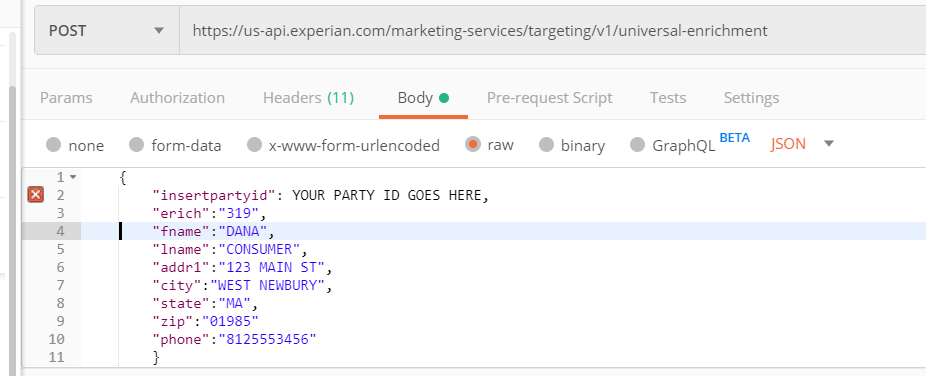
REMINDER: add the actual insertpartyid
6. Click on the “Headers" tab and make the following changes:
a. Authorization: Bearer YOUR ACCESS TOKEN
b. Content-Type: application/json
7. The screen should now look like this:
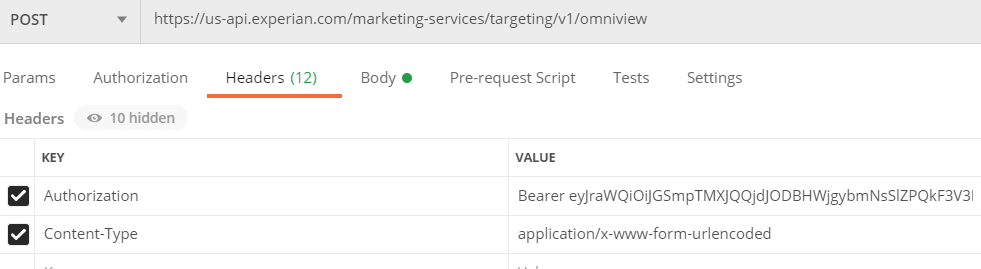
Please note that there is a space between "Bearer" and the Access token. Refer to the "Getting your OAuth2 Bearer Token" section for instructions on requesting the Access Token.
8. Press the Send button to submit the test request message and wait for the response.
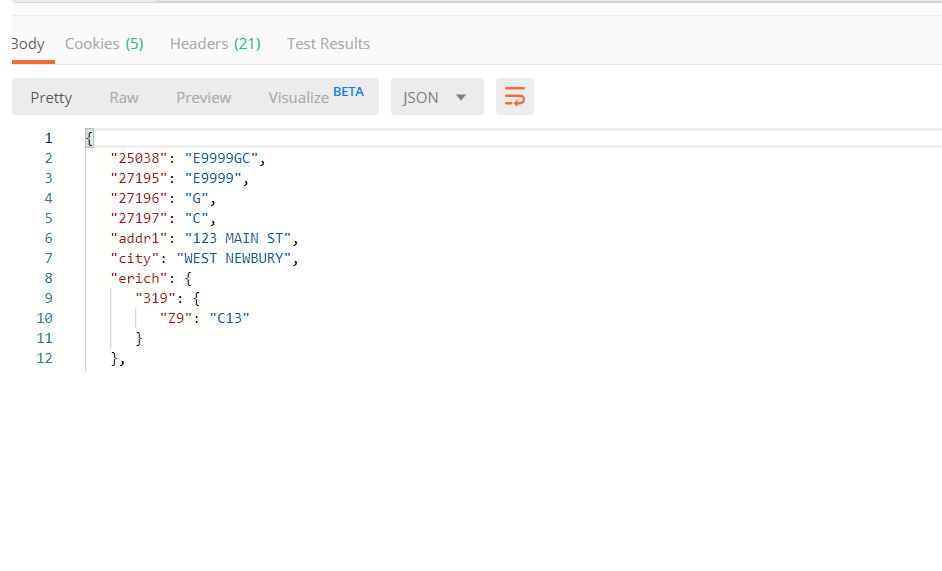
If this is the response you see, congratulations!
You have verified that your setup is correct! This record does not contain erich it is only used for setup.
Transaction Processing - Available APIs
The production endpoint URL of the Experian Services API is: https://us-api.experian.com/marketing-services/targeting/v1/[Api Name]
The "Product Name" component within the URL tells the system what product you want to run for the request message. Currently, the system supports the following APIs:
| Product Name | [API Name] | Brief Product Description | |
| OmniView | omniview omniview2 |
Single Transaction Cross-Channel persistent linkage omniview2 adds postal address cleansing to enhance postal address matching. No address data is returned. |
|
| OmniView Client Opt-Out | omniview-optout | Single Transaction Initiate an opt-out of a customer record from ‘YOUR’ OmniView client repository |
|
| OmniView Micro batch | omniview-microbatch omniview-microbatch2 |
OmniView called with 1-300 records in a single transaction. Omniview-microbatch2 adds postal address cleansing to enhance postal address matching. No address data is returned. |
|
| Address Coding and OmniView | hyov | Single Transaction Address Coding and Standardization standardized postal address is returned with omniview ID Cross-Channel persistent linkage. |
|
| Address Cleansing and Standardization | address-correction | Single Transaction Address Coding and Standardization |
|
| Universal Enrichment | universal-enrichment | Single Transaction Consumer Data Append |
|
| Universal Enrichment Micro Batch | ue-microbatch | Universal Enrichment called with 1-300 records in a single transaction | |
| Universal Enrichment Data Dictionary | ue-datadictionary | Get the details for specific ConsumerView field(s), long description, available values, value meaning and more |
- omniview2 and omniview-microbatch2 are longer running APIs as they execute multiple services in a single transaction. Their goal is to improve the matching of postal address data.
Service Details and Examples
Universal Enrichment Overview
Universal Enrichment API supports single requests or Micro Batches of requests returning a single response for the batch.
Below are samples. For a list of keywords for sending data, reference Appendix A – API Keywords. Please see your account representative for a complete and updated list of available ConsumerView fields that can be appended.
Standard Request Message
Universal Enrichment Example
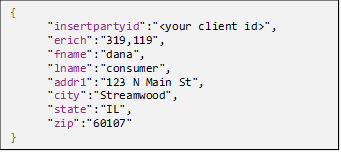
Standard Response
The response returns the requested data and the field values requested, and for each field value appended, the level of the data appended, such as “GB (postal address)” or “LV” (living unit). See the Data Append Level Field (below) for details on the codes.
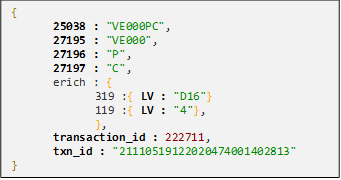
Each response includes four match-related fields:
Return Code (Field ID 25038): A consolidated field containing the overall match result.
Match Score (Field ID 27195): Provides OmniView's match result for research purposes. This field contains the same data as positions 1–5 of the Return Code.
Match Level (Field ID 27196): Indicates the highest match level determined from the keys provided by OmniView, along with any subsequent geographic searches performed when OmniView cannot confidently identify a match. This field contains the same data as position 6 of the Return Code.
Match Address (Field ID 27197): Identifies the address used for geographic data appends. This field contains the same data as position 7 of the Return Code.
For more information on return codes out of the Universal Enrichment system, you can read this document.
Return Code Structure
Every Universal Enrichment System return code is exactly 7 characters long:
| Component | Bytes | Description |
| Base match code | 1-5 | Identifies the type of identity outcome (e.g. FE001, AC100, TA100) |
| Match level | 6 | Strength of the identity match: P = Person, H = Household, A = Address, G = Geographic, N = None |
| Address source | 7 | Which address was used for enrichment: C = Client-supplied, E = Experian/repository, N = None |
Example: FE001PE = FE001 (unique email/phone match) + P (person-level) + E (Experian address used for enrichment)
Match Level (Byte 6)
Byte 6 describes the strongest level of identity resolution published by Universal Enrichment System based on your threshold settings.
| Code | Match Level | What it means |
| P | Person-level | A specific individual was identified. Highest-quality match used for deterministic identity resolution. |
| H | Household-level | A household was identified but not a single person. Common when name evidence is ambiguous or thresholds prevented person-level output. |
| A | Address-level | An address was matched but no individual identity or household record is published. Useful for address and geographic enrichment only. |
| G | Geographic-level | Only a geographic area was matched. No individual identity, household, or address record was published. |
| N | No match | No appendable outcome. Typically seen on no-match, blocklist, and overflow codes. |
Address Append Source (Byte 7)
Byte 7 indicates which address source Universal Enrichment System retained for geographic enrichment — determined by Universal Enrichment's address resolution logic, not simply whether an address was present on the input.
| Code | Source | What it means |
| C | Client Address | The address you supplied was used for enrichment. Typical when a valid client address is present and matches. |
| E | Experian / repository address | Universal Enrichment System used an address from Experian's repository for enrichment. Common in Trade Area, MAID, IP, and Experian ID lookup flows. |
| N | No address | No usable address was retained for enrichment. No geographic or address-level data was appended. |
Data Append Field Level Detail
The Data Append Level is a dynamically created field that reveals the level (table key) of the specific data appended.
For single real-time transactions, the level is appended as part of the returned data elements in this format: “Field Id”: {“2 Byte Table Code”: “Field Value”}
(e.g., “224” : {”Z5”: ”1M”})
The Data Append Level field ID is assigned for micro batch and batch processing, which is calculated by adding nine million to the requested field id. For example, when Field ID 224 (Marital Status) is requested, it will have an accompanying field of 9000224 in the accompanying response header:
{
"csv_header": "25038|27195|27196|27197|224|9000224",
"rec1": "VE000PE|VE000|P|E|1M|Z5",
"record_count_error": 0,
"record_count_processed": 1
}
Data Append Field Level Detail
| Data Append Level | Table Name | Description |
| Z9 | ZIP9 | Zip code + Zip4 code |
| Z7 | ZIP9[7] | Zip code + first 2 digits of zip4 code |
| Z5 | ZIP9[5] | Zip code |
| LV | LUID | ConsumerView living unit id |
| XS | PixelV5 | Pixel code + Geo Pixel code 2014 (V5) |
| AD | Address | Address id |
| PA | AdultPID | Adult person id |
| GB | GEOCEN | Census state code, county code, tract code and block group |
| GT | GEOCEN[11] | Census state code, county code, tract code |
| GC | GEOCEN[5] | Census state code and county code |
| CB | GEOCEN2020 | Census 2020 state code, county code, tract code and block group |
| CT | GEOCEN2020[11] | Census 2020 state code, county code, tract code |
| CC | GEOCEN2020[5] | Census 2020 state code and county code |
| MD | MAID | Mobile Ad Id |
| IP | IP | IP Address |
| LA | LUIDAID | Living Unit at an Address |
| EM |
Appending data for Persons 2-8 in a household
Keywords (Adult_2, Adult_3, Adult_4, Adult_5, Adult_6, Adult_7, Adult_8)
The “erich” keyword must also be used for person 1, calling the same field ids.
Sample request:
{
"erich": "10769,3413,876,7820,14708,14577",
"adult_2": "189,224,1066,8216,9126,10769,10799",
"adult_3": "189,224,1066,8216,9126,10769,10799",
"adult_4": "189,224,1066,8216,9126,10769,10799",
"adult_5": "189,224,1066,8216,9126,10769,10799",
"adult_6": "189,224,1066,8216,9126,10769,10799",
"adult_7": "189,224,1066,8216,9126,10769,10799",
"adult_8": "189,224,1066,8216,9126,10769,10799"
}
For the response, each adult maps to the same field ID + (adult # * 100,000,000)
The Adults must be in order and not skip a number.
Restricting Returned Data by State
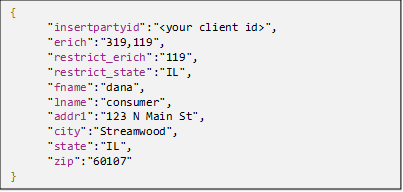
Appended data can be restricted on a by-state basis by leveraging a combination of “restrict_erich” and “restrict_state.” This can be leveraged with or without a postal address on the input record. Below is an example with the postal address on input. With this example, no data would be returned for field 119 due to the presence of the “restrict” keywords and the restricted state.
Universal Enrichment - Micro Batch Overview
Micro Batch allows sending a single request with up to 300 records in it. The user provides the list of enrichment element numbers (same as a single transaction) and a layout preceded by the keyword “layout,” indicating the order of the fields included (fields use the same keywords), a delimiter indicator, and a record identifier.
The record identifier must begin with “rec1” and be numbered sequentially.
An optional keyword is “notables” with the default value of “false.” This provides the append level. If no append level is desired, use “notables”: “true.”
The response provides a header row indicating the order in which the requested fields are returned. In addition, each record will have a return code, match score code, match level code, match address code, and the data appended and append level for the field requested append (reference Data Append Field Level Detail above for additional information).
Standard Request Message
{
"partyid":"####",
"delimiter":"|",
"erich":"319,186 ",
"layout":"fname|lname|suffix|gender|addr1|addr2|city|state|zip|email|phone",
"rec1":"Bob|Smith|||123 Main St||Anytown|IL|12345||",
"rec2":"|||||||||myemail@email.com|",
"rec3":"Sue|Jones|||456 Elm Rd||Anytown|IL|12345||"
}
Keywords: Appendix A - Universal Enrichment Keywords
Standard Response
{
"csv_header": "25038|27195|27196|27197|319|9000319|186|9000186"
"rec1": "VE000PE|VE000|P|E|A01|LV||",
"rec2": "E9999NN|E9999|N|N||||",
"rec3": "VE000PE|VE000|P|E|J36|LV||",
"record_count_error": 0,
"record_count_processed": 3,
"txn_id": "19042516360427701002######"
}
Universal Enrichment Data Dictionary API
The Universal Enrichment Data Dictionary (metadata) API allows you to look up field IDs and have their metadata (descriptors, valid values, and data format) for use as an informational resource or to add the metadata to reports or user interfaces to add context for end users.
Standard Request
PartyId=0000&fields=319,119
Standard Response
[
{
"Alternate_Name": "MOSAIC_HH_v3",
"Compliance_Hold": "",
"Data_Level": "Household",
"Data_Type": "Modeled",
"FieldCategory_1": "Mosaic",
"FieldCategory_2": "Mosaic Household",
"FieldCategory_3": "",
"Field_ID": "319",
"Field_Name": "Mosaic Household",
"Field_Type": "Character",
"Field_Values": "A01=American Royalty|A02=Platinum Prosperity|A03=Kids and Cabernet|A04=Picture Perfect Families|A05=Couples with Clout|A06=Jet Set Urbanites|B07=Generational Soup|B08=Babies and Bliss|B09=Family Fun-tastic|B10=Cosmopolitan Achievers|C11=Aging of Aquarius|C12=Golf Carts and Gourmets|C13=Silver Sophisticates|C14=Boomers and Boomerangs|D15=Sports Utility Families|D16=Settled in Suburbia|D17=Cul de Sac Diversity|D18=Suburban Attainment|E19=Full Pockets Empty Nests|E20=No Place Like Home|E21=Unspoiled Splendor|F22=Fast Track Couples|F23=Families Matter Most|G24=Status Seeking Singles|G25=Urban Edge|H26=Progressive Potpourri|H27=Birkenstocks and Beemers|H28=Everyday Moderates|H29=Destination Recreation|I30=Stockcars and State Parks|I31=Blue Collar Comfort|I32=Steadfast Conventionalists|I33=Balance and Harmony|J34=Aging in Place|J35=Rural Escape|J36=Settled and Sensible|K37=Wired for Success|K38=Gotham Blend|K39=Metro Fusion|K40=Bohemian Groove|L41=Booming and Consuming|L42=Rooted Flower Power|L43=Homemade Happiness|M44=Red/ White and Bluegrass|M45=Diapers and Debit Cards|N46=True Grit Americans|N47=Countrified Pragmatics|N48=Rural Southern Bliss|N49=Touch of Tradition|O50=Full Steam Ahead|O51=Digital Dependents|O52=Urban Ambition|O53=Colleges and Cafes|O54=Striving Single Scene|O55=Family Troopers|P56=Mid-scale Medley|P57=Modest Metro Means|P58=Heritage Heights|P59=Expanding Horizons|P60=Striving Forward|P61=Humble Beginnings|Q62=Reaping Rewards|Q63=Footloose and Family Free|Q64=Town Elders|Q65=Senior Discounts|R66=Dare to Dream|R67=Hope for Tomorrow|S68=Small Town Shallow Pockets|S69=Urban Survivors|S70=Tight Money|S71=Tough Times|U00=Unknown",
"Length": "3",
"Long_Description": "Mosaic Household is a lifestyle consumer segmentation system providing classifications at the household level and developed by Experian. The Mosaic system identifies consumers into types and groups based upon dimensions of consumer demographics/ household composition/ ethnicity/ socioeconomics/ behaviors and lifestyles.",
"Mask": "",
"Retire_Date": "",
"Royalty": ""
},
{
"Alternate_Name": "Digital_Moms",
"Compliance_Hold": "",
"Data_Level": "Household",
"Data_Type": "Modeled",
"FieldCategory_1": "Lifestyle Models",
"FieldCategory_2": "Life Stages and Events",
"FieldCategory_3": "Parents and Family",
"Field_ID": "119",
"Field_Name": "Digital Moms",
"Field_Type": "Character",
"Field_Values": "0=Unknown/Unscored|1=Extremely Likely|2=Highly Likely|3=Very Likely|4=More than Likely|5=Likely|6=Somewhat Likely|7=Very Unlikely|8=Highly Unlikely|9=Extremely Unlikely",
"Length": "1",
"Long_Description": "Digital Moms tend to be more tech-savvy and resourceful than their counterparts without children when it comes to online and mobile activities. Digital Moms identifies a household's likelihood to contain a Mom that is frequently online/ and a frequent social networker.",
"Mask": "9",
"Retire_Date": "",
"Royalty": ""
}
]
Alternate Keywords and Functions
“columns”:”<value>”
Control what columns of the data dictionary are to be returned
| Value | Action |
| Blank (default) | Returns above columns |
| Standard | Field_ID, Field_Name, Field_Type, Field_Values, Length, Mask, Retire_Date |
| data_level | Assumes (Standard) + Data_Level |
| royalty | Assumes (Standard) + Royalty |
| compliance_hold | Assumes (Standard) + Compliance_Hold |
| All | Returns all Data Dictionary return data for the fields |
“fields”:”<value>”
| Value | Action |
| Field ids | List of desired field ids Including alias IDs for persons 2-8 fields |
| all | Returns the entire available data dictionary Optional parameter (Alias:true) to return the alias values for persons 2-8 fields |
“aliases”:”value”
| Value | Action |
| True | When used with "fields":"all," it will return all alias values for persons 2-8 |
Address Cleansing and Standardization
Cleansing your postal address can improve match rates and enable better communications with your customers. The service is powered by Experian CorrectAddress service.
| Description | Keyword | Note | Validation Rule |
| Address Line 1 | addr1 | Optional | 1 - 30 (truncates after 30) |
| Address Line 2 | addr2 | Optional | 1 - 30 (truncates after 30) |
| Address Line 3 | addr3 | Optional | 1 - 30 (truncates after 30) |
| City | city | Optional | 1 to 40 characters (truncates after 40) |
| State | state | Optional | 2 alphabetic characters |
| ZIP Code | zip | Optional | 4 or 5 numbers (if 4 numbers, then assume a leading zero) |
| Country Code | country | Optional | 3 alphabetic characters Three-letter ISO code (e.g., ‘USA’), currently only accepts USA and if no code is provided system defaults to USA. |
| Party ID | insterPartyID | Required | 4 to 5 numbers |
Standrd Request Message
This is a sample request for the OmniView service product:
insertPartyID=1234&fname=dana&lname=doe&addr1=475%20Anton%20Blvd&city=Costa%20Mesa&state=CA&zip=92626&country=USA
Standard Response Message
The response message contains the results of address verification and standardization processing. The output fields in the response message are:
{
"Hygiene":{
"DPC": "42",
"addr1": "475 ANTON Blvd",
"addr2": "",
"checkDigit": "8",
"city": "COSTA MESA",
"crrt": "C025",
"errcode": "",
"post": "",
"sname": "ANTON ",
"snum": "475",
"spref": "",
"ssuf": "BLVD",
"state": "CA",
"unit": "",
"unitno": "",
"urb": "",
"z4fn": "1",
"zip": "92626",
"zip4": "4348"
},
"transaction_id": 22584974,
"txn_id": "19120315562661601000602813"
}
z4fn (Coding Return Codes)
The Return Code is the integer value returned after the validation process.
| Return Code | Description |
| 1 | Match found; four-digit ZIP add-on assigned. |
| >1 | Multiple possible results, but no exact match made. The number of results is the value of the return code. |
| <0 | Multiple possible results only when error code contains 11; no exact match made. The number of results is the absolute value of the return code. |
| -1 | When error code contains 07, delivery point validation failed; five-digit ZIP returned. |
| -3 | When error code contains 05 - PO Box, Rural Route, or Highway contract; street name normalized though no match found. |
| -99 | No match found, and the original input has been returned. |
Errcode (Address Validation Codes)
Error Codes are descriptors that will provide information about the address provided and what the system did to correct the address or what was wrong with the address.
| Error Code | Description |
| 00 |
The address is Default Highrise or Rural Route. This address matched to a default delivery record in a multi-unit building, or a rural/highway contract record with route number in the street name field.
|
| 01 |
No match in 5-digit ZIP Code; match found in finance number. Input ZIP code was incorrect. Correction applied successfully using city/state information provided. See Appendix B for information on finance numbers.
|
| 02 | ZIP Code add-on not found; replaced with correct add-on. Input +4 code was incorrect. Correction applied successfully. See Appendix B for information on ZIP-Addon codes. |
| 04 | City name corrected. Input city name was incorrect. Correction applied successfully. |
| 05 | PO Box, Rural Route or Highway Contract address standardized. The input address was a box, rural route, or highway contract address in a non-standard form (e.g., P.O.Box, or POBOX). Standardization performed successfully. |
| 06 | Street number is not a precise match in street range; e.g., alphanumeric 10A within numeric range 1-99. The input address contained extra characters in the street number. These characters were retained in the output. |
| 07 | Address non-deliverable; no add-on assigned. Delivery Point Validation (DPV) check failed. |
| 08 | Secondary number is not precise match in secondary range; e.g., alphanumeric 10A within numeric range 1-99. The input address contained extra characters in the secondary number. These characters were retained in the output. |
| 09 | The address is Delivery Point Alternate. See Appendix B for information on Delivery Point Alternate records. |
| 10 | The city is part of multiple counties. More than one county name is listed for the address city name. Preferred county name is returned. |
| 11 | No match; failed CASS multi-component rule; number of results is absolute value of return code. Several problems were found in the input address. Unable to match using CASS logic. The number of near matches returned is equal to the absolute value of the return code. |
| 12 | All highrise records returned; first result is the CASS-certified address; Z's follow last result. Multiple records containing secondary ranges (apartment low – high numbers) returned in the results parameter. End of results is indicated by a string of ten “Z”s (ZZZZZZZZZZ). This error code always appears with error code “00”. |
| 13 | Military address. |
| 14 | Street address with appended apartment number. The input address contained secondary information that could not be resolved through the CASS process. Secondary number was retained in the output. |
| 15 | No match; near matches placed in results field; Z's follow last result. Multiple records containing possible match candidates returned in the results parameter. End of results is indicated by a string of ten “Z”s (ZZZZZZZZZZ). This error code always appears with error code “99”. |
| 16 |
Preferred city name used. Input city name was changed to a preferred city name for this address.
|
| 18 |
DPV False Positive. DPV process stopped, ZIP+4 codes will no longer be assigned until DPV has been reenabled. Each subsequent call will return error code “21”.
|
| 19 | No match; Address found in Early Warning System database. |
| 20 | Street name modified. Input street name was incorrect. Correction applied successfully. |
| 21 | DPV processing has already stopped; please contact IST to restart the module. See error code “18”. |
| 22 | LACSLink processing has already stopped; please contact IST to restart the module. See error code “24”. |
| 23 | No match; no correlation between city and unique ZIP Code; 5-digit ZIP Code deleted. The input record contained a unique ZIP code, the input city did not match the ZIP. According to CASS rules for handling unique ZIP codes, 5-digit ZIP code was deleted. |
| 24 | LACSLink False Positive. LACSlink process stopped, ZIP+4 codes will no longer be assigned until LACSlink has been reenabled. Each subsequent call will return error code “22”. |
| 30 | Foreign address. |
| 31 | Geocoder files missing or corrupt. |
| 40 | Multiple matches; incorrect post-directional. The input address contained an incorrect post-directional abbreviation. Unable to correct automatically. Candidate records returned. |
| 41 | Multiple matches; incorrect pre-directional. The input address contained an incorrect pre-directional abbreviation. Unable to correct automatically. Candidate records returned. |
| 42 | Multiple matches; incorrect street suffix. Input address contained an incorrect street suffix. Unable to correct automatically. Candidate records returned. |
| 43 | ZIP Code is PO Box or Rural Route only. ZIP code contains no street records. Match is made to a PO Box, route, or general delivery record. |
| 44 | Apparent extraneous information removed. Some input information was considered unnecessary and was removed. |
| 45 | Street suffix modified. Input address contained an incorrect street suffix. Correction applied successfully. |
| 46 | Street directional modified. Input address contained an incorrect pre- or post-directional abbreviation. Correction applied successfully. |
| 47 | Address requires apartment/suite number; none provided. Missing secondary number. |
| 48 | Multiple matches; would resolve with pre-directional. Input address contained no pre-directional abbreviation. Unable to correct automatically. Candidate records returned. |
| 49 | Multiple matches; would resolve with post-directional. The input address contained no post-directional abbreviation. Unable to correct automatically. Candidate records returned. See Appendix B for information on post-directionals. |
| 50 | Multiple matches; would resolve with street suffix. Input address contained no street suffix. Unable to correct automatically. Candidate records returned. |
| 51 | Address does not require apartment/suite; none provided. This address matched to a default delivery record in a multi-unit building, or a rural/highway contract record with route number in the street name field. (See error code “00”.) No secondary information was required. |
| 52 | Address does not require apartment/suite; incorrect input. This address matched to a default delivery record in a multi-unit building, or a rural/highway contract record with route number in the street name field. (See error code “00”.) Secondary information was provided, but incorrect. |
| 57 | Address not standardized; not enough information provided. |
| 58 | Address not standardized; invalid ZIP Code. Input ZIP code was incorrect. Unable to standardize address. |
| 59 | Address not standardized; belongs to US territory. Unable to standardize address. State abbreviation indicates that the address belongs to one of the territories. |
| 60 | Expired verification database; DPV/LACSLINK processing disabled. Postal data files expired. Address validation halted. Data expires 105 days after the build date. Build date can be obtained by calling GetBuildDate API function. |
| 61 | House number not on street. Input street number was incorrect. |
| 64 | Data mismatch. Postal data files do not match CorrectAddress library. |
| 65 | Unable to open data file(s). Postal data files are missing or corrupt. |
| 66 | Out of memory. |
| 67 | Trial expired. |
| 68 | Invalid or missing license key. |
| 80 | RDI error: unable to open data files. Residential Delivery Indicator lookup files are missing or corrupt. |
| 81 | RDI error: out of memory. |
OmniView
Marketers are faced with the problem of "fragmented identity." They have bits and pieces of information about consumers, gathered from disparate sources, that cannot easily be linked to a known, identified individual or enhanced with demographic or behavioral data.
Data must be retained in a permanent repository to make sense of all these different fragments. As the client sends in periodic updates, the hope is that some of the latest information can link together previously unrelated fragments. In simple terms, the repository can "learn." As Experian gains more information and fills in more of the details around an individual, a clearer picture of that individual emerges. Successfully identifying an individual opens the ability to expand a profile with Experian’s demographic, behavioral, and survey data.
Request Message Keywords
The request message keywords supported by OmniView are as follows:
| Description | Keyword | Note | Validation Rule |
| First Name | fname | Optional | 1 to 100 characters (truncates after 100) |
| Middle Name | mname | Optional | 1 to 100 characters (truncates after 100) |
| Last Name | lname | Optional | 1 to 100 characters (truncates after 100) |
| Second Last Name | lname2 | Optional | 1 to 100 characters (truncates after 100) |
| Name Suffix | suffix | Optional | 1 to 15 characters (truncates after 15) |
| Gender | gender | Optional | 1 character M for Male, F or Female (case insensitive) |
| Date of Birth | dob | Optional | 8 numeric YYYYMMDD |
| Address Line 1 | addr1 | Optional | 1 - 30 (truncates after 30) |
| Address Line 2 | addr2 | Optional | 1 - 30 (truncates after 30) |
| Address Line 3 | addr3 | Optional | 1 - 30 (truncates after 30) |
| City | city | Optional | 1 to 40 characters (truncates after 40) |
| State | state | Optional | 2 alphabetic characters |
| ZIP Code | zip | Optional | 4 or 5 numbers (if 4 numbers, then assume a leading zero) |
| Country Code | country | Optional | 3 alphabetic characters Three-letter ISO code (e.g., ‘USA’), currently only accepts USA and if no code is provided system defaults to USA. |
| Email Address | Optional | 50 with '@' and '.' within string | |
| Phone Number | phone | Optional | 10 numbers |
| Party ID | insertPartyID | Required | 4 to 5 numbers |
| Inquiry Mode | inquiryOnly | Optional | inquiryOnly keyword, along with a value of "true" |
Please reference Appendix A for a complete list of API keywords.
Please note that "Party ID" is the only required field to get a valid response. However, to receive a "meaningful" response (that is, a response that contains linkage IDs), you must provide a consumer name and at least one valid addressable channel (such as postal address or email, for example).
Inquiry Mode is a special, optional mode within OmniView that allows you to look for existing matches in the Linkage repository. Inquiry Mode does not perform any merges with existing records or generate new IDs in the case of a non-match to the repository. To use "Inquiry Mode," the request message must contain the "inquiryOnly" keyword, along with a value of "true."
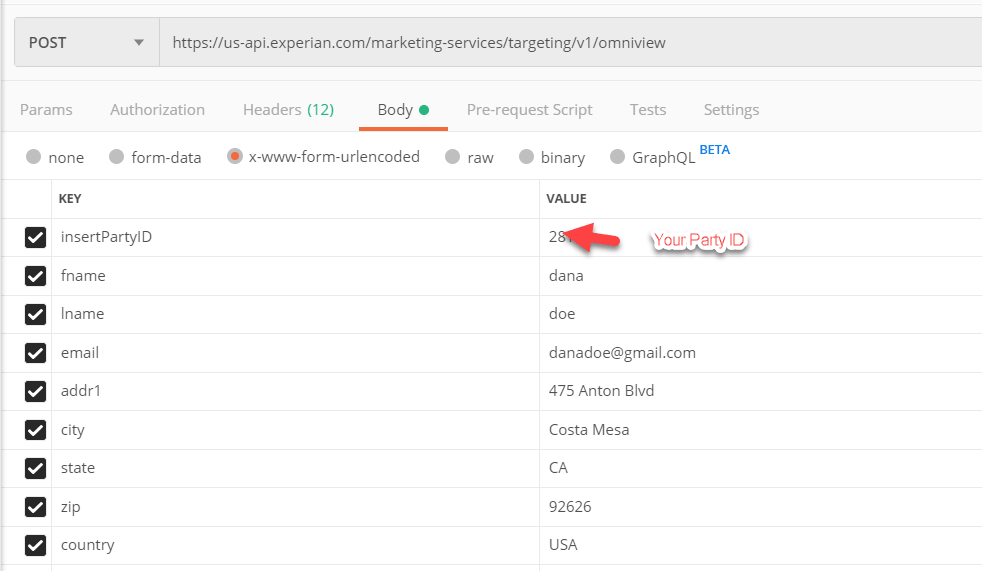
Postman Sample
This is a sample request Headers:
- Authorization: Bearer Your Access Token
- Content-Type: application/x-www-form-urlencoded
This is a sample request for the OmniView service product.
Sample Response Message
{
"address_id": "3747401211502440678",
"household_id": "2435364666769872899",
"individual_id": "3291549116741943296",
"match_code": "",
"response_code": "VG000",
"transaction_id": 21119861,
"txn_id": "15082816092411701000102813"
}
The response message contains the results of OmniView's linkage processing. The output fields in the response message are:
| Description | Keyword |
| Address ID | address_id |
| Household ID | household_id |
| Individual ID | individual_id |
| Matching Party ID | match_code |
| Return Code | response_code |
| Transaction Code | transaction_id |
| Transaction ID | txn_id |
The Address ID is a unique, numeric representation of any addressable channel. "Address ID" is often used interchangeably with "U.S. Postal Address ID," which can be misleading. Technically, a "U.S. Postal Address ID" is a type of "Address ID," but there could be other types of "Address IDs" for other channels.
The Household ID is a unique, numeric representation of a household, defined as a family sharing a last name and either residing at the same postal address or sharing any piece of address data. When a family moves to a new postal address, that family will receive a brand-new Household ID.
The Individual ID is a unique, numeric representation of a person, defined by a collection of name variations and an address across one or more supported channels.
The Matching Party ID field contains the Party ID that the record matched to in the repository. If the record does not match any existing records in the repository, this field is blank.
The Transaction Code is an OmniView system-generated number that uniquely defines each transaction; this field is used for troubleshooting purposes.
The Transaction ID is a system-generated number that uniquely defines each transaction; this field is used for troubleshooting.
The Return Code field indicates what happened during processing or why the input record failed during the linkage process.
OmniView Opt-Out
Remove customer records from ‘your’ OmniView repository.
The OmniView Opt-out is a separate process from OmniView. It does not count against OmniView volume.
OmniView Opt-out is a service that allows marketers to remove records from their OmniView repository. It does not remove records from the Experian reference data.
Opt-outs are compiled through the API transactions and applied nightly.
Process Walkthrough:
1. OmniView Lookup
- Inquiry Only to see if the record exists, view OmniView return code
- VE – Experian Reference Data Only
- VC – Client repository only
- VB – Record exists on both Experian Reference and Client Repository
2. OmniView Opt-out
- To request the record be removed from ‘your’ repository.
3. The system executes the Opt-outs every night
4. Confirm opt-out: OmniView Lookup
- Inquiry Only to see that the record has been removed.
- Note: a VE return means the record exists on the Experian reference data but not on the client reference.
OptOut Request Message
Use POST
This is a sample request for the OmniView OptOut "/omniview-optout"
insertPartyID=1234&fname=dana&lname=doe&email=danadoe%40gmail.com&addr1=475%20Anton%20Blvd&city=Costa%20Mesa&state=CA&zip=92626&country=USA
OptOut Response Message
{
"record_id": "[72, 73]",
"records_opted_out": "2",
"response": "Record received, will be opted out in 24 hours",
"transaction_id": 0,
"txn_id": "20021116230442901000102813"
}
OmniView - Micro Batch
Micro Batch allows sending up to 300 records in a single request. The user provides the list of multiple records and a layout preceded by the keyword “layout,” indicating the order of the fields included (fields use the same keywords), a delimiter indicator, and a record identifier.
The record identifier must begin with “rec1” and be numbered sequentially, not skipping numbers.
The response provides a header row indicating the order in which the requested fields are returned. In addition, each record will have the same information provided in a transactional OmniView call.
Microbatch transactions are limited to 300 records in a single request.
Micro Batch must use “raw” as the data option.
Standard Request Message
Header

Body
{
" partyid":"####",
"delimiter":"|",
"layout":"fname|lname|suffix|gender|addr1|addr2|city|state|zip|email|phone",
"rec1":"Bob|Smith|||123 Main St||Anytown|IL|12345||",
"rec2":"|||||||||myemail@email.com|",
"rec3":"Sue|Jones|||456 Elm Rd||Anytown|IL|12345||"
}
Standard Response Message
{
"csv_header": "individual_id,household_id,address_id,match_code,response_code",
"rec1": "2813405268656785415,5471187138245507583,-8439935269078990433,BOTH,VB000",
"rec2": "2813394547933972480,5471187138245507583,-8439935269078990433,BOTH,VB000",
"rec3": "2813394535606913027,-8164884287276253420,4099623137368913659,BOTH,VB000",
"record_count_error": 0,
"record_count_processed": 9,
"transaction_id": 7147711,
"txn_id": "19120908301497001002102813"
}
OmniView Microbatch Inquiry Only
Body
{
" partyid":"####",
"delimiter":"|",
"inquiry_only": "true"
"layout":"fname|lname|suffix|gender|addr1|addr2|city|state|zip|email|phone",
"rec1":"Bob|Smith|||123 Main St||Anytown|IL|12345||",
"rec2":"|||||||||myemail@email.com|",
"rec3":"Sue|Jones|||456 Elm Rd||Anytown|IL|12345||"
}
Standard Response Message
{
"csv_header": "individual_id,household_id,address_id,match_code,response_code",
"rec1": "2813405268656785415,5471187138245507583,-8439935269078990433,BOTH,VB000",
"rec2": "2813394547933972480,5471187138245507583,-8439935269078990433,BOTH,VB000",
"rec3": "2813394535606913027,-8164884287276253420,4099623137368913659,BOTH,VB000",
"record_count_error": 0,
"record_count_processed": 9,
"transaction_id": 7147711,
"txn_id": "19120908301497001002102813"
}
OmniView - Multichannel Requests
When making requests through OmniView Single Record and Micro Batch, you can include multiple channels, such as postal addresses, emails, and phones, for each record you send. All channels will be considered in the matching process. To include multiple addresses, emails, or phones, add a sequence number to the end of the attribute name. For example, you can add email, email_1, email_2, email_3, and so on. It's important to note that the response format will remain the same.
Single Record Multichannel Request Message
{
"fname": "Avery",
"mname": "",
"lname": "Morgan",
"suffix": "",
"addr1": "100 Example Ave",
"addr2": "",
"city": "Example City",
"state": "CA",
"zip": "90000",
"addr1_1": "200 Sample St",
"addr2_1": "",
"city_1": "Demo Town",
"state_1": "NY",
"zip_1": "10000",
"addr1_2": "300 Fiction Ln",
"addr2_2": "Apt 5F",
"city_2": "Testville",
"state_2": "TX",
"zip_2": "70000",
"email": "avery.morgan@example.com",
"email_1": "a.morgan@example.com",
"email_2": "amorgan@example.org",
"phone": "(202) 555-0101",
"phone_1": "(202) 555-0102",
"phone_2": "(202) 555-0103",
"insertpartyid": "<ClientPartyID>"
}
Micro Batch Multichannel Request Message
{
"partyid": "<ClientPartyID>",
"delimiter": ",",
"layout": "fname,mname,lname,suffix,addr1,addr2,city,state,zip,addr1_1,addr2_1,city_1,state_1,zip_1,addr1_2,addr2_2,city_2,state_2,zip_2,phone,phone_1,phone_2,email,email_1,email_2",
"rec1": "Avery,,Morgan,,100 Example Ave,,Example City,CA,90000,200 Sample St,,Demo Town,NY,10000,300 Fiction Ln,Apt 5F,Testville,TX,70000,(202) 555-0101,(202) 555-0102,(202) 555- 0103,avery.morgan@example.com,a.morgan@example.com,amorgan@example.org"
}
Address Coding + OmniView (/hyov)
Correct, code, and standardize a postal address, improve customer postal address data, and receive all the benefits of OmniView.
Sample Request Message
This is a sample request for the OmniView service product:

Response Message
The response message contains the results of Address Cleansing and OmniView's linkage processing:
{
"Hygiene":{ Address Coding and Standardization response
"DPC": "42",
"addr1": "475 ANTON Blvd",
"addr2": "",
"checkDigit": "8",
"city": "COSTA MESA",
"crrt": "C025",
"errcode": "",
"post": "",
"sname": "ANTON ",
"snum": "475",
"spref": "",
"ssuf": "BLVD",
"state": "CA",
"unit": "",
"unitno": "",
"urb": "",
"z4fn": "1",
"zip": "92626",
"zip4": "4348"
},
"RETURN_CODE": "VB000", OmniView response
"address_id": "-14567713844710505",
"household_id": "945747049608938167",
"individual_id": "-4943021943975156851",
"match_code": "BOTH",
"transaction_id": 22584974,
"txn_id": "19120315562661601000602813"
}
z4fn (Coding Return Codes)
The Return Code is the integer value returned after the validation process.
See return codes in the “Address Cleansing and Standardization” section.
Errcode (Address Validation Codes)
Error Codes are descriptors that will provide information about the address provided and what the system did to correct the address or what was wrong with the address.
See return codes in the “Address Cleansing and Standardization” section.
Process Model Validation
Validate batch automation model options.
Authentication URL: https://us-api.experian.com/oauth2/v1/token
Service URL: https://us-api.experian.com/marketing-services/targeting/v1/msvalidate?
Standard Request Message
This is a sample request for the Process Model Validation service product.
partyId=<number>&modelName=M#######&stsFolder=<folderTargetingTestFolder
- partyId: Represents the value that Experian provides.
- modelName: The model that indicates what services will be executed, provided by Experian.
- stsFolder: The folder that will receive the data file and will then be executed on reception.
Standard Response Message
A Positive return
{"validate":true}}
A Negative return
{"validate":false}
Combined APIs
This section outlines the usage of the Combined API for Universal Enrichment, featuring Reverse Append and Hygiene. It includes sample requests, responses, field definitions, and further information for a successful integration.
Authentication URL: https://us-api.experian.com/oauth2/v1/token
Endpoints
The production endpoint URL of the Experian Services API is:
https://us-api.experian.com/marketing-services/targeting/v1/[Api Name]
| API Name | Method | Endpoint URL | Description |
| Universal Enrichment with Reverse Append and Hygiene | POST | {HOSTNAME}/ue-ov | Single Transaction: Identity resolution, address coding, and standardization for postal addresses. |
| Universal Enrichment with Reverse Append and Hygiene Microbatch | POST | {HOSTNAME}/ue-ov-microbatch | Handles 1-300 records in a single batch transaction. |
Input erich Fields
When using this API, specify the requested enrichment fields in the erich element of the request.
Erich Request Example:
"erich": "29770,10789"
Erich Response Examples:
If a match is found for the provided erich value, the response will indicate a successful lookup:
"data_lookup_results": {
"29770": "Y",
"10789": "John"
}
If no match is found, the response will return an empty object for the corresponding erich value:
"data_lookup_results": {
"29770": {},
"10789": {}
}
Sample Combined Microbatch Request
{
"insertpartyid": "1234",
"delimiter": ",",
"erich": "10799,3413,10796,10789,10795,11385,11387,10361,10157,10161,10114,10581,10579",
"layout": "fullname,fname,mname,lname,addr1,addr2,city,state,zip,phone,email,md5email",
"rec1": "AVERY MORGAN,,,,,,,,90000,,,",
"rec2": ",,,,,,,,,,,9ccc719de921cfef3a6ff1a43fa00181"
}
Request Fields
| Field | Description | Required |
| insertpartyid | Specifies the client's Party ID created during onboarding | Yes |
| delimiter | Defines the delimiter for the input records, e.g., ",". | Yes |
| layout | Specifies the header for the CSV input format. | Yes |
| rec[n] | Input data rows, aligned with the fields specified in the layout. | Yes |
| erich | Indicates the enrichment types for the data. Comma-seprated list of enrichment field IDs. | Yes |
Sample Combined Microbatch Response
{
"csv_header": "FlowControl_Return_Code,25038,27195,27196,27197,10799,9010799,3413,9003413,10796,9010796,10789,9010789,10795,9010795,11385,9011385,11387,9011387,10361,9010361,10157,9010157,10161,9010161,10114,9010114,10581,9010581,10579,9010579,hy_z4fn,hy_errcode,hy_MatchLevel,hy_addr1,hy_addr2,hy_city,hy_state,hy_zip,hy_zip4,zip11,hy_pre_directional,hy_street_number,hy_street_name,hy_street_suffix,hy_post_directional,hy_unit,hy_unit_number,hy_dpc,hy_check_digit,hy_crrt,hy_urb,pinning_individual_id,pinning_household_id,pinning_address_id,pinning_matchReturnType,pinning_Return_Code",
"rec1": "FC000,TA100PC,TA100,P,C,2025550104,PA,2025550105,LV,MS,PA,AVERY,PA,,,MORGAN,PA,,,100 EXAMPLE AVE,AD,,,EXAMPLE CITY,Z9,CA,AD,90000,Z9,0001,Z9,1,,1,100 EXAMPLE AVE,,EXAMPLE CITY,CA,90000,0001,90000000100,,100,EXAMPLE,AVE,,,,00,0,R000,,3000000000000101,2000000000000101,1000000000000101,,VG000",
"rec2": "FC000,FE001PE,FE001,P,E,2025550106,PA,2025550107,LV,MS,PA,JAMIE,PA,Q,PA,SAMPLE,PA,,,200 DEMO RD,AD,,,EXAMPLE CITY,Z9,CA,AD,90000,Z9,0002,Z9,1,,1,200 DEMO RD,,EXAMPLE CITY,CA,90000,0002,90000000200,,200,DEMO,RD,,,,00,0,R000,,3000000000000102,2000000000000102,1000000000000102,,VG000",
"record_count_error": 0,
"record_count_input": 2,
"record_count_output": 2,
"record_count_processed": 2,
"transaction_id": 16878099
}
Response Fields
| Field | Description |
| csv_header | Header row of the returned CSV. |
| rec[n] | Processed output data rows corresponding to the layout fields |
| record_count_error | Count of records with errors during processing |
| record_count_input | Total number of input records |
| record_count_output | Total number of successfully processed records |
| record_count_processed | Total records processed |
| transaction_id | Unique identifier for the API transaction |
Sample Combined Single Transaction Request
{
"insertpartyid": "1234",
"erich": "10799,3413,10796,10789,10795,11385,11387,10361,10157,10161,10114,10581,10579",
"fname": "",
"mname": "",
"lname": "",
"prefix": "",
"suffix": "",
"addr1": "",
"addr2": "",
"city": "",
"state": "",
"zip": "",
"md5email": "2ad40c0d9a866eed7076030292e78124",
"sha1email": "",
"sha256email": "",
"md5phone": "",
"sha1phone": "",
"sha256phone": ""
}
Request Fields
The following fields are included in the Sample Combined Microbatch Request:
| Field Names | Description | Required |
| `insertpartyid` | The client's Party ID created during onboarding. | Yes |
| `erich` | A comma-separated list of codes identifying specific records. | Yes |
| `fname` | First name of the individual. | No |
| `mname` | Middle name of the individual. | No |
| `lname` | Last name of the individual. | No |
| `prefix` | Name prefix (e.g., Mr., Dr., etc.). | No |
| `suffix` | Name suffix (e.g., Jr., Sr., etc.). | No |
| `addr1` | Primary address line. | No |
| `addr2` | Secondary address line. | No |
| `city` | City name. | No |
| `state` | State code (e.g., CA, NY). | No |
| `zip` | ZIP code. | No |
| `md5email` | Email address hashed using the MD5 algorithm. | No |
| `sha1email` | Email address hashed using the SHA-1 algorithm. | No |
| `sha256email` | Email address hashed using the SHA-256 algorithm. | No |
| `md5phone` | Phone number hashed using the MD5 algorithm. | No |
| `sha1phone` | Phone number hashed using the SHA-1 algorithm. | No |
| `sha256phone` | Phone number hashed using the SHA-256 algorithm. | No |
Sample Combined Single Transaction Response
{
"FlowControl_Return_Code": "FC000",
"data_lookup_results": {
"10161": "EXAMPLE CITY",
"10361": "300 FICTION LN",
"10581": "90000",
"10789": "CASEY",
"10799": "2025550110",
"10579": "0003",
"3413": "2025550111",
"11385": "RIVERA",
"11387": "III",
"10796": {},
"10114": "CA",
"10795": "E",
"10157": {}
},
"hygiene_results": {
"hy_zip11": "90000000300",
"hy_street_name": "FICTION",
"hy_dpc": "00",
"hy_z4fn": "1",
"hy_unit": "",
"hy_pre_directional": "",
"hy_post_directional": "",
"hy_MatchLevel": "1",
"hy_state": "CA",
"hy_check_digit": "0",
"hy_city": "EXAMPLE CITY",
"hy_crrt": "C001",
"hy_errcode": "",
"hy_street_number": "300",
"hy_zip4": "0003",
"hy_street_suffix": "LN",
"hy_urb": "",
"hy_addr3": "",
"hy_addr1": "300 FICTION LN",
"hy_addr2": "",
"hy_zip": "90000",
"hy_unit_number": ""
},
"pinning_results": {
"pinning_Return_Code": "VG000",
"pinning_household_id": "2000000000000000301",
"pinning_address_id": "1000000000000000301",
"pinning_individual_id": "3000000000000000301",
"pinning_matchReturnType": ""
},
"transaction_id": 16892228,
"ue_results": {
"27197": "E",
"27195": "FE001",
"Records Processed": "valid",
"27196": "P",
"25038": "FE001PE"
}
}
Response Fields
FlowControl Fields
| Field Name | Type | Description |
| 'FlowControl_Return_Code' | String | Indicates the overall status of the request. |
Data Lookup Results
| Field Name | Type | Description |
| Various enrichment fields (e.g., `10161`, `10361`) |
String | Represents matched data for the corresponding input record. Possible values: "EXAMPLE CITY", "300 FICTION LN", etc. – indicates the enrichment data {} – indicates that a match wasn’t found and enrichment information is available |
Hygiene Results
| Field Name | Type | Description |
| `hy_zip11` | String | Full ZIP+4 code and carrier route. |
| `hy_state` | String | State code. |
| `hy_city` | String | City name. |
| `hy_addr1` | String | Cleaned and standardized primary address line. |
| `hy_MatchLevel | String | Level of address match (e.g., exact, partial). |
Pinning Results
| Field Name | Type | Description |
| `pinning_Return_Code` | String | Status of the pinning operation. |
| `pinning_household_id` | String | Unique identifier for the household. |
| `pinning_address_id` | String | Unique identifier for the address. |
| `pinning_individual_id` | String | Unique identifier for the individual. |
UE Results
| Field Name | Type | Description |
| `Records Processed` | String | Indicates if the record is valid. |
| Various codes (e.g., `27197`, `27196`) | String | Represents specific processing outcomes for the input records. |
Transaction Metadata
| Field Name | Type | Description |
| `transaction_id` | Integer | Unique identifier for the transaction. |
Appendix A - Keywords
The two required keywords are:
- “partyID” followed by your Experian assigned ID
- For Universal Enrichment, it is “erich” followed by your desired field IDs separated by commas.
Request Keywords
| Description | Keyword | Required? | UE/OV | Notes |
| Inquiry Mode | inquiryOnly | N | OV | inquiryOnly keyword, along with a value of "true" |
| Party ID | insertPartyID | Y | UE/OV | |
| Requested Enrichment Fields | erich | Y | UE | Indicates the enrichment types for the data. Comma-separated list of enrichment field IDs. |
| Restrict appended data by state | restrict_erich | N | UE | Field IDs to restrict; used together with restrict_state. Works with or without a postal address on input. |
| State restriction value | restrict_state | N | UE | State code(s) for which restricted fields return no data; pairs with restrict_erich. |
| No Tables | notables | N | UE/OV | Default: false When including this keyword, followed by “true”, the table name where each value was appended from is NOT returned. Note: the default is “false” meaning the table names are returned. |
| First Name | fname | N | UE/OV | |
| Middle Name | mname | N | UE/OV | |
| Last Name | lname | N | UE/OV | |
| Second Last Name | lname2 | N | UE/OV | |
| Name Prefix | prefix | N | UE/OV | |
| Name Suffix | suffix | N | UE/OV | |
| Full Name | fullname | N | UE/OV | |
| Gender | gender | N | UE/OV | 1 character, M for Male, F or Female (case insensitive) |
| Date of Birth | dob | N | UE/OV | 8 numeric YYYYMMDD |
| Data append for household persons 2–8 | adult_# (adult_2 … adult_8) | N | UE | Field-ID list, same as erich (which must also be used for person 1). Adults must be in order without skipping. Response maps to field ID + (adult # × 100,000,000). |
| Address Line 1 | addr1 | N | UE/OV | |
| Address Line 2 | addr2 | N | UE/OV | |
| Address Line 3 | addr3 | N | UE/OV | |
| City | city | N | UE/OV | |
| State | state | N | UE/OV | |
| ZIP Code | zip | N | UE/OV | |
| Zip+4 | zip4 | N | UE/OV | |
| Country Code | country | N | UE/OV | |
| Multichannel: additional addresses | addr1_#, addr2_#, addr3_#, city_#, state_#, zip_#, zip_4#, country_# | N | UE/OV | OmniView Single Record & Micro Batch multichannel requests: append a sequence number (_1, _2, _3 …) to include multiple addresses. |
| Email Address | N | UE/OV | ||
| Multichannel: additional emails | email_# | N | UE/OV | Multichannel sequence-number pattern (email, email_1, email_2 …) |
| MD5 Email | md5email | N | UE/OV | Also supports multichannel (_1, _2, ...) |
| SHA1 Email | sha1email | N | UE/OV | Also supports multichannel (_1, _2, ...) |
| SHA256 Email | sha256email | N | UE/OV | Also supports multichannel (_1, _2, ...) |
| Phone Number | phone | N | UE/OV | |
| Multichannel: additional phones | phone_# | N | UE/OV | Multichannel sequence-number pattern (email, email_1, email_2 …) |
| MD5 Phone | md5phone | N | UE/OV | Also supports multichannel (_1, _2, ...) |
| SHA1 Phone | sha1phone | N | UE/OV | Also supports multichannel (_1, _2, ...) |
| SHA256 Phone | sha256phone | N | UE/OV | Also supports multichannel (_1, _2, ...) |
| Email/Phone Threshold | ep_threshold | N | UE | Default: coverage Other values: balanced, accuracy coverage = accept all matches; balanced = all name+email/phone matches plus email/phone-only matches with a single matching individual; accuracy = name+email/phone matches only |
| Mobile Ad ID | maid | N | UE | |
| Internet Protocol address | ip | N | UE | |
| IP Address Type | ip_type | N | UE | IPV4 or IPV6 Default: IPV4 |
| IP Hash Type | ip_hash | N | UE | Raw, MD5, SHA1, SHA256 Default: Raw |
| Address Append | address_append | N | UE | Y or N |
| Digital Precision | digital_precisions | N | UE | Default: 1:many 1:1 returns the first entity only 1:many can return multiple `maid_entity_N` objects |
| Append Head of Household | append_hoh | N | UE | Default: Household Other values: Individual, Address individual = append Person 1 on individual-level matches only; household (default) = append Person 1 on person and household matches; address = append Person 1 on person, household, and address matches |
| Use New Household | use_new_household | N | OV | Return persistent household ID |
| Pin All Records | pin_all_records | N | OV | Creates consistent pins for error records or no match records |
| MAID Score threshold | maid_threshold | N* | UE | Default: `coverage` Other values: balanced, accuracy *Required for MAID processing coverage = all results; balanced = PID/LUID associations with MAID Accuracy Score ≥ 0.2; accuracy = ≥ 0.4 |
| MAID: MD5 Hash | md5maid | N | UE | |
| MAID: SHA1 Hash | sha1maid | N | UE | |
| MAID: SHA256 Hash | sha2maid | N | UE | |
| MAID: SHA256 Hash | sha256maid | N | UE | |
| IP Threshold | ip_threshold | N* | UE | Default: `coverage` Other values: balanced, accuracy coverage = all results; balanced = LUID associations with IP Accuracy Score ≥ 0.2; accuracy = ≥ 0.4 |
| IP: MD5 Hash | md5ip | N | UE | |
| IP: SHA1 Hash | sha1ip | N | UE | |
| IP: SHA256 Hash | sha2ip | N | UE | |
| IP: SHA256 Hash | sha256ip | N | UE | |
| Match Level | match_level | N | UE | Default: ALL Other values: PERSON, HOUSEHOLD, ADDRESS Restricts matching to the level; does not change the level of data appended. HOUSEHOLD includes Person; ADDRESS includes Person and Household |
| Address Capture Threshold | ac_threshold | N | UE | Default: `coverage` Other values: balanced, accuracy, precision |
| Search radius around input zip | zip_radius | N | UE | Miles. Default: -1 (skip Trade Area) |
| Mirco-batch: Delimiter | delimiter | N* | UE/OV | *Required for Micro Batch only – represents delimiter used to separate fields in array |
| Mirco-batch: Layout | layout | N* | UE/OV | *Required and used for Micro Batch only – represents the order of the fields within each request record |
| Mirco-batch: Record ID | rec$ | N* | UE/OV | *Required and used for Micro Batch only – represents the record id where # = unique number. Must begin at 1 (rec1) and number continuously. Skipping a number will result in records not being processed. |
| Person ID | pid | N | UE | |
| Living Unit ID | luid | N | UE | |
| Encrypted Person ID | encrypted_pid | N | UE | |
| Encrypted Living Unit ID | encrypted_luid | N | UE | |
| Account Number | acct | N | UE | |
| Carry Input | carryinput | N | UE/OV | true or false. Default: false Used for microbatch. Returns original record with requested fields on output. |
| Name Return | name_return | N | UE | Default: "All". Values: All, InitialOnly. "InitialOnly" appends name fields (10789, 10794, 11387) only when the input first initial matches the appended first name; otherwise, they return blank. |
| Special ConsumerView Multi Address | cvmulti | N | Special ConsumerView multi-address system parameter |
Address Capture Thresholds
Thresholds normalize as follows:
| Threshold | Normalized Value | Description |
| coverage | 0.0 | No filtering is applied. All Address Capture and Trade Area matches are accepted. |
| balanced | 0.2 | The appended zip code must match only if the input record lacks a postal address (blank Address 1 and Address 2 fields). |
| accuracy | 0.4 | The appended record's zip code must match the input zip code (or trade area zip codes) for all Address Capture and Trade Area matches. |
| precision | 0.6 | Only the highest-confidence Address Capture and Trade Area matches are accepted; lower-confidence match tiers are filtered out. |
MAID/IP Thresholds
Thresholds normalize as follows:
| Threshold | Normalized Value | Description |
| coverage | 0.0 | Least restrictive. Returns MAID/IP matches at the lowest accepted score level. |
| balanced | 0.2 | Applies a moderate score cutoff and filters out the lowest-confidence MAID/IP matches. |
| accuracy | 0.4 | Applies a higher score cutoff and returns stronger MAID/IP matches. |
Email/Phone Thresholds
Thresholds normalize as follows:
| Threshold | Normalized Value | Description |
| coverage | 0.0 | Least restrictive. Accepts all matches. |
| balanced | 0.2 | Accepts all name plus email/phone matches, and email/phone matches if there is only one corresponding individual. |
| accuracy | 0.4 | Accepts only name plus email/phone matches. |
Appendix B: HTTP Response Codes
| Code | Name | Description |
| 200 | OK | See response body |
| 202 | Field Request Error | Data Append Error. The field requested is not on your list of contracted fields. If you would like to purchase this field, please contact your sales representative. |
| 302 | Unable to authenticate response | Automated Password – Static IP not on file |
| 401 | Unable to authenticate | Unable to authenticate username / password |
| 400 | Bad Request | Request was malformed, Error in json input |
| 401 | Invalid Party ID or Service for Login | Login is not authorized to use this Party ID or invalid security Token. |
| 403 | Token Generation Error | There was a problem generating the token, please validate your client id and secret and username and password. Ensure all calls are being sent from the known list of static IPs |
| 404 | Not Found | Match failed. Match details available in JSON response body |
| 405 | Method Not Allowed | For an Enrichment request, this error indicates that the request message contains a marketing element that the client is not authorized to use. |
| 500/501 | Internal Server Error | System malfunction, Experian is automatically notified of these. |
| 503 | Service Unavailable | The service is intentionally down for maintenance. |
Positive Responses
A positive response will contain data from the request (Real-Time only), a Universal Enrichment Match Code (Field ID 25038 for Batch), and for every enrichment element in addition to data, it provides the level the associated field data was appended.
Note: Real-Time and Batch always provide the Data Append level. For Micro Batch, there is the option to exclude.
Problem Responses
Missing or Invalid User Credentials
If the Experian Services API request message is missing your user credentials, or if those credentials are invalid, then Experian's Single Sign On (SSO) authentication system will reject the request message. In this scenario, you will receive a response message containing a status of "401" (see Appendix A for a list of all status values).
Missing or Invalid Party ID
If the Party ID is missing from the Experian Services API request message or the Party ID value is invalid, then the API cannot process the request. In this scenario, the response message will contain a status of "401" (see Appendix B for a list of status values).
Invalid User Credentials / Party ID / Service
The combination of your user credentials, Party ID, and the requested service (the "product model" component of the URL) must be valid. Your credentials must be associated with the Party ID, and the Party ID must be associated with the requested service. If the combination of these three elements is invalid, then the API cannot process the request. In this scenario, the response message will contain a status of "401" (see Appendix B for a list of status values).
Invalid Enrichment Request
If using the Enrichment service, you must have a contractual agreement with Experian. This agreement governs your access to specific marketing elements. If your request message contains a marketing element you do not have access to, then the API cannot process the request. In this scenario, the response message will contain a status of "405" (see Appendix B for a list of status values).
Compliance Approval Required Fields Response
Some Enrichment elements are governed by Compliance and require additional agreements in addition to the standard contract. If your request message contains a compliance-governed marketing element and you do not have authorization for it, you will get the following response:
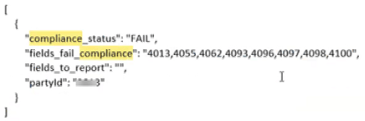
Appendix C: Code Samples
Sample code is available for the following program languages:
- C#
- Java
- Python
- PHP
Sample C# Code
This section contains sample C# code that can be used to construct and send a message to the Experian Services API service.
using System;
using System.Net.Http;
using System.Text;
using System.Threading.Tasks;
using Newtonsoft.Json;
public class ExperianService
{
private readonly HttpClient _httpClient;
public ExperianService(HttpClient httpClient)
{
_httpClient = httpClient ?? throw new ArgumentNullException(nameof(httpClient));
_httpClient.BaseAddress = new Uri("https://us-api.experian.com");
_httpClient.DefaultRequestHeaders.Add("Host", "us-api.experian.com");
_httpClient.DefaultRequestHeaders.Add("Content-Type", "application/json");
}
public async Task<string> GetAccessTokenAsync()
{
var tokenRequest = new
{
username = "tester1@experian.com",
password = "yourpassword",
client_id = "your client_id",
client_secret = "your client_secret"
};
var json = JsonConvert.SerializeObject(tokenRequest);
var content = new StringContent(json, Encoding.UTF8, "application/json");
var response = await _httpClient.PostAsync("/oauth2/v1/token", content);
response.EnsureSuccessStatusCode();
var responseContent = await response.Content.ReadAsStringAsync();
var token = JsonConvert.DeserializeObject<Tokens>(responseContent);
return "Bearer " + token.access_token;
}
public async Task<HttpResponseMessage> PostDataAsync(string token)
{
var requestData = new
{
insertpartyid = "YOUR PARTY ID",
erich = "319",
fname = "DANA",
lname = "CONSUMER",
addr1 = "123 MAIN ST",
city = "WEST NEWBURY",
state = "MA",
zip = "01985",
phone = "8125553456"
};
var json = JsonConvert.SerializeObject(requestData);
var content = new StringContent(json, Encoding.UTF8, "application/json");
_httpClient.DefaultRequestHeaders.Authorization = new System.Net.Http.Headers.AuthenticationHeaderValue("Bearer", token);
return await _httpClient.PostAsync("/marketing-services/targeting/v1/universal-enrichment", content);
}
}
// Usage example:
public async Task UseExperianService()
{
var httpClient = new HttpClient();
var experianService = new ExperianService(httpClient);
var token = await experianService.GetAccessTokenAsync();
var response = await experianService.PostDataAsync(token);
// Process the response as needed
if (response.IsSuccessStatusCode)
{
// Successful response handling
var responseData = await response.Content.ReadAsStringAsync();
// Process responseData
}
else
{
// Handle unsuccessful response
Console.WriteLine($"Error: {response.StatusCode}");
}
}
Sample Java Code
This section contains sample Java code that can be used to construct and send a message to the Experian Services API service.
import java.net.URI;
import java.net.http.HttpClient;
import java.net.http.HttpRequest;
import java.net.http.HttpResponse;
import java.net.http.HttpHeaders;
import java.nio.charset.StandardCharsets;
import com.google.gson.Gson;
public class ExperianService {
private final HttpClient httpClient;
public ExperianService() {
this.httpClient = HttpClient.newBuilder().build();
}
public String getAccessToken() throws Exception {
String url = "https://us-api.experian.com/oauth2/v1/token";
String requestBody = "{\"username\": \"tester1@experian.com\", \"password\": \"yourpassword\", \"client_id\": \"your client_id\", \"client_secret\": \"your client_secret\"}";
HttpRequest request = HttpRequest.newBuilder()
.uri(URI.create(url))
.header("Host", "us-api.experian.com")
.header("Content-Type", "application/json")
.POST(HttpRequest.BodyPublishers.ofString(requestBody))
.build();
HttpResponse<String> response = httpClient.send(request, HttpResponse.BodyHandlers.ofString());
if (response.statusCode() == 200) {
Gson gson = new Gson();
Tokens tokens = gson.fromJson(response.body(), Tokens.class);
return "Bearer " + tokens.getAccessToken();
} else {
throw new Exception("Failed to retrieve access token. Status code: " + response.statusCode());
}
}
public HttpResponse<String> postData(String token) throws Exception {
String url = "https://us-api.experian.com/marketing-services/targeting/v1/universal-enrichment";
String requestBody = "{\"insertpartyid\":\"YOUR PARTY ID\",\"erich\":\"319\",\"fname\":\"DANA\",\"lname\":\"CONSUMER\",\"addr1\":\"123 MAIN ST\",\"city\":\"WEST NEWBURY\",\"state\":\"MA\",\"zip\":\"01985\",\"phone\":\"8125553456\"}";
HttpRequest request = HttpRequest.newBuilder()
.uri(URI.create(url))
.header("Content-Type", "application/json")
.header("Authorization", token)
.POST(HttpRequest.BodyPublishers.ofString(requestBody))
.build();
return httpClient.send(request, HttpResponse.BodyHandlers.ofString());
}
public static void main(String[] args) {
try {
ExperianService experianService = new ExperianService();
String token = experianService.getAccessToken();
HttpResponse<String> response = experianService.postData(token);
if (response.statusCode() == 200) {
// Process the successful response
String responseBody = response.body();
System.out.println("Response: " + responseBody);
} else {
// Handle unsuccessful response
System.out.println("Failed to post data. Status code: " + response.statusCode());
}
} catch (Exception e) {
e.printStackTrace();
}
}
}
class Tokens {
private String access_token;
public String getAccessToken() {
return access_token;
}
}
Sample Python Code
This section contains sample Python code that can be used to construct and send a message to the Experian Services API service.
import requests
import json
class ExperianService:
def __init__(self):
self.base_url = "https://us-api.experian.com"
def get_access_token(self):
url = f"{self.base_url}/oauth2/v1/token"
payload = {
"username": "tester1@experian.com",
"password": "yourpassword",
"client_id": "your client_id",
"client_secret": "your client_secret"
}
headers = {
"Host": "us-api.experian.com",
"Content-Type": "application/json"
}
response = requests.post(url, headers=headers, json=payload)
response.raise_for_status()
token = response.json().get("access_token")
return f"Bearer {token}" if token else None
def post_data(self, token):
url = f"{self.base_url}/marketing-services/targeting/v1/universal-enrichment"
payload = {
"insertpartyid": "YOUR PARTY ID",
"erich": "319",
"fname": "DANA",
"lname": "CONSUMER",
"addr1": "123 MAIN ST",
"city": "WEST NEWBURY",
"state": "MA",
"zip": "01985",
"phone": "8125553456"
}
headers = {
"Content-Type": "application/json",
"Authorization": token
}
response = requests.post(url, headers=headers, json=payload)
return response
def main():
experian_service = ExperianService()
try:
token = experian_service.get_access_token()
if token:
response = experian_service.post_data(token)
if response.status_code == 200:
# Process the successful response
print("Response:", response.json())
else:
# Handle unsuccessful response
print(f"Failed to post data. Status code: {response.status_code}")
else:
print("Failed to obtain access token.")
except requests.RequestException as e:
print("Request Error:", e)
if __name__ == "__main__":
main()
OmniView Opt-Out Python Sample
This section contains sample Python code that can be used to construct and send an Opt-Out request to the Experian Services API service.
import requests
import json
class ExperianService:
def __init__(self, access_token, okta_username):
self.base_url = "https://us-api.experian.com/marketing-services/targeting/v1"
self.access_token = access_token
self.okta_username = okta_username
def omniview_optout(self, party_id, first_name, last_name, email, address, city, state, zip_code, country):
url = f"{self.base_url}/omniview-optout/"
payload = {
"insertpartyid": party_id,
"fname": first_name,
"lname": last_name,
"email": email,
"addr1": address,
"city": city,
"state": state,
"zip": zip_code,
"country": country
}
headers = {
'Authorization': f"Bearer {self.access_token}",
'Content-Type': 'application/json',
'CT-REMOTE-USER': self.okta_username
}
response = requests.post(url, data=json.dumps(payload), headers=headers)
return response.json() if response.ok else f"Request failed with status code {response.status_code}"
# Example usage:
def main():
access_token = "<Your Access Token>"
okta_username = "<Your Okta Username>"
experian_service = ExperianService(access_token, okta_username)
# Replace <Your PartyID>, <INFO>, etc. with actual data
response = experian_service.omniview_optout(
"<Your PartyID>",
"<INFO>",
"<INFO>",
"<INFO>",
"<INFO>",
"<INFO>",
"<INFO>",
"<INFO>",
"<INFO>"
)
print(response) # View the response
if __name__ == "__main__":
main()
Sample PHP Code
This section contains sample PHP code that can be used to construct and send a message to the Experian Services API service.
class ExperianService {
private $base_url = "https://us-api.experian.com";
public function getAccessToken() {
$url = $this->base_url . "/oauth2/v1/token";
$data = array(
"username" => "tester1@experian.com",
"password" => "yourpassword",
"client_id" => "your client_id",
"client_secret" => "your client_secret"
);
$headers = array(
"Host: us-api.experian.com",
"Content-Type: application/json"
);
Sample PHP Code