Introduction
Experian custom audiences and social activation can help you identify your customers and the right potential customers and activate your audiences across most major social platforms.
This document will take you through details on how to send and receive data to Meta, Pinterest, Snap and TikTok. Both Experian clients and their partners can use this article to understand how to send audiences to their preferred social platforms for activation.
Quickly jump to a section using these links:
Custom audience process
Audience creation and distribution:
1. Contact Experian’s Audience Team with all audience requests
2. Through a collaborative effort, Experian’s Audience Team will supply audience recommendations for your approval. Experian’s data experts will also confirm the audience name(s) to be used
3. Once the audience is approved and all necessary paperwork is complete between the client and Experian, the Audience Team will distribute the audience to the client’s Social Ad Account.
If you prefer a self-service experience to audience creation and distribution, please reach out to your Experian relationship manager to learn more about Audience Engine.
Experian Social activation process
Determine if campaign falls within Special Ad Categories: Employment, Housing, or Financial Products/Services. If so, follow this process.
If the campaign does not fall within the Employment, Housing or Financial Products/Services categories, see the below process.
Experian Meta Process
Log into Buiness Manager.
Locate the Business Settings tab.
In the Ad Accounts tab, locate the ad account in which the Experian audiences will be uploaded (search by either ad account name OR ID)
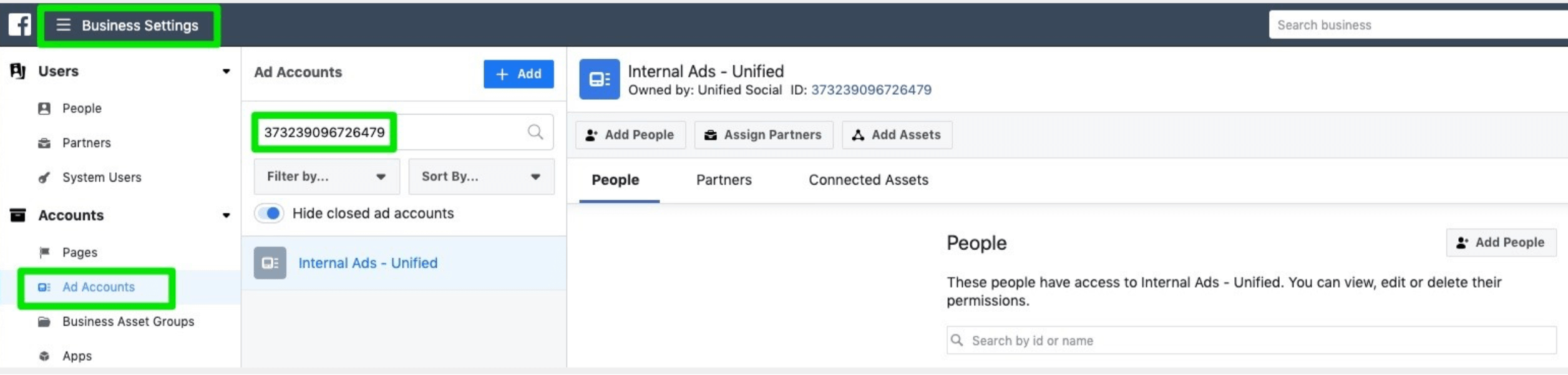
Click into the ad account.
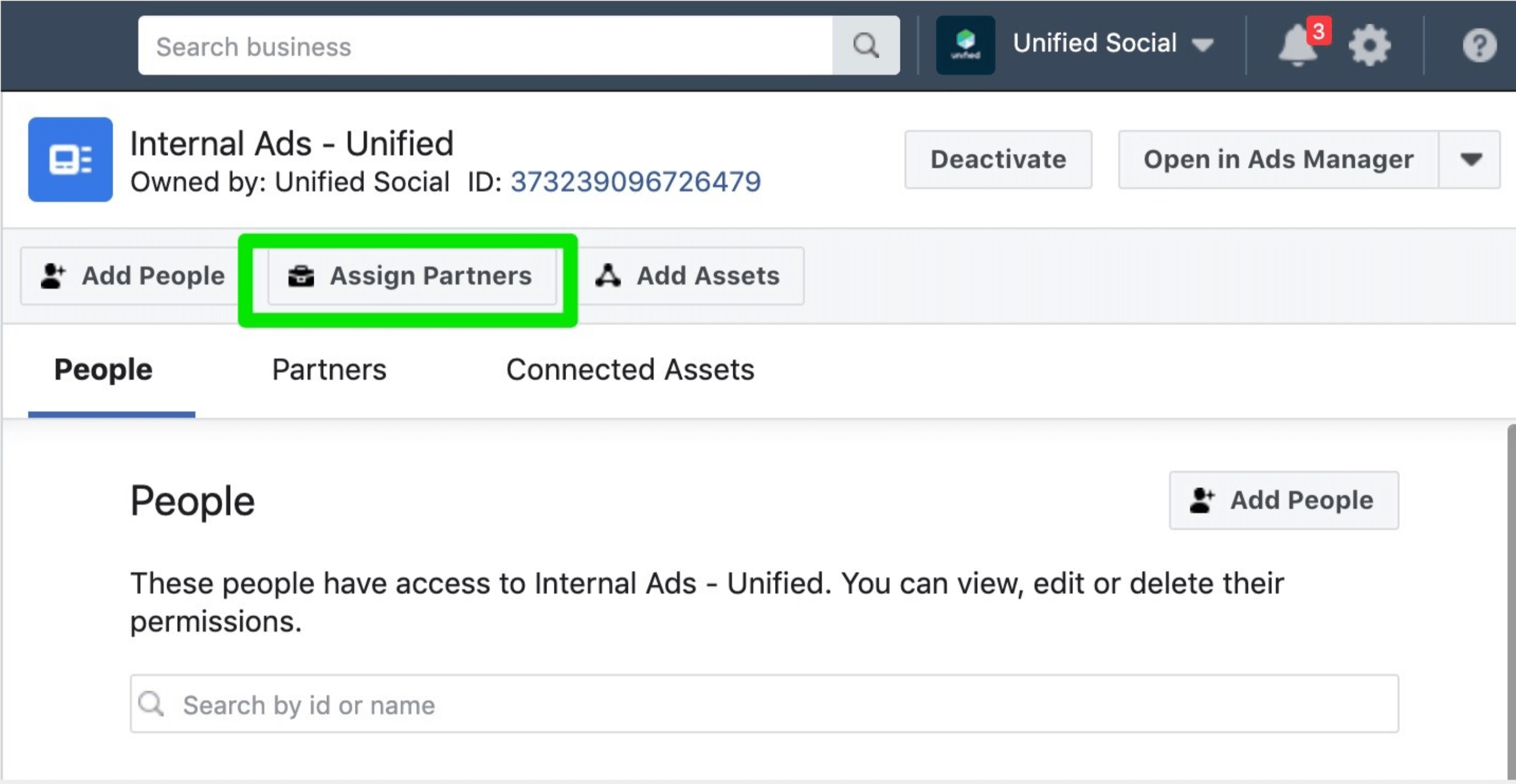
Click "Assign Partners" under the ad account name and ID.
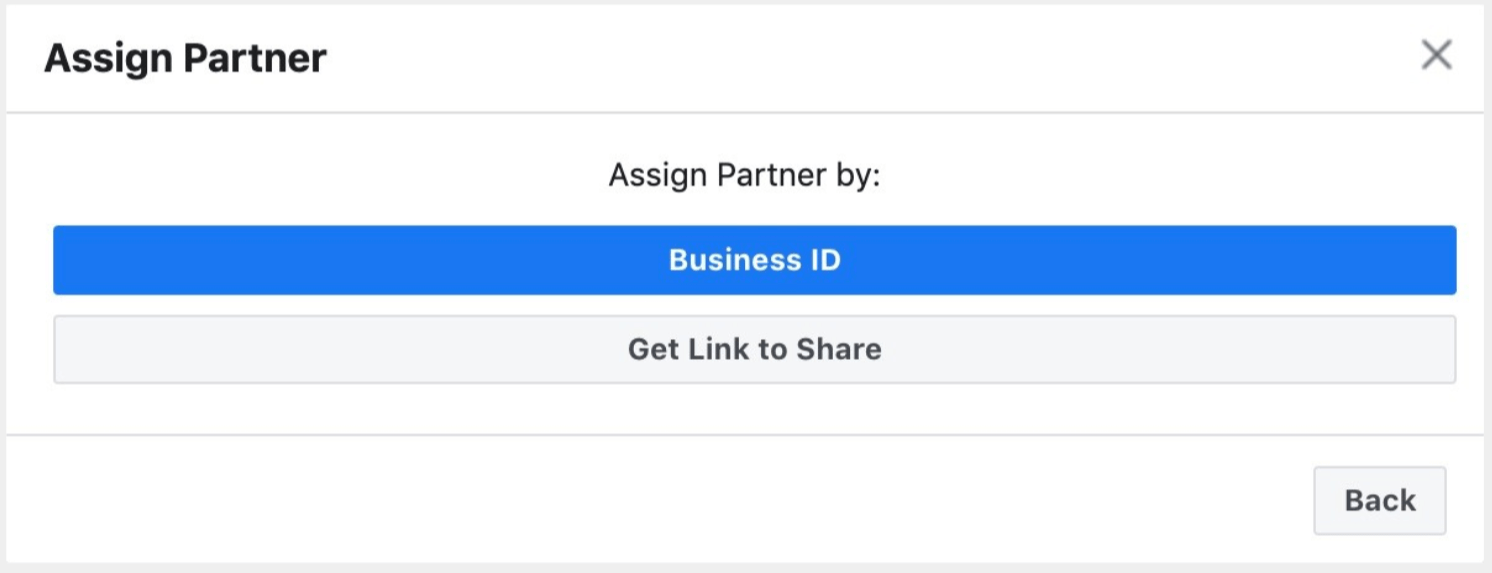
Click "Business ID" under Assign Partners by:
Enter in the Experian Business Manager ID (this can be found in the URL of the Experian Business Manager).
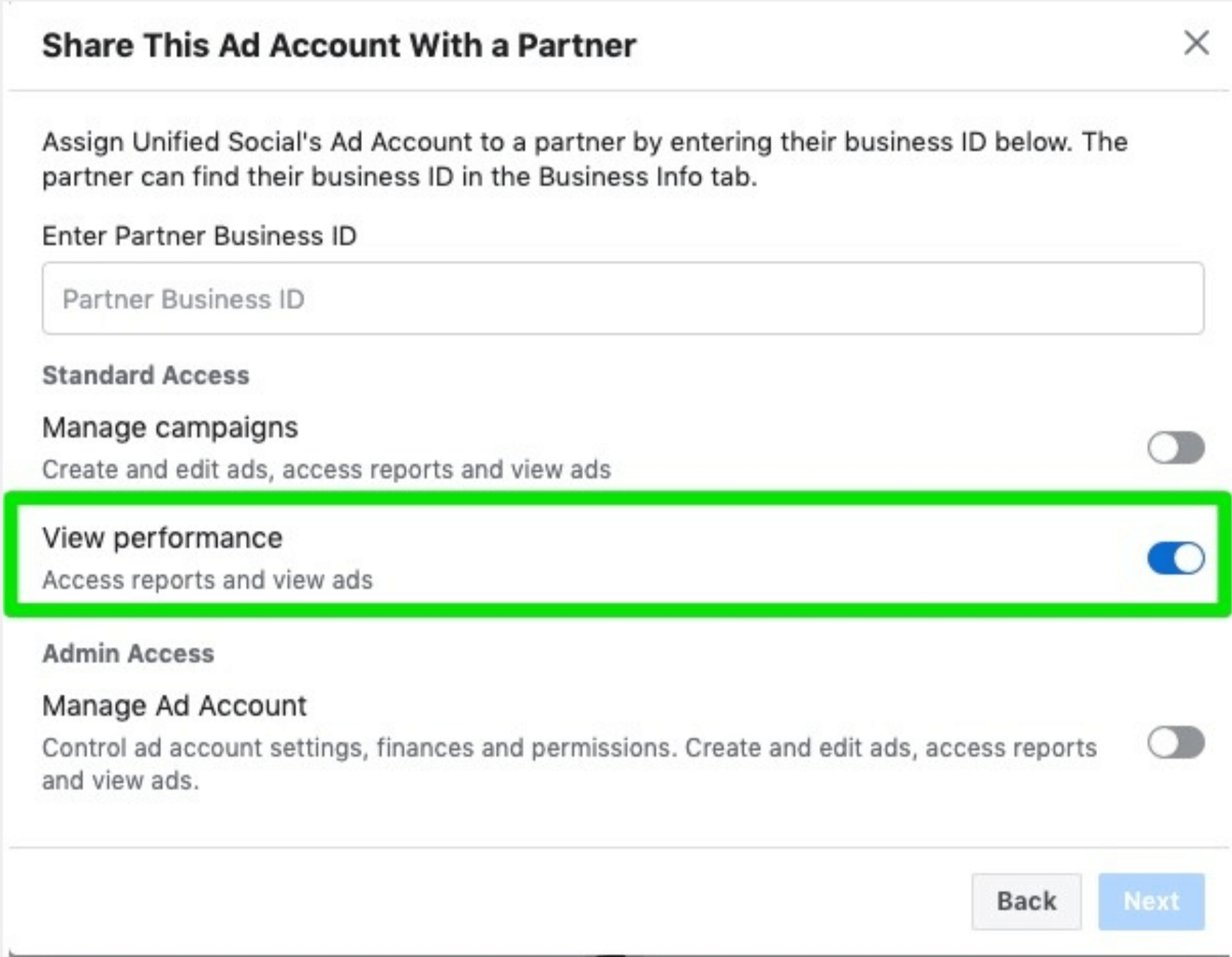
Grant "View Performance" level access.
Click next. Now Experian Business Manager has been granted access to the Advertiser's ad account!
Experian Meta Process for Special Ad Categories via LiveRamp
Log into Buiness Manager.
Locate the Business Settings tab.
In the Ad Accounts tab, locate the ad account in which the Experian audiences will be uploaded (search by either ad account name OR ID)
Click into the ad account.
Click "Assign Partners" under the ad account name and ID.
Click "Business ID" under Assign Partners by:
Enter in the LiveRamp Business Manager ID: 705664196188477
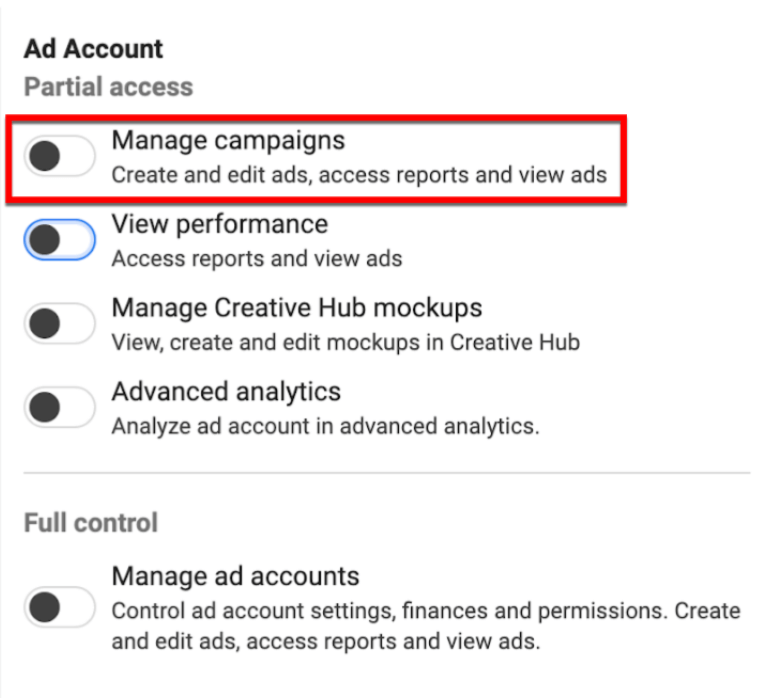
Grant "Manage campaigns" level access.
Click next. Now LiveRamp's Business Manager has been granted access to the Advertiser's ad account!
From Pinterest, click Ads in the top left corner then select Overview to open Ads Manager
Click next to your name
Click the ad account you'd like to add people to, then click View account settings
Click Add people.
Enter the email address for the business profile you want to add to your account and then press enter.
Select both Analyst & Audience levels of access
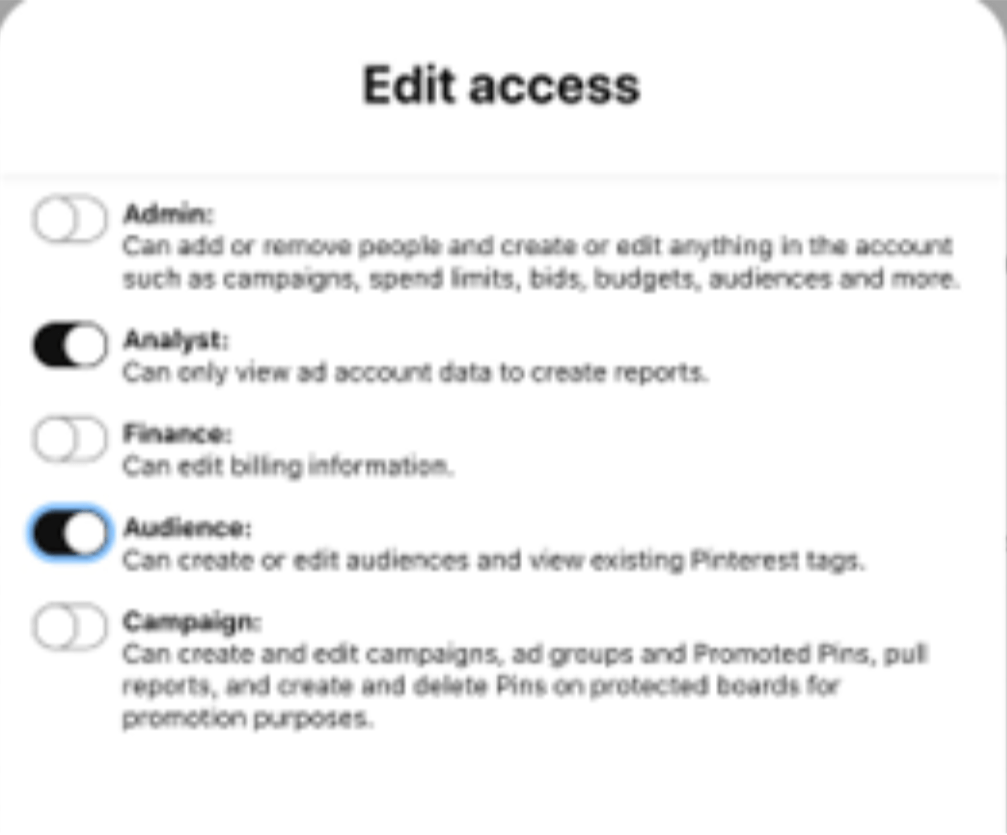
Click Add to account. Now Experian has been granted access to the Advertiser’s Pinterest ad account!
TikTok
Authentication:
The following authorization process needs to be completed for all new TikTok accounts:
1. Follow this authorization Link: https://digital-auth.experian.com
2. Click the ‘Authorize’ button under TikTok
3. After being directed to TikTok for Business, you may be prompted to Login to your account
4. You will then be redirected to Experian.com, the URL will have extra text that will need to be copied:
- Example: experian.com/?auth_code=a5590da3c642f7794b0b69b646235930e03c43&code=…
- You will only need to copy the text after? auth_code=
- Highlighted in above example
- In this example the auth code is: a5590da3c642f7794b0b69b646235930e03c43
5. Provide the auth code to Experian Ops at audiences@experian.com
6. Please notify Experian’s Audience Team once authentication is complete
Please note: If Experian’s access to the account is removed, the authorization process will need to be completed again before pushing any new audience segments to your account.
TikTok Reporting Process
In order to streamline the billing process for the usage of audiences on Tiktok, Experian requires self-reporting in a precise format. This formatting can be easily created using the ‘custom reports’ tool in TikTok Ads Manager.
Experian TikTok self-reporting format:
Dimensions
1. Audience
2. By Day
Metrics
1. Cost
2. Impressions
Click on ‘Analytics’ in the top menu and select ‘Custom Reports’
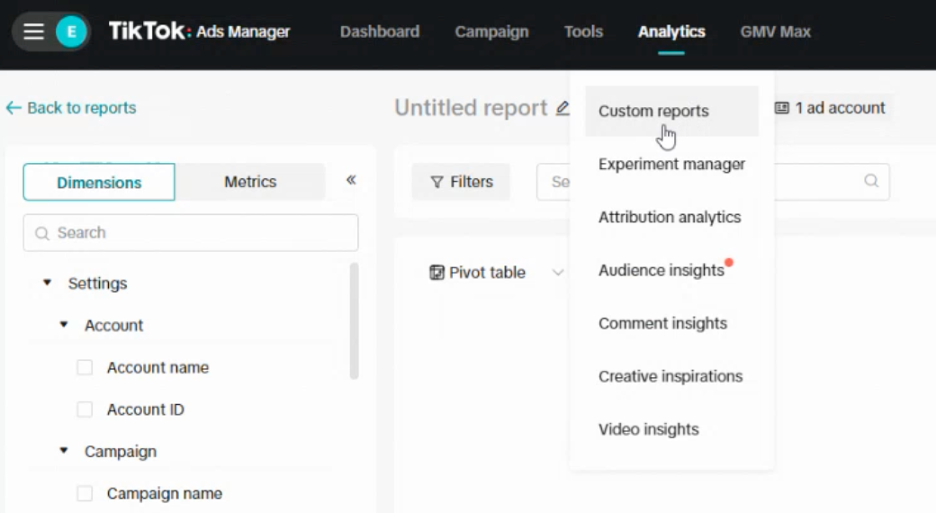
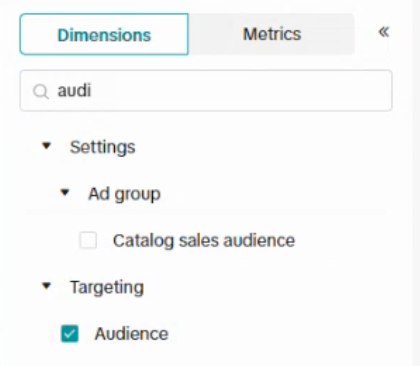
In the left hand rail, click on the ‘Dimensions’ tab and select ‘Audience’ (in the ‘targeting’ section) and ‘By Day’ (in the ‘time’ section).
Now click on the ‘Metrics’ tab and select ‘cost’ and ‘impressions’ (both in the ‘core’ section)
On the right side, above the reporting output, use the date picker to select the reporting period.
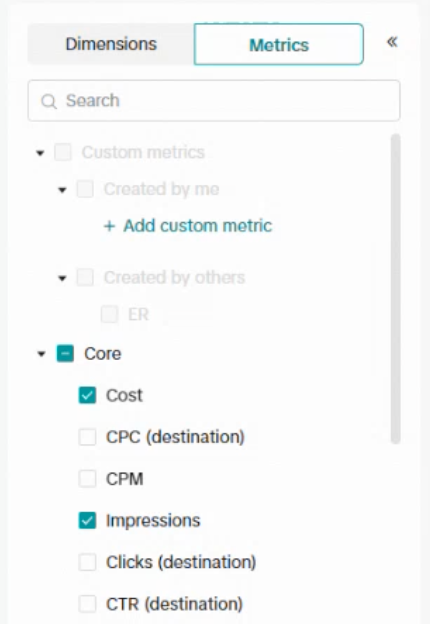
Just below the date picker, click on ‘Export’ to create an excel or .csv file.

Snap
1. Consult with your Experian representative on the audience you would like to build. You should include the following in your request:
- Details about the brand, campaign, goal, and product or service that will be promoted
- Required: Advertiser name and ad account ID
2. Log in to your Ads Manager.
3. Go to the 'Members' view.
4. Select 'Invite New Member' in the top right corner.
5. Fill out the form as follows and as seen (right):
Name: Experian Uploader
Email Address: Snap.Ops@Experian.com
Organization Role: Member
6. Go to the 'Ad Accounts' view and select the corresponding ad account. Add 'Experian Uploader' as a member to this account and assign them as 'Data Manager’'.
Permission Requirements
Meta
Meta requires a minimum audience size of 4,000 IDs and minimum of 1,000 matched IDs.
Pinterest Minimums
Please ensure Experian has an ‘Analyst and Audience’ level access.
TikTok
The permission level needs to be Ad Account Operator or Ad Account Admin.
Snap
Please ensure Experian has an ‘Data Manager’ level access.
Standard delivery locations and cadence
These are the standard social delivery locations we support to send and receive Experian data inputs and outputs.
- Meta
- TikTok
- Snap
Delivery will be done once, but audience can be refreshed at your discretion. If you would like to have an audience refreshed please let you Experian representative know.
Please note Social platforms will expire audiences at the following timelines
- Meta will expire audiences after 6 months of not being used or refreshed
- Pinterest will expire audiences after 6 months of not being used or refreshed
- TikTok will expire audiences after 1 year of not being used (TikTok does not allow refreshes)
- Snap does not have automatic audience expiration
Audience Sizes
Meta Minimums
Please ensure Experian has ‘View Performance’ level access.
Pinterest Minimums
For any custom audience (including audiences from Experian), the audience size needs to be over 4,000 after matching to Pinterest users.
TikTok Minimums
For any custom audience (including audiences from Experian) to be applied to campaigns, the audience size needs to be over 1,000 after matching with TikTok users.
Snap Minimums
For any custom audience (including audiences from Experian) to be applied to campaigns, the audience size needs to be over 1,000 after matching with Snap users.
Audience reporting
Meta
Meta will automatically report usage back to Experian. No action required for reporting. Experian will bill based on the usage report.
Pinterest Minimums
Pinterest will automatically report usage back to Experian. No action required for reporting.
TikTok
Please self-report usage back to Experian by the 10th of every month for the month prior. Experian will use that report to invoice the client directly.
Snap
All fees flow through Snap, you will not be required to pay or report anything directly to Experian.