
The U.S. Citizenship and Immigration Services (USCIS) and the Department of Homeland Security periodically update E-Verify to maintain data accuracy and strengthen program integrity across participating organizations. As part of these ongoing system enhancements, the Client Validation feature provides a standardized process for employers and service providers to review, update, and certify enrollment records.
Employer vs. employer agent: What’s the difference?
- The Employer: The hiring organization that owns the workforce. The employer holds ultimate legal responsibility for complying with employment eligibility verification requirements and remains accountable for all data submitted to E-Verify.
- The Employer Agent: A designated third-party provider (such as an I-9 administrator) that manages E-Verify cases on behalf of one or more client companies. Before an agent can create cases for a company, that company must be formally enrolled as a client under the agent’s account.
Why client validation matters
E-Verify’s Client Validation process ensures that the records maintained for client companies remain accurate, up to date, and audit-ready. Over time, organizations change addresses, update executive contacts, or shift hiring locations.
The validation review requires verification of:
• Company information and legal identifiers
• Designated business points of contact
• Physical hiring site details and locations
• Employer category classifications and NAICS codes
• Authorized signatories and enrollment records
By mandating periodic reviews and certifications of client profiles, E-Verify maintains program integrity without placing an entirely new compliance burden on employers. Instead, it serves as a scheduled checkpoint to confirm that existing enrollment data is accurate.
The employer agent’s operational role
While the employer owns its business information, the employer agent functions as the system administrator. As such, agents are responsible for coordinating reviews and updating records in the portal.
Employer agents should establish a regular workflow to:
- Monitor the portal for client validation requests.
- Coordinate directly with the client company to verify contact details, hiring sites, and profile information.
- Modify any outdated or inaccurate details directly within the system.
- Finalize and certify the validation within E-Verify.
How to access client validation
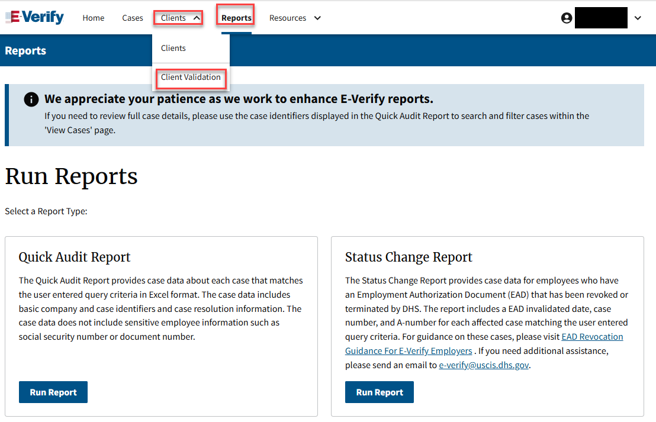
A common hurdle for Employer Agent users is navigating to the Client Validation dashboard. If you attempt to navigate directly via Home > Clients, the Client Validation option may not appear.
To access the validation portal correctly:
- Log in to your E-Verify Employer Agent account.
- Click on the Reports tab in the top navigation bar.
- Open the Clients drop-down menu.
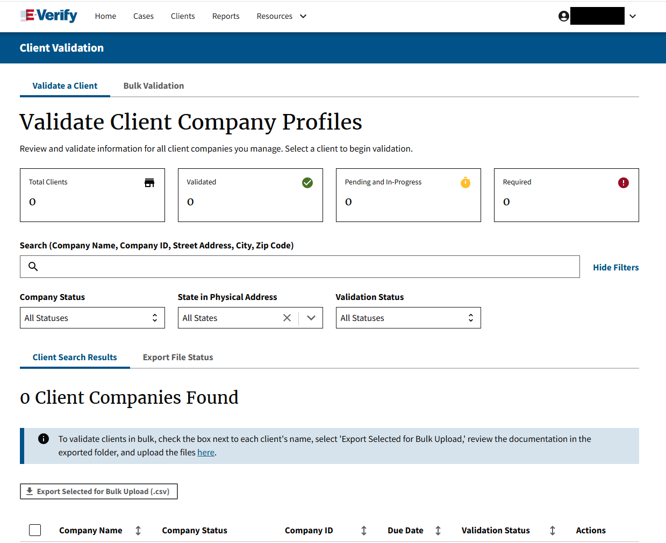
- Select Client Validation.
E-Verify navigation
Home > Reports > Clients (drop-down) > Client Validation
Bulk Validation: Managing multi-client portfolios
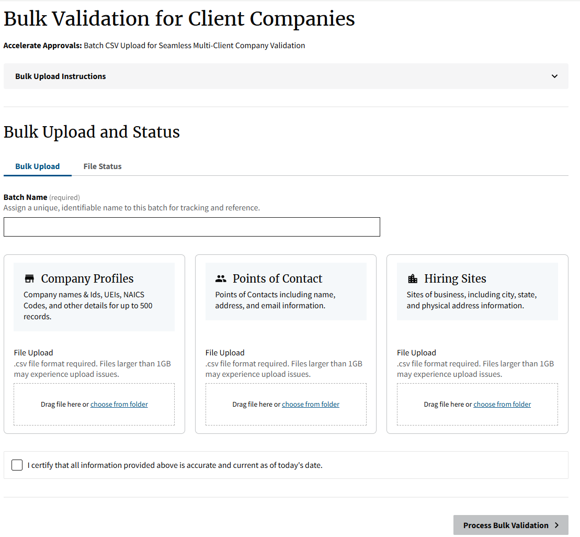
For agents managing dozens or hundreds of client organizations, manual validation can be time-consuming. E-Verify offers a Bulk Validation option via CSV batch upload:
- Filter client companies by status, due date, or state, and export selected clients.
- Upload structured .csv templates covering Company Profiles (up to 500 records), Points of Contact, and Hiring Sites.
- Assign a unique batch name, certify accuracy, and process the validation in bulk.
Key takeaways
Client Validation is not a disruption; it is a vital checkpoint that reinforces the collaborative partnership between employers and their service agents:
- Employers remain responsible for the accuracy of their underlying corporate and workforce records.
- Employer Agents are responsible for administering and certifying that information within the E-Verify platform.
Completing validation requests promptly prevents administrative holds, ensures full regulatory compliance, and guarantees uninterrupted case processing for client hiring pipelines.
Reference: U.S. Department of Homeland Security / USCIS E-Verify Bulletin

Vijay Thakkar has more than 12 years of HR Operations experience, including 8 years helping employers improve their Form I-9 management and E-Verify compliance, especially for mergers & acquisitions, internal and external I-9 audits, training and development, migration to the electronic system, I-9 escalations, quality checks, strategic planning, and building standard operating procedures with a keen interest in US immigration and global mobility.
Prior to joining Experian, Thakkar has served as Levi Strauss & Co’s I-9 subject matter expert, an investigator to the behavioral health unit at the US Army, and Sustainability Analyst at his alma mater the University of Texas at Arlington from where he earned his Master’s in Human Resource Management and MBA.